
相似矩形判定与比例关系互动练习
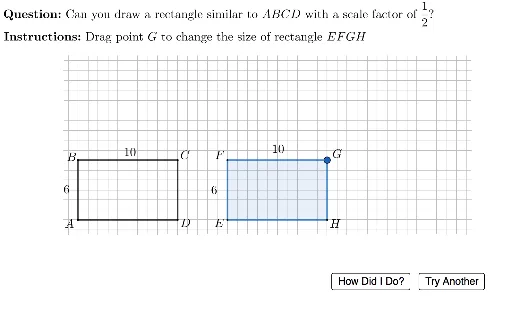
几何画板及绘图内容加载中,请稍等……
该范例通过动态交互方式演示相似矩形的判定与性质。核心数学概念是相似多边形的定义:对应角相等且对应边成比例,对于矩形而言,只需验证长宽比是否相等。作图要点包括:使用Random随机生成矩形尺寸,通过If和UnicodeToLetter生成题目选项,利用Polygon绘制矩形,PointIn和Intersect检测点击位置,Segment构造辅助线,并配合滑块(如currScale)调整缩放比例,实现即时反馈。适合初中高年级或高中几何课程,用于巩固相似图形的比例关系,也可作为课堂练习或自学检测工具。
GeoGebra 命令及参数
Random(2, 5) → currScaleRandom(0, 1) → currTypeRandom(2, floor(33 / (currScale + 1))) → smallWidthIf(currType ≟ 0, smallWidth, largeWidth) → ABCDwidthUnicodeToLetter(10003) → cmarkRandom(1, floor(16 / currScale)) → smallHeightIf(currType ≟ 0, smallHeight, largeHeight) → ABCDheightIf(currType ≟ 0, largeHeight, smallHeight) → EFGHheightIf(currType ≟ 0, largeWidth, smallWidth) → EFGHwidthLaTeX(If[currType ≟ 0, ("\vphantom\dfrac{2}{2}" * currScale), (("\dfrac{1}{" * currScale) * "}")]) → scaleFactorDispPolygon(E + (1, 1), E + (1, maxDragHeight), E + (maxDragWidth, maxDragHeight), E + (maxDragWidth, 1)) → polyRegion, f, g, h, iLaTeX((("\text{\textbf{Question: }Can you draw a rectangle similar to \(ABCD\) with a scale factor of }" * scaleFactorDisp) * "? ")) → MainInstrucPointIn(polyRegion) → GIntersect(Line[E, yAxis], Line[G, xAxis]) → FIntersect(Line[E, xAxis], Line[G, yAxis]) → HPolygon(E, F, G, H) → studentQuad, e, f_1, g_1, h_1Polygon({E, E + (0, EFGHheight), E + (EFGHwidth, EFGHheight), E + (EFGHwidth, 0)}) → correctQuadSegment(A, B) → abSegment(B, C) → bcSegment(C, D) → cdSegment(A, D) → adLaTeX("\text{\textbf{Instructions: }Drag point \(G\) to change the size of rectangle \(EFGH\)}") → SpecInstrucLaTeX((((((((("\text{\textcolor{#1b5e20}{" * correct) * "} The scale factor is \( ") * scaleFactorDisp) * " \), so the new height is \(") * EFGHheight) * " \) and the new width is \(") * EFGHwidth) * " \).}")) → fbCorrectLaTeX((((((((((((((((("\text{\textcolor{#d32f2f}{" * incorrect) * "}Since the scale factor is \(") * scaleFactorDisp) * "\), the new height will be \(") * scaleFactorDisp) * " \times ") * ABCDheight) * " = ") * EFGHheight) * "\), and the new } \\ \text{width will be \(") * scaleFactorDisp) * " \times ") * ABCDwidth) * "=") * EFGHwidth) * "\). Please try again.}")) → fbWrong
AI 绘图提示语参考
请绘制一个交互式几何练习图形,包含一个随机生成的矩形ABCD,以及一个学生绘制的矩形EFGH。学生可以通过拖动点G来改变矩形EFGH的大小。图形中应显示正确的矩形和错误的矩形,并附有相应的说明文字。重点在于展示相似矩形的比例关系和动态缩放效果。
以上提示语为根据原始绘图命令整理而来,仅供参考。