
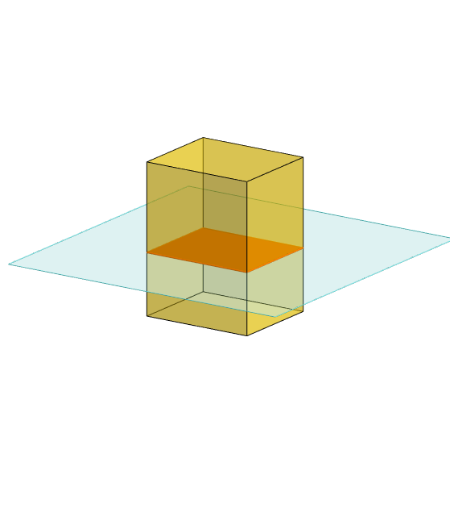
四角柱体(长方体)的截面 by Anthony OR 柯志明
几何画板及绘图内容加载中,请稍等……
所属专题
Area, Surface Area, Volume, Cross Section, 3D
3D Geometry & Cross Sections
Sections of 3D Shapes
Cross Sections
Cross sections
本范例演示如何通过不同平面截取四角柱体(长方体)并观察其截面形状。涉及的核心数学概念包括立体几何、截面几何、三维图形的表示。作图要点使用了GeoGebra的Polygon、PointIn、Translate、Rotate、Prism、Plane、IntersectPath、OrthogonalLine等命令和对象来构建长方体、截面平面及交线。适合高中阶段学生学习立体几何、截面分析及空间想象能力。
GeoGebra 命令及参数
Polygon(B + (-2, -2), B + (2, -2), B + (2, 2), B + (-2, 2)) → poly3, e, f, g, iPointIn(poly3) → CTranslate((0, 0, 0), Vector[B, C]) → APolygon(A + (-4, -4), A + (4, -4), A + (4, 4), A + (-4, 4)) → poly1, a, b, c, dRotate(Rotate[Translate[poly1, Vector[A, A + (0, 0, h)]], (90° * s), A + (0, 0, h), yAxis], (90° * t), A, zAxis) → poly2Rotate(D, 120°, (0, 0, 0)) → EPrism(Polygon[(-1.5, -1.25, 0), (1.5, -1.25, 0), (1.5, 1.25, 0), (-1.5, 1.25, 0)], (-1.5, -1.25, 4)) → m, M, edge2, edge3, edge4, edge5, edge6, edge7, edge8, N, Q, face1, face2, face3, face4, face5, edge1Polygon(D, E, 3, xOyPlane) → poly4, j, k, l, FPointIn(poly2) → GPointIn(poly2) → HPointIn(poly2) → IPlane(G, I, H) → nIntersectPath(n, m) → poly6, poly5, r, a_1, b_1, c_1, K, L_1, O, P, J, L, p, qRotate(m, 0, zAxis) → m'Rotate(m, 0, zAxis) → m'_1OrthogonalLine(A, n) → d_1
AI 绘图提示语参考
绘制一个长方体,其底面为正方形,位于水平面上,高度可调。在长方体内部或表面放置一个可旋转的截面多边形,该多边形由三个点确定,形成一个平面。用该平面切割长方体,显示交线形成的截面形状。同时,在长方体外部绘制一个正三角形,并使其绕原点旋转。最后,从长方体一个顶点向截面平面作垂线,显示垂足。整体展示三维空间中平面截取棱柱的几何关系。
以上提示语为根据原始绘图命令整理而来,仅供参考。