
rugby 转换踢球点位置分析
几何画板及绘图内容加载中,请稍等……
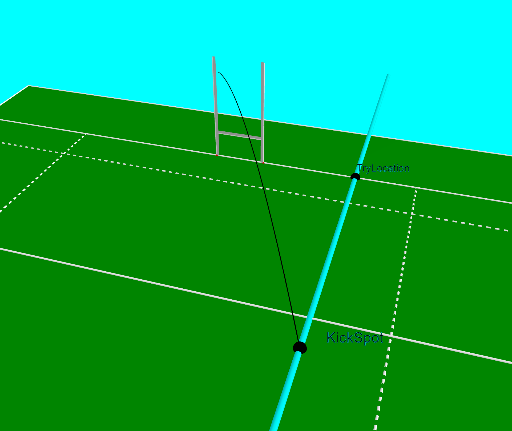
本范例演示如何确定足球转换踢球点位置,涉及圆、轨迹、比例等数学概念。作图要点包括使用GeoGebra命令如Intersect、Locus、OrthogonalLine等构建几何图形。适合高中生或数学爱好者学习几何作图与函数图像分析。
GeoGebra 命令及参数
Intersect(xAxis, yAxis) → APolygon(A, B, C, D) → poly1, a, b, c, dPoint(c) → TryLocationSegment((x(TryLocation), 50), (x(TryLocation), 100)) → kicksegmentOrthogonalLine(TryLocation, c) → a_2Point(kicksegment) → KickSpotVector(KickSpot, centreposts) → goaldirectionOrthogonalLine(G, d) → eOrthogonalLine(F, d) → fOrthogonalLine(E, d) → gIntersect(e, b) → HIntersect(f, b) → IIntersect(g, b) → JPolygon(M, D, C, N) → poly2, m, d_1, c_1, nPolygon(A, K, L, B) → poly3, a_1, k, l, b_1Segment(O, A_1) → hSegment(P, B_1) → iSegment(Z, W) → jSegment(Q, U) → pSegment(R, V) → qSegment(T, S) → rSegment(D, C) → sSegment(F, I) → t_2Segment(A, B) → e_1Segment(M, K) → f_1Segment(K, L) → g_1Segment(L, N) → h_1Segment(N, M) → i_1Segment(C_1, D_1) → j_1Segment(G_1, H_1) → k_1Segment(I_1, J_1) → l_1Segment(E_1, F_1) → m_1Segment(L_1, K_1) → n_1Segment(N_1, M_1) → p_1Segment(Q_1, O_1) → q_1Segment(R_1, P_1) → r_1Segment(G, H) → s_1Segment(E, J) → t_1Segment(Q, KickSpot) → b_2Segment(KickSpot, R) → c_2Angle(R, KickSpot, Q) → αOrthogonalLine(centreposts, c) → centrelineSegment(centreposts, TryLocation) → f_2Circle(Q, f_2) → g_2Intersect(g_2, centreline, 2) → centrecrossCircle(centrecross, Q) → h_2OrthogonalLine(centrecross, centreline) → i_2Intersect(h_2, i_2) → W_1, BestSpotLocus(BestSpot, TryLocation) → loc1OrthogonalPlane(KickSpot, goaldirection) → oCornerThreeD(-1, 11) → S_1CornerThreeD(-1, 11) → EPCornerThreeD(-1, 1) → T_1CornerThreeD(-1, 2) → U_1CornerThreeD(-1, 3) → V_1CornerThreeD(-1, 4) → Z_1CornerThreeD(-1, 5) → A_2CornerThreeD(-1, 6) → B_2CornerThreeD(-1, 7) → C_2Midpoint(CornerThreeD[-1, 1], CornerThreeD[-1, 7]) → VCENTREVector(VCENTRE - EP) → VDIRUnitVector(VDIR) → UVDIRCircle(Q, R, KickSpot) → d_2Vector(KickSpot, Aimspot) → kickdirUnitVector(kickdir) → unitkickdirLaTeX(α, true, true) → text1CurveCartesian(xball(tt), yball(tt), zball(tt), tt, 0, maxt) → u_1Intersect(d_2, a_2) → Anglespot1, Anglespot2Segment(Q, Anglespot1) → j_2Segment(R, Anglespot1) → k_2Segment(R, Anglespot2) → l_2Segment(Q, Anglespot2) → m_2Polygon(Q, U, U + (0.3, 0), Q + (0.3, 0)) → q1, q_2, u_2, n_2, r_2Polygon(T, S, S + (0, 0, 0.3), T + (0, 0, 0.3)) → q2, s_2, e_2, f_3, i_3Polygon(R, V, V + (-0.3, 0), R + (-0.3, 0)) → q3, r_3, v_2, g_3, h_3
AI 绘图提示语参考
画一个橄榄球场地,标出尝试点、球门线和中心线。从尝试点垂直向上画一条线到球门线,交点处标记为踢球点。以踢球点为中心,画一个圆与球门线交于两点,再画两条线分别垂直于中心线和踢球点与圆上一点的连线,这两条线的交点即为最佳射门点。
以上提示语为根据原始绘图命令整理而来,仅供参考。