
数列的表示
几何画板及绘图内容加载中,请稍等……
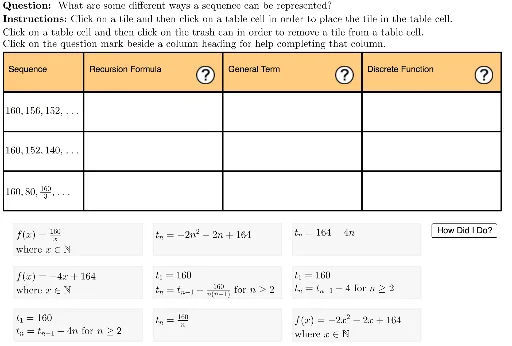
本范例演示数列的不同表示方法。涉及的核心数学概念包括数列和级数。通过使用GeoGebra命令如Sequence、Flatten、Shuffle等,可以构造数列的递推公式、通项公式以及散点图。适合高中数学教学和学习。
GeoGebra 命令及参数
Sequence(Polygon[{tableAnchor + (col1Width + col2Width + col3Width, 0 - (rowHeight * i)), tableAnchor + (col1Width + col2Width + col3Width + col4Width, 0 - (rowHeight * i)), tableAnchor + (col1Width + col2Width + col3Width + col4Width, 0 - (rowHeight * i) - rowHeight), tableAnchor + (col1Width + col2Width + col3Width, ((-rowHeight) * i) - rowHeight)}], i, 0, lastRow - 1) → tableCol4Sequence(Polygon[{tableAnchor + (col1Width + col2Width, 0 - (rowHeight * i)), tableAnchor + (col1Width + col2Width + col3Width, 0 - (rowHeight * i)), tableAnchor + (col1Width + col2Width + col3Width, 0 - (rowHeight * i) - rowHeight), tableAnchor + (col1Width + col2Width, ((-rowHeight) * i) - rowHeight)}], i, 0, lastRow - 1) → tableCol3Sequence(Polygon[{tableAnchor + (col1Width, 0 - (rowHeight * i)), tableAnchor + (col1Width + col2Width, 0 - (rowHeight * i)), tableAnchor + (col1Width + col2Width, 0 - (rowHeight * i) - rowHeight), tableAnchor + (col1Width, ((-rowHeight) * i) - rowHeight)}], i, 0, lastRow - 1) → tableCol2Flatten(Sequence[Sequence[(i, j), i, -8, -8 + (2 * (tileWidth + 1)), tileWidth + 1], j, 3, 3 - (2 * (tileHeight + 1)), (-tileHeight) - 1]) → fixedFrameAnchorsShuffle(fixedFrameAnchors) → shuffledFrameAnchorsLaTeX(UnicodeToLetter[10003]) → cmarkLaTeX(UnicodeToLetter[10007]) → xmarkSequence(Polygon[{tableAnchor + (0, 0 - (rowHeight * i)), tableAnchor + (col1Width, 0 - (rowHeight * i)), tableAnchor + (col1Width, 0 - (rowHeight * i) - rowHeight), tableAnchor + (0, ((-rowHeight) * i) - rowHeight)}], i, 0, lastRow - 1) → tableCol1LaTeX((((("\text{" * QUESTION) * "\\") * INSTRUCTIONS) * "}")) → TEXTText("Recursion Formula", tableAnchor + (0.5 + col1Width, ((-rowHeight)) / 2)) → col2HeaderText("General Term", tableAnchor + (0.5 + col1Width + col2Width, ((-rowHeight)) / 2)) → col3HeaderText("Discrete Function", tableAnchor + (0.5 + col1Width + col2Width + col3Width, ((-rowHeight)) / 2)) → col4HeaderText("160, 156, 152, \ldots", tableAnchor + (0, (-rowHeight) - rowHeight / 3), true, true) → sequence1Text("160, 80, \tfrac{160}{3}, \ldots", tableAnchor + (0, ((-rowHeight) * 3) - rowHeight / 3), true, true) → sequence3Text("160, 152, 140, \ldots", tableAnchor + (0, ((-rowHeight) * 2) - rowHeight / 3), true, true) → sequence2Zip(Polygon[A, A + (tileWidth, 0), A + (tileWidth, (-tileHeight)), A + (0, (-tileHeight))], A, shuffledFrameAnchors) → framesElement(frames, 1) → frame1Element(frames, 2) → frame2Element(frames, 3) → frame3Element(frames, 4) → frame4Element(frames, 5) → frame5Element(frames, 6) → frame6Element(frames, 7) → frame7Element(frames, 8) → frame8Element(frames, 9) → frame9Element(cells, 1) → cell1Element(frames, activeTile) → highlightedTileElement(cells, 2) → cell2Element(cells, 3) → cell3Element(cells, 4) → cell4Element(cells, 5) → cell5Element(cells, 7) → cell7Element(cells, 8) → cell8Element(cells, 9) → cell9Element(cells, activeCell) → highlightedCellElement(tableCol1, 1) → col1HeaderCellText("Sequence", tableAnchor + (0.5, ((-rowHeight)) / 2)) → col1HeaderElement(tableCol2, 1) → col2HeaderCellElement(tableCol3, 1) → col3HeaderCellElement(tableCol4, 1) → col4HeaderCellElement(cells, 6) → cell6Zip(A ≟ B, A, itemsInCells, B, 1…9) → cellsCorrectZip(Text[If[A, cmark, ""], Vertex[B, 2] + symbolOffset], A, cellsCorrect, B, cells) → cmarkListZip(Text[If[¬A, xmark, ""], Vertex[B, 2] + symbolOffset], A, cellsCorrect, B, cells) → xmarkListLaTeX("\text{You found three different algebraic representations for each sequence.}") → feedback
AI 绘图提示语参考
绘制一个序列的多种表示形式,包括递推公式、通项公式和离散函数。首先画出一个表格,包含四列:递推公式、通项公式、离散函数和序列。然后在表格中输入三个序列:160, 156, 152, ...;160, 80, 160/3, ...;160, 152, 140, ...。接着在表格下方绘制九个方块,表示序列的项,并用不同颜色标记当前项。最后在表格上方添加标题:递推公式、通项公式、离散函数和序列。
以上提示语为根据原始绘图命令整理而来,仅供参考。