
圆的半径与体积
几何画板及绘图内容加载中,请稍等……
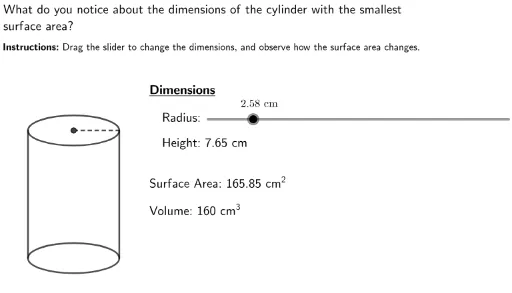
本范例演示圆的半径与体积的关系。核心数学概念包括圆的性质和体积计算。通过使用GeoGebra命令如Ellipse、Segment、Min等,可以动态展示半径变化对圆和圆柱体积的影响。适合高中数学教学和学习。
GeoGebra 命令及参数
Min(0.1, Height / 100) → OutsideEllipse(CentPt1, CentPt2, OutsideBot) → cEllipse(TopCentPt1, TopCentPt2, OutsideTop) → dSegment(LeftTop, LeftBot) → LeftLineSegment(OutsideBot, OutsideTop) → RightLineSegment(TopCentPt, OutsideTop) → RadiusSegLaTeX(Radius + "\ cm") → RadiusTextLaTeX(Height + "\ cm") → HeightTextLaTeX("Radius\text{:}") → RadiusWordsLaTeX("Surface\ Area\text{:}\ " + SurfaceArea + "\ cm^2") → SATextLaTeX("Volume\text{:}\ 160\ cm^3") → VTextLaTeX(" What\ do\ you\ notice\ about\ the\ dimensions\ of\ the\ cylinder\ with\ the\ smallest\\ surface\ area?") → InstructionsLaTeX("\textbf{Instructions\text{:}}\ Drag\ the\ slider\ to\ change\ the\ dimensions,\, and\ observe\ how\ the\ surface\ area\ changes.") → Instructions2LaTeX("Height\text{:}\ " + RoundHeight + "\ cm") → HTextLaTeX("\underline{Dimensions}") → DimensionsLaTeX("\textbf{" + Dimensions + "}\\ \ \\\ \\\ \ \ " + RadiusWords + "\\ \ \\ \ \\ \ \ \ " + HText + "\\ \ \\ \ \\ \ \\ \ \\" + SAText + "\\ \ \\ \ \\" + VText) → Text
AI 绘图提示语参考
画一个圆形和圆柱体,展示半径和体积的关系。首先绘制一个底面为圆形的圆柱体,通过滑块动态调整圆柱体的高度和底面半径。标注底面半径和高度,并计算显示圆柱体的表面积和体积。特别关注当圆柱体表面积最小时,其尺寸的变化情况。
以上提示语为根据原始绘图命令整理而来,仅供参考。