
放射性球:折纸模型的动态动画
几何画板及绘图内容加载中,请稍等……
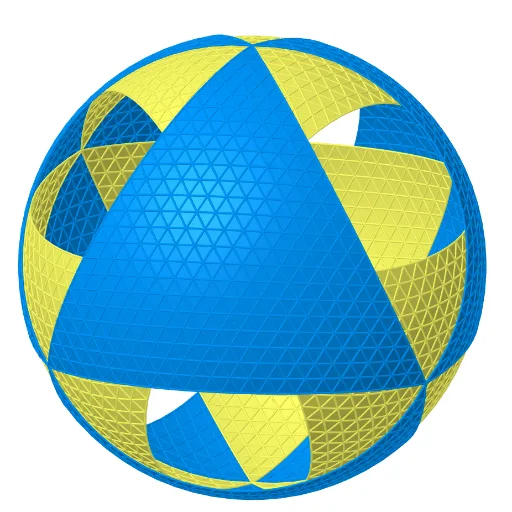
该范例演示了一个由纸张折叠而成的“放射性球”模型的三维动态动画,模型源自《Action Modular Origami》一书。核心数学概念包括球体、正二十面体、四面体、平面与圆的相交、相似变换、旋转、平移、缩放以及微分方程(用于描述动态过程)。作图要点:使用GeoGebra命令如Point、Intersect、Tetrahedron、Plane、Circle、Center、Midpoint、Sphere、IntersectPath、Line、Rotate、Polygon、Icosahedron、OrthogonalLine、Sequence、TrianglePointsFrequency2、Flatten、CircumcircleArc、Translate、Dilate、Mirror等,构建了多个面、边、顶点以及辅助圆和线段,并通过滑块或序列实现动画。适合高中及以上学段,用于立体几何、变换几何和折纸数学的教学,也可作为数学建模与动态演示的参考。
GeoGebra 命令及参数
Point(xAxis) → BIntersect(yAxis, xAxis) → APoint(Circle[Midpoint[A, B], (Distance[A, B] * sqrt(3) / 2), Segment[A, B]]) → CTetrahedron(A, B, C) → a, D, edgeCD, edgeBD, faceABC, faceACD, faceABD, faceBCD, edgeAC, edgeAB, edgeBC, edgeADPlane(C, D, A) → jCircle(A, B, C) → cCenter(c) → EMidpoint(D, E) → FMidpoint(F, E) → OOSphere(OO, B) → bIntersectPath(j, b) → qLine(C, OO) → lRotate(q, 240°, l) → q'_1Intersect(q, q'_1, 2) → LPoint(l) → KPlane(K, L, A) → mIntersectPath(m, b) → rPoint(r) → MRotate(M, 240°, l) → M'_1Midpoint(M, M'_1) → J_1Rotate(M, 120°, l) → M'Polygon(M, M', M'_1) → poly1, m'_1, m_1, m'Icosahedron(M'_1, M', M) → c_1, A_1, face1, face2, face8, face7, face6, face9, face10, face3, face4, face5, B_1, face13, face14, face19, face16, face18, face20, face17, face15, face12, face11, C_1, edge1, edge5, edgeMM', edge7, edge3, edge8, edge18, edge6, edge12, edge9, D_1, edge11, edge13, edge10, edge15, edge2, edge4, edge16, edge19, edge17, edge24, E_1, edge25, edge26, edge29, edge20, edge27, edge23, edge28, edge22, edge21, edge14, F_1, G_1, H_1, I_1Midpoint(F_1, C_1) → N_1Line(M, N_1) → f_2Midpoint(F_1, M) → M_1Line(C_1, M_1) → g_2Intersect(f_2, g_2) → O_1Midpoint(C_1, M'_1) → K_1Line(M, K_1) → d_1Line(C_1, J_1) → e_1Intersect(d_1, e_1) → L_1Line(M'_1, L_1) → j_3Intersect(edge3, j_3) → C_2Polygon(O_1, C_2, M) → poly6, m_3, o_2, c_3Polygon(M, C_2, M'_1) → poly2, s_1, t_1, b_1Plane(MM, xOyPlane) → o_1Line(E, D) → fIntersect(f, o_1) → B_2Intersect(l, poly1) → GRotate(MM, (-(60°)), G, poly1) → MM'_2Plane(OO, D, M) → uOrthogonalLine(M, f, u) → k_1Intersect(f, k_1) → VRotate(MM, 240°, l) → MM'_1Rotate(MM, 120°, l) → MM'Polygon(MM, MM', MM'_1) → poly11, mm'_1, mm, mm'Rotate(MM, 60°, G, poly1) → MM'_5Polygon(MM, MM'_5, 6, poly11) → poly33, d_2, A_2, e_2, f_3, g_3, h_3, i_3, V_1, W_1, Z_1Rotate(M, 60°, G, poly1) → M'_5Polygon(B_2, MM'_2, MM) → poly4, l_1, p_1, q_1Polygon(M, M'_5, 6, poly1) → poly3, t, S, f_1, g_1, h_1, i_1, j_1, P, Q, RMidpoint(B_1, E_1) → T_1Line(T_1, M') → a_2Line(F_1, A_1) → p_2Line(C_1, E_1) → n_2OrthogonalLine(O_1, face5) → j_2Midpoint(M', E_1) → Q_1Line(Q_1, B_1) → b_2Intersect(b_2, a_2) → U_1OrthogonalLine(U_1, face10) → c_2Polygon(M, L_1, C_1) → poly5, k_2, l_2, m_2Sequence(Rotate[{poly1, poly2, poly6}, (n * 120°), l], n, 0, 2, 1) → listIcosFace1Rotate(listIcosFace1, 1200°, c_2) → listIcosFace4Rotate(listIcosFace1, 240°, j_2) → listIcosFace3Rotate(listIcosFace3, (-(144°)), n_2) → listIcosFace1''Rotate(listIcosFace1'', (-(((3 * 72))°)), p_2) → listIcosFace2Line(Q_1, A_1) → r_2Midpoint(E_1, A_1) → P_1Line(P_1, M') → s_2Intersect(r_2, s_2) → S_1OrthogonalLine(S_1, face9) → t_2Rotate(listIcosFace1, 120°, t_2) → listIcosFace1'_3Rotate(M, 120°, f) → M'_4Point(f) → OPlane(B, OO, D) → ePlane(A, OO, B) → dIntersectPath(e, d) → iRotate(B, 60°, A) → B'Plane(A, B, B') → oTrianglePointsFrequency2(A, B, n, o) → listPointsFlatSequence(Sequence[ProjectPointOnSphere[Element[Element[listPointsFlat, i], j], O, b], j, 1, Length[Element[listPointsFlat, i]]], i, 1, n + 1) → listPointsSequence(Sequence[Polygon[Element[Element[listPoints, j], i], Element[Element[listPoints, j], i + 1], Element[Element[listPoints, j + 1], i]], i, 1, n - j + 1], j, 1, n) → listPolyUpProjSequence(Sequence[Polygon[Element[Element[listPoints, j], i], Element[Element[listPoints, j], i + 1], Element[Element[listPoints, j - 1], i + 1]], i, 1, n - j + 1], j, 2, n) → listPolyDownProjFlatten({listPolyUpProj, listPolyDownProj}) → listPolyProjRotate(listFace, 240°, f) → listFace''Rotate(listFace'', 120°, l) → listFace'''Rotate(listFace, 120°, i) → listFace'Rotate(listFace', 240°, f) → listFace''_1CircumcircleArc(L, M, A) → arc1Rotate(arc1, 240°, l) → arc3Rotate(arc1, 120°, l) → arc2Intersect(zAxis, c) → H,Plane(D, OO, A) → gIntersect(edgeBD, c) → I,IntersectPath(g, b) → hIntersectPath(e, b) → kIntersectPath(d, b) → pIntersect(h, p, 1) → JRotate(q, 120°, l) → q'Midpoint(A, L) → NTranslate({listFace''_1, listFace', listFace'', listFace'''}, Vector[A, A]) → listPoly1Line(N, OO) → n_1Dilate(Rotate[listPoly1, (-(90°)), n_1], dil, OO) → listPoly1'Plane(OO, xOyPlane) → sRotate(M, (-(60°)), G, poly1) → M'_3Intersect(f, arc1) → T,Sequence(Rotate[{poly33, poly4}, (n * 120°), l], n, 0, 2, 1) → listTruncOctaFace1Intersect(arc1, arc3, 2) → USequence(Rotate[listTruncOctaFace1, (n * 120°), i], n, 0, 2, 1) → listTruncOctaFace11Rotate(listTruncOctaFace1, 240°, f) → listTruncOctaFace3Translate({listTruncOctaFace11, listTruncOctaFace3}, Vector[A, A]) → listTruncOcta1Dilate(Rotate[listTruncOcta1, (-(90°)), n_1], dil, OO) → listTruncOcta1'Plane(C_1, E_1, B_1) → vMirror(listIcosFace1, v) → listIcosFace1'Line(OO, N) → r_1Intersect(i, f) → WPoint(listIcosFace1) → ZTranslate({listIcosFace4, listIcosFace1, listIcosFace2, listIcosFace3}, Vector[A, A]) → listIcos1Plane(B_1, D_1, A_1) → wMirror(listIcosFace1, w) → listIcosFace1'_1Plane(S, OO, R) → a_1OrthogonalLine(O_1, k_1, space) → h_2Line(O_1, OO) → i_2Line(I_1, M') → q_2Rotate(listIcosFace2, (-(144°)), n_2) → list1Intersect(edge11, s_2) → R_1Mirror(listIcosFace1, w) → listIcosFace1'_5Rotate(MM, 60°, G, poly1) → M'_2Rotate(MM, 120°, G, poly1) → MM'_3Line(K_1, OO) → k_3Line(G, OO) → l_3Midpoint(A_1, M'_1) → D_2Midpoint(A_1, D_1) → E_2Line(D_2, D_1) → n_3Line(E_2, M'_1) → p_3Intersect(n_3, p_3) → F_2OrthogonalLine(F_2, face7) → q_3Plane(C_1, M'_1, E_1) → u_1Mirror(listIcosFace1, u_1) → listIcosFace11Rotate(listIcosFace11, 240°, j_2) → listIcosFace31Rotate(listIcosFace11, 120°, c_2) → listIcosFace41Dilate({Sequence[Rotate[listIcosFace11, (n * 120°), l_3], n, 0, 2, 1], listIcosFace41}, dil, OO) → listIcos2
AI 绘图提示语参考
绘制一个动态的放射性球体折纸模型。先构建一个正四面体,以其底面为基准生成外接圆和球心,再以球心为球心、顶点为半径作球。在球与四面体一个面的交线上取点,通过旋转生成对称点,连接形成三角形面。以该三角形为底面构造二十面体,并找出其内部关键交点,连接成多个多边形面。最后添加辅助平面和旋转轴,通过旋转和镜像生成完整的三维折纸结构,并设置动画滑块控制旋转角度,展示折叠过程。
以上提示语为根据原始绘图命令整理而来,仅供参考。