
指数法则:幂的商
几何画板及绘图内容加载中,请稍等……
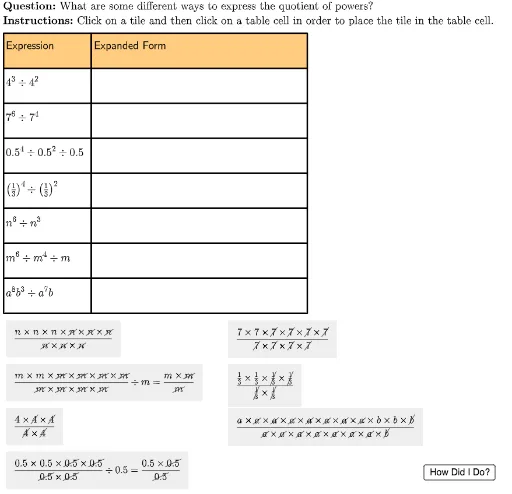
本范例演示了幂的商的指数法则。通过几何画板,学生可以直观地理解如何简化和计算不同指数的幂的商。构造摘要中使用了Sequence, Element, UnicodeToLetter, LaTeX等命令,展示了如何通过几何画板进行指数形式与展开形式之间的转换。适合初中及以上学生学习指数运算。
GeoGebra 命令及参数
Sequence(Polygon[tableAnchor + (col1Width, 0 - (rowHeight * i)), tableAnchor + (col1Width + col2Width, 0 - (rowHeight * i)), tableAnchor + (col1Width + col2Width, 0 - (rowHeight * i) - rowHeight), tableAnchor + (col1Width, ((-rowHeight) * i) - rowHeight)], i, 0, lastRow - 1) → tableCol2Element(tableCol2, 2) → E2UnicodeToLetter(10003) → cmarkUnicodeToLetter(10007) → xmarkSequence(Polygon[tableAnchor + (0, 0 - (rowHeight * i)), tableAnchor + (col1Width, 0 - (rowHeight * i)), tableAnchor + (col1Width, 0 - (rowHeight * i) - rowHeight), tableAnchor + (0, ((-rowHeight) * i) - rowHeight)], i, 0, lastRow - 1) → tableCol1Element(tableCol1, 1) → B1Element(tableCol1, 2) → B2Element(tableCol1, 3) → B3Element(tableCol1, 4) → B4Element(tableCol1, 5) → B5Element(tableCol1, 6) → B6Element(tableCol2, 1) → E1Element(tableCol2, 3) → E3Element(tableCol2, 4) → E4Element(tableCol2, 5) → E5Element(tableCol2, 6) → E6Sequence(Polygon[tableAnchor + (col1Width + col2Width, 0 - (rowHeight * i)), tableAnchor + (col1Width + col2Width + col3Width, 0 - (rowHeight * i)), tableAnchor + (col1Width + col2Width + col3Width, 0 - (rowHeight * i) - rowHeight), tableAnchor + (col1Width + col2Width, ((-rowHeight) * i) - rowHeight)], i, 0, lastRow - 1) → tableCol3Element(tableCol3, 1) → M1Element(tableCol3, 2) → M2Element(tableCol3, 3) → M3Element(tableCol3, 4) → M4Element(tableCol3, 5) → M5Element(tableCol3, 6) → M6LaTeX("\text{Expression}") → A1Element(tableCol1, 7) → B7Element(tableCol1, 8) → B8LaTeX("\text{Expanded Form}") → C1Element(tableCol2, 7) → E7Element(tableCol2, 8) → E8LaTeX("\text{Exponential Form}") → K1Element(tableCol3, 7) → M7Element(tableCol3, 8) → M8LaTeX("4^3 \div 4^2") → A2LaTeX("7^6 \div 7^4") → A3LaTeX("0.5^4 \div 0.5^2 \div 0.5") → A4LaTeX("\left(\tfrac{1}{3}\right)^4 \div \left(\tfrac{1}{3}\right)^2") → A5LaTeX("n^6 \div n^3") → A6LaTeX("m^6 \div m^4 \div m") → A7LaTeX("a^8b^3 \div a^7b") → A8LaTeX("\text{\textbf{Question: }What are some different ways to express the quotient of powers?\\\textbf{Instructions: }Click on a tile and then click on a table cell in order to place the tile in the table cell.}") → TEXTLaTeX("\text{You expanded and simplified the quotient of powers.}") → feedbackFinal
AI 绘图提示语参考
绘制一个三列八行的表格,用于展示幂的除法运算。第一列标题为“表达式”,第二列为“展开形式”,第三列为“指数形式”。表格中放置多个幂的除法算式,如4的3次方除以4的2次方、7的6次方除以7的4次方、0.5的4次方除以0.5的2次方再除以0.5、三分之一的4次方除以三分之一的2次方、n的6次方除以n的3次方、m的6次方除以m的4次方再除以m,以及a的8次方b的3次方除以a的7次方b。每个算式对应展开形式和指数形式的结果。表格上方有说明文字,提示点击方块放入表格单元格,并显示完成反馈。
以上提示语为根据原始绘图命令整理而来,仅供参考。