
周长与面积计算 by cemccourseware
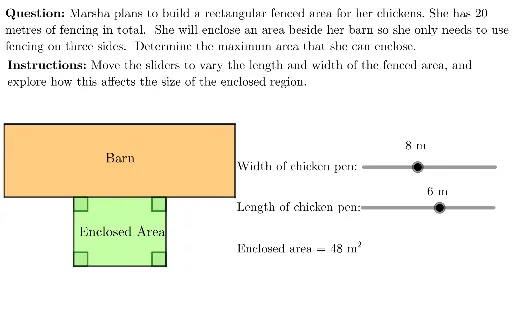
几何画板及绘图内容加载中,请稍等……
①本范例演示了如何使用 GeoGebra 绘制并计算多边形的周长与面积;②涉及的核心数学概念包括周长、面积、解析几何、优化问题、三角函数和圆锥曲线;③作图要点——从下方『构造摘要』提炼用到了 Point, UnicodeToLetter, Line, Intersect, Polygon, Segment, LaTeX, Angle 等命令/对象;④适合高中及以上学生学习和教师教学使用。
GeoGebra 命令及参数
Point(Circle[B, 20]) → FUnicodeToLetter(10007) → xmarkUnicodeToLetter(10003) → cmarkLine(A, xAxis) → lLine(A, yAxis) → bLine(B, yAxis) → cLine(B, xAxis) → dLine(C, xAxis) → eLine(D, yAxis) → fIntersect(e, f) → EPolygon(A, C, E, D) → chickenPen, a, c_1, e_1, d_1Segment(B, F) → hIntersect(l, c) → GLine(F, yAxis) → gIntersect(l, g) → HPolygon(B, G, H, F) → barn, b_1, g_1, h_1, f_1LaTeX("\text{\textbf{Instructions: }Move the sliders to vary the length and width of the fenced area, and \\explore how this affects the size of the enclosed region.}") → SpecInstrucAngle(A, D, E) → αAngle(C, A, D) → βAngle(D, E, C) → γAngle(E, C, A) → δ