
完全平方三项式
几何画板及绘图内容加载中,请稍等……
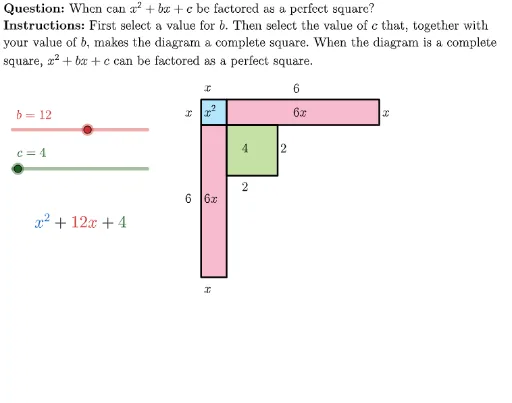
这个范例演示了完全平方三项式的几何表示。核心数学概念包括二次方程和完全平方三项式。通过使用GeoGebra命令如Polygon、Text等,可以构造出完全平方三项式的几何图形。适合初中及以上学生学习二次方程和几何作图。
GeoGebra 命令及参数
LaTeX((((("\text{" * QUESTION) * "\\") * INSTRUCTIONS) * "}")) → TEXTLaTeX(("b=" * b)) → bLabelLaTeX(("c=" * c)) → cLabelPolygon((1, -1), (1, -1 - rootC), 4) → A4Polygon({(0, 0), (1, 0), (1, -1), (0, -1)}) → A1Polygon({(0, 0), (1, 0), (1, -1), (0, -1)}) → A1borderPolygon({(1, 0), (1 + halfB, 0), (1 + halfB, -1), (1, -1)}) → A2Polygon({(1, 0), (1 + halfB, 0), (1 + halfB, -1), (1, -1)}) → A2borderPolygon({(0, -1), (1, -1), (1, -1 - halfB), (0, -1 - halfB)}) → A3Polygon({(0, -1), (1, -1), (1, -1 - halfB), (0, -1 - halfB)}) → A3borderText((("\vphantom{x^2}" * If[halfB ≟ 1, "", "" + halfB]) * "x"), (0, -1 - (halfB - 1) / 2), true, true) → labelCText("x", (0, 0.75), true, true) → labelDText(halfB, (1 + (halfB - 1) / 2, 0.75), true, true) → labelEText(("\vphantom{x^2}" * halfB), (-0.75, -1 - (halfB - 1) / 2), true, true) → labelGPolygon((1, -1), (1, -1 - rootC), 4) → A4borderText("x^2", (0, -0.1), true, true) → labelAText((("\vphantom{x^2}" * If[halfB ≟ 1, "", "" + halfB]) * "x"), (1 + (halfB - 1) / 2, -0.1), true, true) → labelBText("\vphantom{x^2}x", (-0.75, -0.1), true, true) → labelFText("\vphantom{x^2}x", (1 + halfB, -0.1), true, true) → labelIText("\vphantom{\sqrt{1}}x", (0, -1 - halfB), true, true) → labelHText(If[isPerfectSquare, "\vphantom{\sqrt{1}}" + rootC, "\sqrt{" + c + "}"], (1 + (rootC - 1) / 2, -1 - rootC), true, true) → labelKText(If[isPerfectSquare, "\vphantom{\sqrt{1}}" + rootC, "\sqrt{" + c + "}"], (1 + rootC, -1 - (rootC - 1) / 2), true, true) → labelLText("\vphantom{\sqrt{1}}" + c, (1 + (rootC - 1) / 2, -1 - (rootC - 1) / 2), true, true) → labelJ
AI 绘图提示语参考
画一个几何图形来展示完全平方三项式,包含三个部分:一个正方形代表x^2,一个矩形代表2bx,另一个正方形代表c。这些部分组合成一个更大的正方形,展示完全平方三项式的几何意义。在图形中标注每个部分的值,如x^2, 2bx, c,并使用根号表示c的平方根如果它是完全平方数。
以上提示语为根据原始绘图命令整理而来,仅供参考。