
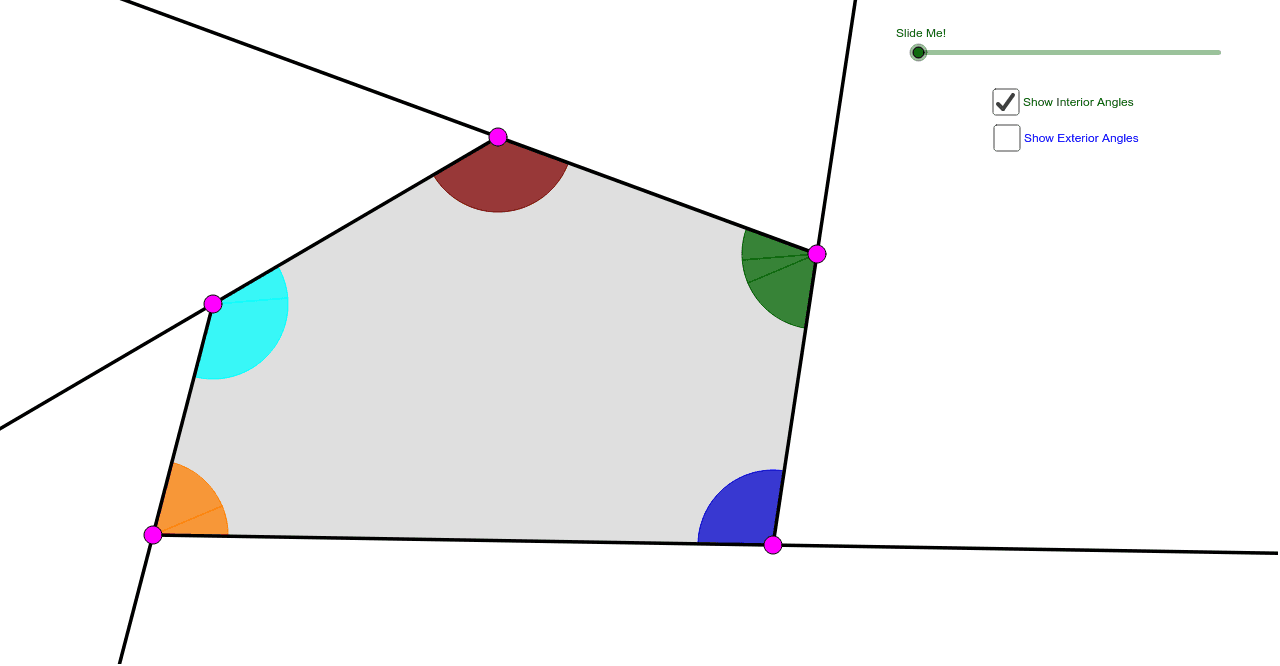
任意五边形内角与外角和定理演示
几何画板及绘图内容加载中,请稍等……
所属专题
Polygons & Angles
Polygons & Angles
Polygons & Angles ( s n attar)
Polygons & Angles
Polygons & Angles
Polygons & Angles
Polygons & Angles
Geometry: Polygons & Angles
Geometry: Polygons & Angles
该GeoGebra范例通过直观的方式向学生展示了任意五边形的内角和为540度,并且外角和为360度。它涉及的核心数学概念包括多边形内角和、外角和定理。通过使用Ray(射线)、Circle(圆)、Segment(线段)、Intersect(交点)等GeoGebra命令,学生可以动态探索五边形的性质。适合初中及以上学生学习几何学。
GeoGebra 命令及参数
Ray(A, B) → aRay(B, C) → bRay(C, D) → cRay(D, E) → dRay(E, A) → eCircle(A, 1.5) → fCircle(B, 1.5) → gCircle(C, 1.5) → hCircle(D, 1.5) → kCircle(E, 1.5) → pSegment(C, A) → iSegment(C, E) → jIntersect(f, a, 1) → FIntersect(f, i, 1) → GIntersect(f, e, 1) → HIntersect(f, e, 2) → IIntersect(p, e) → J,Intersect(p, j) → K,Intersect(p, d, 1) → LIntersect(p, d, 2) → MIntersect(k, d, 1) → NIntersect(k, c, 2) → OIntersect(h, c, 1) → PIntersect(h, j, 1) → QIntersect(h, i, 1) → RIntersect(h, b, 1) → SIntersect(g, a, 2) → TIntersect(g, b, 1) → UIntersect(g, a, 1) → VCircleSector(A, F, G) → qCircleSector(A, G, H) → rCircleSector(B, U, V) → sCircleSector(C, P, Q) → tCircleSector(C, Q, R) → c_1CircleSector(C, R, S) → d_1Intersect(k, c, 1) → WCircleSector(D, O, N) → e_1CircleSector(D, N, W) → f_1CircleSector(E, M, J) → g_1CircleSector(E, J, K) → h_1CircleSector(E, K, L) → k_1CircleSector(A, I, F) → p_1CircleSector(B, T, U) → q_1Intersect(h, b, 2) → ZCircleSector(C, Z, P) → r_1Vector(A, B) → uVector(C, B) → vVector(E, D) → wVector(C, D) → u_1Vector(C, E) → v_1Vector(A, E) → w_1Translate(q, u) → q'Translate(d_1, v) → s_1Mirror(s_1, B) → t_1Dilate(A, If[0 < l ≤ 1, 1 - l, 0], B) → A'Dilate(C, If[0 < l ≤ 1, 1 - l, 0], B) → C'Dilate(A, If[1 < l ≤ 2, 2 - l, 0], E) → A'_1Dilate(C, If[1 < l ≤ 2, 2 - l, 0], E) → C'_1Dilate(C, If[2 < l ≤ 3, 3 - l, 0], D) → C'_2Dilate(E, If[2 < l ≤ 3, 3 - l, 0], D) → E'Vector(A, B) → a_1Vector(C, C') → b_1Vector(A, A'_1) → i_1Vector(E, E') → j_1Vector(C, C'_2) → l_1Vector(C, C'_1) → m_1Translate(d_1, b_1) → c_2Translate(r, i_1) → r'_1Translate(r, w_1) → r'_2Translate(k_1, w) → d_2Translate(k_1, j_1) → e_2Translate(c_1, v_1) → f_2Translate(c_1, m_1) → g_2Translate(t, u_1) → t'Translate(t, l_1) → t'_1Translate(q, a_1) → r'Translate(d_1, b_1) → h_2If(0 < l < 1, Rotate[h_2, ((l * 180))°, C']) → k_2Vector(A, A') → n_1Translate(q, n_1) → q'_1Mirror(r'_2, E) → p_2If(1 < l < 2, Rotate[r'_1, (((l - 1) * 180))°, A'_1]) → q_2Line(E, C) → a_2Mirror(t', D) → t''Line(E, D) → b_2Segment(E, C) → i_2If(2 < l < 3, Rotate[t'_1, (((l - 2) * 180))°, C'_2]) → r_2Line(E, D) → j_2Vector(D, C) → u_2Vector(E, C) → v_2Vector(A, C) → w_2Vector(B, C) → l_2Dilate(B, If[0 < o < 1, 1 - o, 0], C) → B'Dilate(A, If[1 < o < 2, 2 - o, 0], C) → A'_2Dilate(E, If[2 < o < 3, 3 - o, 0], C) → E'_1Dilate(D, If[3 < o < 4, 4 - o, 0], C) → D'Vector(B, B') → m_2Vector(A, A'_2) → n_2Vector(E, E'_1) → s_2Vector(D, D') → t_2Translate(q_1, m_2) → c_3Translate(q_1, l_2) → d_3Translate(p_1, w_2) → e_3Translate(g_1, v_2) → f_3Translate(e_1, u_2) → g_3If(1 < o < 2, Translate[p_1, n_2]) → h_3If(2 < o < 3, Translate[g_1, s_2]) → k_3If(3 < o < 4, Translate[e_1, t_2]) → p_3Point(a_2) → A_1Point(a_2) → B_1Ray(C, B_1) → a_3Ray(E, A_1) → b_3Polygon(A, B, C, D, E) → poly1, a_4, b_4, c_4, d_4, e_4Polygon(A, B, C) → poly2, c_5, a_5, b_5Polygon(A, C, E) → poly3, e_5, a_6, c_6Polygon(E, C, D) → poly4, d_5, e_6, c_7
AI 绘图提示语参考
绘制一个五边形ABCDE,使用圆心为A、B、C、D、E,半径为1.5的圆与边相交,形成五边形的顶点。通过连接这些顶点,形成五边形的边。使用圆弧命令,以每个顶点为中心,连接相邻顶点,形成五边形的内部和外部角度。最后,使用向量命令,绘制向量AB、BC和ED。
以上提示语为根据原始绘图命令整理而来,仅供参考。