
匹配同类项
几何画板及绘图内容加载中,请稍等……
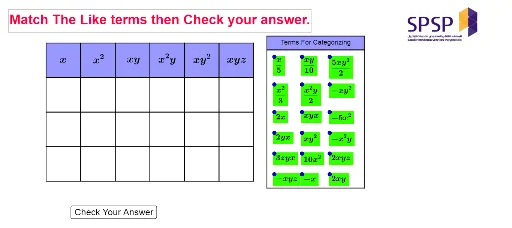
①本范例演示了如何通过 GeoGebra 工具进行同类项匹配,涉及几何图形的构建与属性分析;②核心数学概念包括几何作图、条件概率、几何均值等;③作图要点提炼自构造摘要,使用了 Intersect(交点)、Point(点)、Polygon(多边形)、Midpoint(中点)、Line(线)、OrthogonalLine(垂线)等命令与对象;④适合高中数学教学,用于几何作图与概率统计的直观演示。
GeoGebra 命令及参数
Intersect(xAxis, yAxis) → APoint(xAxis) → BPolygon(A, B, 4) → poly1, f, g, h, i, C, DPolygon(C, B, 4) → poly2, j, k, l, m, E, FPolygon(F, E, 4) → poly3, n, p, q, r, G, HPolygon(H, G, 4) → poly4, s, t, a, b, I, JPolygon(J, I, 4) → poly5, c, d, e, f_1, K, LPolygon(L, K, 4) → poly6, g_1, h_1, i_1, j_1, M, NPolygon(B, A, 4) → poly7, k_1, l_1, m_1, n_1, O, PPolygon(E, B, 4) → poly8, p_1, q_1, r_1, s_1, Q, RPolygon(G, E, 4) → poly9, t_1, a_1, b_1, c_1, S, TPolygon(I, G, 4) → poly10, d_1, e_1, f_2, g_2, U, VPolygon(K, I, 4) → poly11, h_2, i_2, j_2, k_2, W, ZPolygon(M, K, 4) → poly12, l_2, m_2, n_2, p_2, A_1, B_1Polygon(P, O, 4) → poly13, q_2, r_2, s_2, t_2, C_1, D_1Polygon(R, P, 4) → poly14, a_2, b_2, c_2, d_2, E_1, F_1Polygon(T, R, 4) → poly15, e_2, f_3, g_3, h_3, G_1, H_1Polygon(V, T, 4) → poly16, i_3, j_3, k_3, l_3, I_1, J_1Polygon(Z, V, 4) → poly17, m_3, n_3, p_3, q_3, K_1, L_1Polygon(B_1, Z, 4) → poly18, r_3, s_3, t_3, a_3, M_1, N_1Polygon(D_1, C_1, 4) → poly19, b_3, c_3, d_3, e_3, O_1, P_1Polygon(F_1, D_1, 4) → poly20, f_4, g_4, h_4, i_4, Q_1, R_1Polygon(H_1, F_1, 4) → poly21, j_4, k_4, l_4, m_4, S_1, T_1Polygon(J_1, H_1, 4) → poly22, n_4, p_4, q_4, r_4, U_1, V_1Polygon(L_1, J_1, 4) → poly23, s_4, t_4, a_4, b_4, W_1, Z_1Polygon(N_1, L_1, 4) → poly24, c_4, d_4, e_4, f_5, A_2, B_2Midpoint(D, B) → C_2Midpoint(C, E) → D_2Midpoint(F, G) → E_2Midpoint(H, I) → F_2Midpoint(J, K) → G_2Midpoint(L, M) → H_2Midpoint(N, M) → I_2Line(B_5, A_5) → g_5Point(g_5) → J_2Point(g_5) → M_2Line(B_2, Z_1) → i_5OrthogonalLine(J_2, g_5) → j_5OrthogonalLine(M_2, g_5) → k_5Line(K_2, O_2) → h_5Intersect(j_5, h_5) → P_2Intersect(k_5, h_5) → Q_2Polygon(P_2, Q_2, M_2, J_2) → poly25, p_5, q_5, m_5, j_6Polygon(J_2, L_2, N_2, M_2) → poly26, j_7, l_5, n_5, m_6Midpoint(A, P) → L_3Midpoint(A, L_3) → M_3Midpoint(O, D_1) → N_3Midpoint(O, N_3) → O_3Midpoint(C_1, P_1) → P_3Midpoint(C_1, P_3) → Q_3Midpoint(B, R) → R_3Midpoint(B, R_3) → S_3Midpoint(P, F_1) → T_3Midpoint(P, T_3) → U_3Midpoint(D_1, R_1) → V_3Midpoint(D_1, V_3) → W_3Midpoint(E, T) → Z_3Midpoint(E, Z_3) → A_4Midpoint(G, V) → B_4Midpoint(G, B_4) → C_4Midpoint(R, H_1) → D_4Midpoint(R, D_4) → E_4Midpoint(F_1, T_1) → F_4Midpoint(F_1, F_4) → G_4Midpoint(H_1, V_1) → H_4Midpoint(H_1, H_4) → I_4Midpoint(T, J_1) → J_4Midpoint(T, J_4) → K_4Midpoint(I, Z) → L_4Midpoint(I, L_4) → M_4Midpoint(V, L_1) → N_4Midpoint(V, N_4) → O_4Midpoint(J_1, Z_1) → P_4Midpoint(J_1, P_4) → Q_4Midpoint(K, B_1) → R_4Midpoint(K, R_4) → S_4Midpoint(Z, N_1) → T_4Midpoint(Z, T_4) → U_4Midpoint(L_1, B_2) → V_4Midpoint(L_1, V_4) → W_4
AI 绘图提示语参考
绘制一个由多个四边形组成的复杂几何图形,首先在坐标轴上找到交点A,然后以A为起点,依次绘制一系列四边形,每个四边形的顶点通过Midpoint命令确定,最后通过Intersect命令找到两条斜线的交点,形成新的四边形。
以上提示语为根据原始绘图命令整理而来,仅供参考。