
风筝形对角线性质探究(LR7-03-XT3)
几何画板及绘图内容加载中,请稍等……
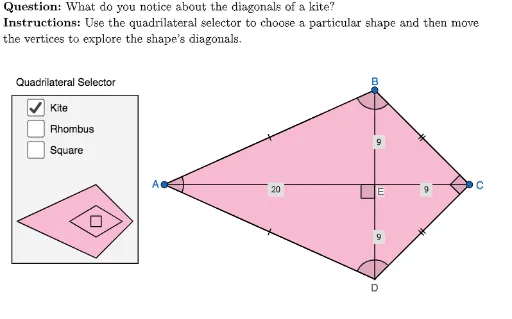
①本范例通过GeoGebra动态演示风筝形(kite)对角线的性质,包括对角线互相垂直以及其中一条对角线被另一条平分等几何关系。②核心数学概念涉及四边形分类、风筝形的定义、对角线性质、对称性以及几何构造中的交点、中点、垂直关系。③作图要点:从构造摘要可见,使用了Polygon、PointIn、Mirror、Circle、Point、Intersect、If、Segment、LaTeX、Midpoint、Angle、Line、AreParallel等命令,构建了风筝形及其辅助圆、菱形、正方形等对象,并通过选择器(selector)切换不同四边形形状,动态展示对角线关系。④适合中学几何教学,尤其适用于八年级或九年级学习四边形性质、几何证明及动态探究场景,也可用于教师课堂演示或学生自主探索。
GeoGebra 命令及参数
Polygon({(-6, 19), (26, 19), (26, 0), (-6, 0)}) → viewBoxPointIn(viewBox) → sqAPointIn(viewBox) → sqBMirror(sqA, AngularBisector[Line[sqA, sqB], OrthogonalLine[sqB, Line[sqA, sqB]]]) → sqCPointIn(viewBox) → kiteAPointIn(viewBox) → kiteCPointIn(viewBox) → rhomBPointIn(viewBox) → rhomACircle(rhomB, rhomA) → circle1forRhombusPoint(circle1forRhombus) → rhomCMirror(rhomB, Line[rhomA, rhomC]) → rhomDIntersect(Line[sqA, Line[sqB, sqC]], Line[sqC, Line[sqA, sqB]]) → sqDIf(showKite, kiteC, If[showRhombus, rhomC, sqC]) → CIf(showKite, kiteA, If[showRhombus, rhomA, sqA]) → ASegment(A, C) → ACCircle(Midpoint[AC], kiteA) → circle1forKitePointIn(circle1forKite) → kiteBPolygon({(-11.5, 9), (-9, 7.5), (-11.5, 6), (-14, 7.5)}) → selectorShapeRhombusMirror(kiteB, Line[kiteA, kiteC]) → kiteDLaTeX((((("\text{" * QUESTION) * "\\") * INSTRUCTIONS) * "}")) → TEXTPolygon({(-8, 7.5), (-11.5, 11), (-19, 7.5), (-11.5, 4)}) → selectorShapeKitePolygon({(-19.5, 19.5), (-7.5, 19.5), (-7.5, 3.5), (-19.5, 3.5)}) → selectorBoxQuadrilateralPolygon({(-12, 8), (-12, 7), (-11, 7), (-11, 8)}) → selectorShapeSquarePolygon({Vertex[selectorShapeRhombus]}) → selectorBorderRhombusPolygon({Vertex[selectorShapeKite]}) → selectorBorderKitePolygon({Vertex[selectorShapeSquare]}) → selectorBorderSquareIf(showKite, kiteD, If[showRhombus, rhomD, sqD]) → DIf(showKite, kiteB, If[showRhombus, rhomB, sqB]) → BSegment(A, B) → ABSegment(A, D) → ADSegment(B, C) → BCSegment(D, B) → DBSegment(D, C) → DCMidpoint(AB) → midABMidpoint(AD) → midADMidpoint(BC) → midBCMidpoint(D, C) → midDCSegment(A, Midpoint[Segment[midAB, B]]) → AB_1Segment(Midpoint[Segment[midAB, A]], B) → AB_2Segment(Midpoint[Segment[midAD, D]], A) → AD_1Segment(Midpoint[Segment[midAD, A]], D) → AD_2Segment(Midpoint[Segment[midBC, C]], B) → BC_1Segment(Midpoint[Segment[midBC, B]], C) → BC_2Segment(D, Midpoint[Segment[midDC, C]]) → DC_1Segment(Midpoint[Segment[midDC, D]], C) → DC_2Polygon({A, B, C, D}) → quadrilateralIntersect(AC, DB) → EAngle(A, B, C) → ABCAngle(B, C, D) → BCDAngle(C, D, A) → CDAAngle(D, A, B) → DABLine(A, B) → lineTopLine(A, D) → lineLeftLine(D, C) → lineBottomLine(B, C) → lineRightAreParallel(lineLeft, lineRight) → parallelLeftRightAreParallel(lineTop, lineBottom) → parallelTopBottomLaTeX(UnicodeToLetter[10003]) → cmarkLaTeX(UnicodeToLetter[10007]) → xmarkLaTeX(Distance[A, E]) → labelAELaTeX(Distance[B, E]) → labelBELaTeX(Distance[C, E]) → labelCELaTeX(Distance[D, E]) → labelDEAngle(A, E, D) → AED