
平行四边形面积计算交互练习
几何画板及绘图内容加载中,请稍等……
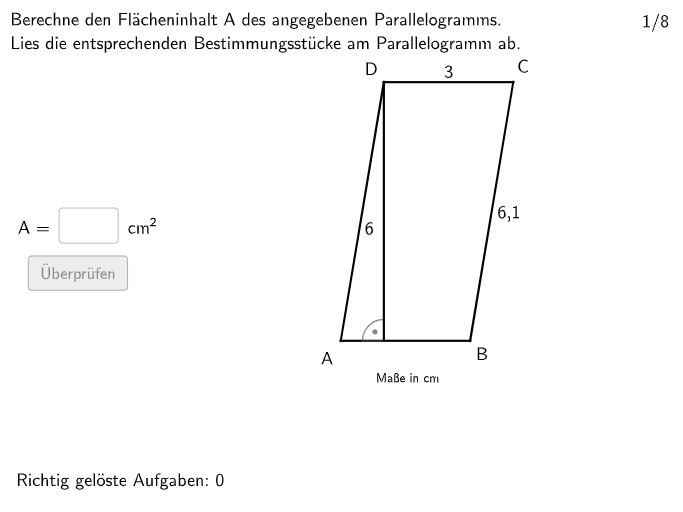
该GeoGebra范例用于演示平行四边形面积的计算方法,通过交互式输入和验证帮助学生掌握面积公式。核心数学概念是平行四边形面积公式(底乘高)及其推导,涉及特殊四边形(平行四边形、梯形、菱形等)的面积公式应用。作图要点包括使用Polygon构造平行四边形,OrthogonalLine和Intersect生成高,Text和InputBox提供输入与反馈,Shuffle和Rotate用于随机变换题目,If和Join控制逻辑,Circle和Angle辅助显示,以及validate、showanswer等按钮实现交互验证。适合小学5-6年级或初中低年级学生,用于课堂练习和自主探究,培养公式应用与推理能力。
GeoGebra 命令及参数
Textfield(input1) → InputBox1Textfield(input2) → InputBox2Shuffle({1, 2}) → ModusList, {1, 2}Shuffle(Sequence[i, i, 24, round((rad2 * 10))]) → Rad1List, {28, 25, 27, 24, 29, 26}Shuffle(Sequence[i, i, 1, 360]) → GradList, {295, 23, 288, 341, 194, 244, 24, 66, 308, 9, 274, 114, 214, 85, 35, 163, 178, 104, 47, 28, 128, 200, 105, 147, 316, 205, 6, 14, 172, 154, 267, 329, 249, 275, 179, 65, 42, 25, 73, 40, 79, 141, 33, 121, 313, 58, 253, 76, 211, 353, 266, 348, 224, 238, 113, 270, 101, 213, 86, 8, 248, 60, 228, 227, 340, 100, 212, 160, 44, 107, 115, 124, 317, 109, 90, 321, 27, 166, 272, 180, 309, 171, 280, 68, 239, 48, 284, 277, 129, 273, 196, 336, 217, 89, 318, 127, 332, 43, 246, 207, 258, 161, 83, 291, 243, 97, 12, 1, 360, 136, 328, 36, 330, 257, 55, 91, 279, 22, 235, 310, 87, 131, 138, 315, 61, 165, 93, 110, 38, 153, 236, 146, 53, 4, 148, 123, 116, 223, 289, 149, 201, 222, 209, 345, 290, 281, 255, 169, 301, 287, 184, 269, 69, 16, 202, 74, 314, 350, 240, 334, 215, 19, 234, 210, 191, 271, 198, 241, 164, 352, 5, 260, 117, 219, 188, 199, 15, 218, 263, 185, 286, 99, 343, 59, 133, 84, 338, 142, 344, 135, 203, 7, 285, 168, 134, 54, 21, 333, 92, 29, 187, 111, 259, 119, 226, 34, 11, 307, 37, 158, 331, 192, 102, 78, 220, 355, 346, 167, 319, 103, 3, 262, 189, 32, 72, 88, 195, 276, 62, 296, 322, 304, 51, 326, 155, 337, 177, 294, 323, 354, 251, 13, 170, 339, 264, 306, 325, 144, 186, 45, 122, 181, 256, 342, 10, 298, 293, 81, 230, 156, 75, 98, 204, 96, 80, 299, 2, 265, 94, 193, 31, 250, 311, 162, 173, 26, 175, 229, 245, 237, 283, 182, 358, 71, 312, 190, 225, 64, 139, 356, 30, 359, 126, 18, 49, 320, 125, 159, 140, 302, 347, 176, 118, 305, 268, 41, 206, 233, 70, 132, 143, 232, 52, 82, 261, 17, 208, 216, 120, 108, 67, 50, 57, 297, 197, 231, 335, 300, 351, 221, 183, 252, 150, 292, 95, 46, 77, 157, 278, 357, 247, 152, 56, 39, 63, 145, 137, 106, 327, 242, 20, 349, 303, 130, 282, 174, 324, 254, 151, 112}Rotate(DrehAnchor, grad°, M) → AShuffle(Join[{Sequence[i, i, 30, 40], Sequence[i, i, 75, 85]}]) → GradList2, {38, 33, 30, 82, 40, 31, 76, 80, 85, 37, 77, 78, 81, 34, 39, 79, 75, 36, 35, 84, 83, 32}Rotate(M, grad2°, A) → DRotate(M, grad2°, C) → B_{1}Polygon(B_{1}, C, D, A) → v1, m'_{1}, c_1, m', aOrthogonalLine(D, a) → fOrthogonalLine(D, m'_{1}) → gOrthogonalLine(C, a) → hOrthogonalLine(C, m') → iIntersect(h, a) → HöheaCPIntersect(i, m') → HöhebCPIntersect(g, m'_{1}) → HöhebDPIntersect(a, f) → HöheaDPIf(modus ≟ 1 ∧ Defined[Hoehea(1)], Length[Hoehea(1)], modus ≟ 1 ∧ (¬Defined[Hoehea(1)]), Length[Hoehea(2)], modus ≟ 2 ∧ Defined[Hoeheb(1)], Length[Hoeheb(1)], modus ≟ 2 ∧ (¬Defined[Hoeheb(1)]), Length[Hoeheb(2)]) → hwertrawShuffle(1…8) → ExNumList, {7, 1, 5, 2, 3, 8, 4, 6}Join({{2, 8}, ExNumList \ {2, 8}}) → ExNumListRealIf(exNum ∈ {1, 2, 7, 8}, (Angabea * Angabeh), (Angabeb * Angabeh)) → solPolygon(PtopLeftCornerFeedback, PtopRightCornerFeedback, PbottomRightCornerFeedback, PbottomLeftCornerFeedback) → rectangleCorrect, rectangleCorrectS3, rectangleCorrectS4, rectangleCorrectS2, rectangleCorrectS1Shuffle(Sequence[Random[0, 10], i, 1, 100]) → randomNosForX, {7, 6, 9, 4, 8, 2, 9, 3, 2, 9, 0, 8, 8, 5, 7, 5, 1, 0, 4, 3, 10, 3, 5, 5, 1, 5, 2, 9, 8, 5, 1, 4, 5, 0, 3, 0, 8, 7, 1, 2, 5, 6, 3, 4, 10, 2, 9, 5, 3, 8, 0, 6, 4, 6, 10, 7, 0, 8, 10, 10, 10, 8, 8, 4, 0, 6, 9, 4, 10, 2, 7, 3, 1, 4, 8, 7, 7, 10, 3, 1, 1, 5, 4, 8, 4, 5, 6, 10, 7, 9, 5, 8, 2, 5, 1, 6, 1, 4, 1, 6}Element(randomNosForX, Mod[questionCount, 100] + 1) → numXShuffle(Sequence[Random[0, 10], i, 1, 100]) → randomNosForY, {4, 1, 8, 5, 6, 0, 9, 8, 7, 3, 6, 8, 5, 5, 2, 1, 7, 3, 4, 3, 1, 10, 4, 7, 10, 9, 6, 3, 1, 8, 2, 0, 6, 2, 6, 6, 4, 4, 8, 2, 1, 0, 1, 5, 9, 0, 4, 9, 8, 0, 6, 6, 0, 6, 9, 4, 7, 3, 10, 2, 9, 8, 1, 3, 3, 0, 2, 1, 2, 10, 7, 0, 0, 0, 2, 0, 1, 1, 2, 4, 3, 7, 3, 8, 1, 9, 3, 6, 10, 6, 8, 8, 4, 5, 2, 9, 9, 1, 8, 0}Element(randomNosForY, Mod[questionCount, 100] + 1) → numYAppend(true, Sequence[If[randomNosForX(i) ≟ randomNosForX(i - 1), false, true], i, 2, 100]) → stayXAppend(true, Sequence[If[randomNosForY(i) ≟ randomNosForY(i - 1), false, true], i, 2, 100]) → stayYRemove(Sequence[If[stayX(i), randomNosForX(i), 0], i, 1, 100], Sequence[0, i, 1, 100]) → randomNosForXwithoutRepeatRemove(Sequence[If[stayY(i), randomNosForY(i), 0], i, 1, 100], Sequence[0, i, 1, 100]) → randomNosForYwithoutRepeatElement(randomNosForXwithoutRepeat, Mod[questionCount, Length[randomNosForXwithoutRepeat]] + 1) → numXwithoutRepeatElement(randomNosForYwithoutRepeat, Mod[questionCount, Length[randomNosForYwithoutRepeat]] + 1) → numYwithoutRepeatDefined(input1) → fixedCircle(M, rad2) → cCircle(M, rad1) → dAngle(M, A, D) → αAngle(M, C, B_{1}) → βText("\textsf{A}", F, false, true, 0, 0) → Text2Text("\textsf{B}", G, false, true, 0, 0) → Text3Text("\textsf{C}", E, false, true, 0, 0) → Text4Text("\textsf{D}", H, false, true, 0, 0) → Text5If(Defined[Segment[HöheaCP, C]], Midpoint[Segment[HöheaCP, C]], Midpoint[Segment[HöheaDP, D]]) → BeschhaIf(Defined[Segment[HöhebCP, C]], Midpoint[Segment[HöhebCP, C]], Midpoint[Segment[HöhebDP, D]]) → BeschhbText(Beschh, If[modus ≟ 1, J, I], false, true, 0, 0) → Text6If(modus ≟ 1, (awert * hwert), (bwert * hwert)) → solwertAngle(C, HöhebCP, D) → γAngle(D, HöheaDP, A) → δAngle(D, HöhebDP, B_{1}) → εAngle(C, HöheaCP, A) → ζRotate(ParaPB, alphakonst°, ParaPA) → L'Circle(ParaPA, bkonst) → eRay(ParaPA, L') → jIntersect(e, j) → ParaPD,If(x(ParaPA) < x(ParaPD), (x(ParaPD), y(ParaPA)), (x(ParaPA), y(ParaPD))) → ParaPHelper1Angle(ParaPB, ParaPA, ParaPHelper1) → ηAngle(ParaPD, ParaPHelper1, ParaPA) → θIf(x(ParaPD) < x(ParaPA), Segment[ParaPA, ParaPHelper1], Segment[ParaPD, ParaPHelper1]) → hoeheaSegment(ParaPA, ParaPD) → kOrthogonalLine(ParaPA, k) → lSegment(ParaPB, ParaPC) → mOrthogonalLine(ParaPB, m) → nIf(Defined[Intersect[l, Ray[ParaPB, ParaPC]]], Intersect[l, Ray[ParaPB, ParaPC]], Intersect[n, Segment[ParaPD, ParaPA]]) → ParaPHelper2If(Defined[Intersect[l, Ray[ParaPB, ParaPC]]], Segment[ParaPA, ParaPHelper2], Segment[ParaPB, ParaPHelper2]) → hoehebAngle(ParaPB, ParaPHelper2, ParaPD) → williwinglAngle(ParaPA, ParaPHelper2, ParaPB) → κMidpoint(ParaPA, ParaPB) → NMidpoint(ParaPC, ParaPB) → OMidpoint(ParaPA, ParaPD) → PMidpoint(ParaPD, ParaPC) → QText(Text9, R, false, true, 0, 0) → Text11Text(Text9, U, false, true, 0, 0) → Text12Text(Text10, S, false, true, 0, 0) → Text13Text(Text10, T, false, true, 0, 0) → Text14Midpoint(ParaPA, ParaPB) → VIf(exNum ∈ {1, 2, 7, 8}, Segment[ParaPD, ParaPC], Segment[ParaPB, ParaPC]) → HintStrecke
AI 绘图提示语参考
在平面中先给定一个平行四边形的顶点形状:从四点构成多边形,并让两条相对边保持平行且可通过旋转产生变化。再在两条相邻边上作垂线以确定高:从顶点处分别向相对边作垂直线,并取垂足,连接形成表示“高”的线段。用角度标记在底边与高所在的方向处标出相关夹角,同时在相应位置放置文字标注四个顶点与必要的中间量。最后加入可输入的长度与反馈用文字区域,并把构造按两种模式随机调整(例如高与边对应关系切换),让用户能根据底和高计算面积并显示检查结果。
以上提示语为根据原始绘图命令整理而来,仅供参考。