
透镜成像距离演示
几何画板及绘图内容加载中,请稍等……
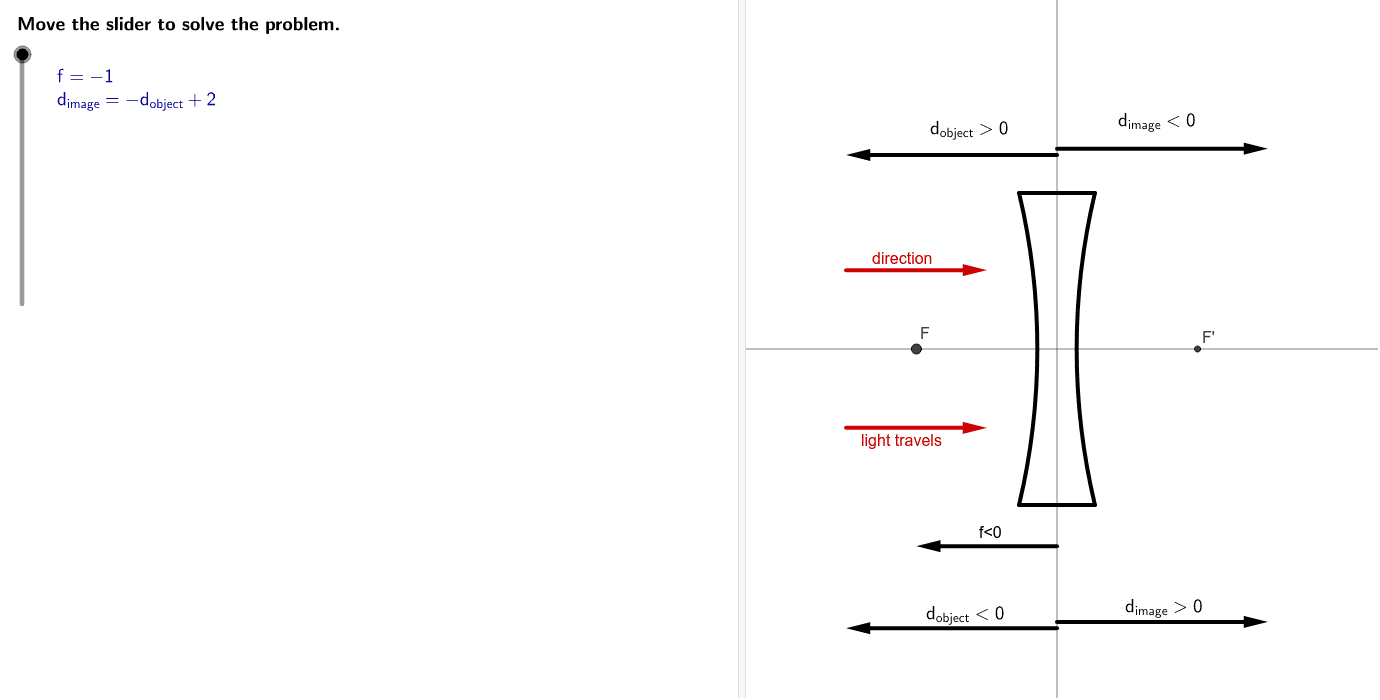
①本范例演示透镜成像中物距(d₁)与像距(d₂)的关系及几何平均性质;②涉及核心概念包括物距、像距、几何平均数、透镜成像公式;③作图要点运用了LaTeX、点、圆弧、线段、向量、中点等GeoGebra命令与对象;④适合高中物理光学与数学几何教学,用于理解透镜成像原理与数学建模。
GeoGebra 命令及参数
LaTeX(steps) → counterLaTeX("\text{Move the slider to solve the problem.}") → text0Corner(1) → ACorner(3) → BPoint(xAxis) → DCircumcircleArc(C, D, F_1) → cCircumcircleArc(I, J, H) → dCircumcircleArc(G, D, E) → eCircumcircleArc(E, J, G) → fSegment(C, H) → bSegment(F_1, I) → gIf(sgn(focal) < 0, "f<0", "f>0") → focaltextVector((0, -1.25), (x(F), (-1.25))) → uMidpoint((0, -1.25), (sgn(focal), (-1.25))) → MLaTeX("d_{image}<0") → imagetextnegVector((0, -1.77), (-1.5, -1.77)) → vMidpoint((0, -1.77), (-1.5, -1.77)) → NVector((0, -1.73), (1.5, -1.73)) → wMidpoint((0, -1.73), (1.5, -1.73)) → OLaTeX("d_{image}>0") → imagetextposVector((0, 1.23), (-1.5, 1.23)) → hMidpoint((0, 1.23), (-1.5, 1.23)) → PVector((0, 1.27), (1.5, 1.27)) → iMidpoint((0, 1.27), (1.5, 1.27)) → QLaTeX("d_{object}>0") → objecttextposLaTeX("d_{object}<0") → objtextnegLine((-1, 0), (1, 0)) → jLine((0, -1), (0, 1)) → kLaTeX("\textcolor{#000099}{f=\frac{d_{object}d_{image}}{d_{object}+d_{image}}}") → text3If(focal < 0, LaTeX[("-d_{object}+" * diff)], LaTeX[("d_{object}+" * diff)]) → drelationLaTeX((((("\textcolor{#000099}{f=" * focal) * "}\cr\textcolor{#000099}{d_{image}= ") * drelation) * "}")) → ProblemIf(focal < 0, LaTeX[diff], LaTeX[("2d_{object}+" * diff)]) → denominatorIf(focal < 0, LaTeX[(("-d_{object}^2+" * diff) * "d_{object}")], LaTeX[(("d_{object}^2+" * diff) * "d_{object}")]) → numeratorLaTeX((("\text{Multiply both sides by }\textcolor{#000099}{" * denominator) * "}.")) → text8If(focal < 0, LaTeX[(focal * diff)], LaTeX[(((focal * 2) * "d_{object}+") * focaldiff)]) → leftsideLaTeX((((((("\textcolor{#000099}{" * focal) * "=\frac{") * numerator) * "}{") * denominator) * "}}")) → text7LaTeX((((("\textcolor{#000099}{" * leftside) * "=") * numerator) * "}")) → text9If(focal < 0, LaTeX[(("\text{Subtract }\textcolor{#000099}{" * numerator) * "}\text{ from both sides.}")], LaTeX[(("\text{Subtract }\textcolor{#000099}{" * leftside) * "}\text{ from both sides.}")]) → text10If(focal < 0, LaTeX[(((("\textcolor{#000099}{d_{object}^2-" * diff) * "d_{object}") * leftside) * "=0}")], LaTeX[(((("\textcolor{#000099}{d_{object}^2 +(" * linterm) * ")d_{object}-") * focaldiff) * "=0}")]) → text11LaTeX("\text{}") → text14If(focal < 0, Polynomial[x^(2) - (diff * x) + (focal * diff)], Polynomial[x^(2) + ((diff - (2 * focal)) * x) - (focal * diff)]) → pUnique(Zip[x(a), a, zeropts]) → zerosLength(zeros) → numzerosIf(Element[zeros, Length[zeros]] ≟ 0 ∨ Element[zeros, 1] ≟ 0, LaTeX["\text{A zero value for }\textcolor{#000099}{d_{object}}\text{ makes no}\cr\text{sense because the object will be in the}\cr\text{middle of the lens.}"], "") → zerorootIf(Element[zeros, 1] < 0, LaTeX["\text{A negative value for }\textcolor{#000099}{d_{object}}\text{ means the object is on}\cr\text{the right side of the lens. This is a virtual object}\cr\text{which typically occurs only in multi-lens systems.}\cr"], "") → negrootIf(Element[zeros, Length[zeros]] > 0, LaTeX["\text{A positive value for }\textcolor{#000099}{d_{object}}\text{ means the object is on}\cr\text{the left side of the lens.}\cr"], "") → posrootLaTeX(((negroot * posroot) * zeroroot)) → text17LaTeX("\textcolor{#000099}{x=\frac{-b\pm\sqrt{b^2-4ac}}{2a}}") → text20If(focal < 0, (focal * diff), ((-focal) * diff)) → quadcIf(focal < 0, (-diff), diff - (2 * focal)) → quadbLaTeX((((((("\textcolor{#000099}{d_{object}=\frac{-(" * quadb) * ")\pm\sqrt{(") * quadb) * ")^2-4(1)(") * quadc) * ")}}{2(1)}}")) → text22LaTeX("\text{Simplify.}") → text23LaTeX((("\textcolor{#000099}{d_{object}=" * zeros) * "}")) → text24If(focal > 0, Zip[a + diff, a, zeros], Zip[(-a) + diff, a, zeros]) → imagesLaTeX("\text{Find }\textcolor{#000099}{d_{image}}\text{ and interpret the result in terms of the}\cr\text{image location relative to the lens.}") → text25LaTeX((("\textcolor{#000099}{d_{image}=" * images) * "}")) → text26If(Min[images] < 0, LaTeX["\text{A negative value for }\textcolor{#000099}{d_{image}}\text{ means the image is on}\cr\text{the left side of the lens.}\cr"], "") → negimageIf(Max[images] > 0, LaTeX["\text{A positive value for }\textcolor{#000099}{d_{image}}\text{ means the image is on}\cr\text{the right side of the lens.}\cr"], "") → posimageIf(Element[images, Length[images]] ≟ 0 ∨ Element[images, 1] ≟ 0, LaTeX["\text{A zero value for }\textcolor{#000099}{d_{image}}\text{ makes no sense because}\cr\text{the image will be in the middle of the lens.}"], "") → zeroimageLaTeX(((negimage * posimage) * zeroimage)) → text27Vector(((-Element[zeros, chooseSolution]), 0), ((-Element[zeros, chooseSolution]), 1)) → lVector((Element[images, chooseSolution], 0), (Element[images, chooseSolution], ((-Element[images, chooseSolution])) / Element[zeros, chooseSolution])) → mLaTeX((((("\textcolor{#000099}{d_{object}=" * Element[zeros, chooseSolution]) * "}\cr \textcolor{#006633}{d_{image}=") * Element[images, chooseSolution]) * "}")) → text28Vector((((-1.5) * abs(focal)), 0.5), (((-0.5) * abs(focal)), 0.5)) → nVector((((-1.5) * abs(focal)), (-0.5)), (((-0.5) * abs(focal)), (-0.5))) → qLaTeX("\text{Use the buttons below to return to the original problem or}\cr\text{randomly generate a similar practice problem.}") → RandomizationTextLaTeX("\text{Substitute the defined variables into the thin lens equation and simplify.}") → text1LaTeX("\text{Given function}") → text2LaTeX((((((("\textcolor{#000099}{(" * focal) * ")=\frac{d_{object}(") * drelation) * ")}{d_{object}+(") * drelation) * ")}}")) → text5If(focal < 0, LaTeX[(((("\text{Graph the simplified equation }\cr\textcolor{#000099}{d_{object}^2-" * diff) * "d_{object}") * leftside) * "=0}.")], LaTeX[(((("\text{Graph the simplified equation }\textcolor{#000099}{d_{object}^2 +(" * linterm) * ")d_{object}-") * focaldiff) * "=0}.")]) → text13LaTeX("\text{Describe the zeros of the function and what that implies for the number of }\cr\text{possible solutions for }\textcolor{#000099}{d_{object}}\text{ and }\textcolor{#000099}{d_{image}.}") → text15LaTeX((((((("\text{There are " * numzeros) * " possible positions for the object so that}\cr\textcolor{#000099}{d_{image}=") * drelation) * "}\text{ is true for a focal length of }\textcolor{#000099}{f=") * focal) * "}.")) → text16LaTeX("\text{Quadratic formula}") → text19LaTeX((((("\text{Substitute }\textcolor{#000099}{d_{object}}\text{ for }\textcolor{#000099}{x}\text{, }\cr\textcolor{#000099}{1}\text{ for }\textcolor{#000099}{a}\text{, }\textcolor{#000099}{" * quadb) * "}\text{ for }\textcolor{#000099}{b}\text{,}\cr\text{and }\textcolor{#000099}{") * quadc) * "}\text{ for }\textcolor{#000099}{c}.")) → text21LaTeX("\text{Solve the simplified formula for }\textcolor{#000099}{d_{object}.}") → text18LaTeX((((("\text{Substitute the given focal length, }\textcolor{#000099}{f=" * focal) * "}\text{,}\cr\text{and the relationship between the image and}\cr\text{object distances, }\textcolor{#000099}{d_{image}=") * drelation) * "}.")) → text4LaTeX("\text{Simplify the numerator and denominator.}") → text6If(focal < 0, LaTeX[(((("\text{The simplified function can be written as }\cr\textcolor{#000099}{d_{object}^2-" * diff) * "d_{object}") * leftside) * "=0}\text{.}")], LaTeX[(((("\text{The simplified function can be written as }\cr\textcolor{#000099}{d_{object}^2 +(" * linterm) * ")d_{object}-") * focaldiff) * "=0}\text{.}")]) → text12LaTeX("\text{Move the slider to change the object's location.}") → text29
AI 绘图提示语参考
画一个透镜成像的几何模型,展示物距和像距的关系,用圆弧表示光路,标出几何平均性质。包含坐标轴、焦点、物点和像点,用向量表示光线路径,用不同颜色标注正负值,并展示公式推导过程,最终得到物距和像距的数学关系式。
以上提示语为根据原始绘图命令整理而来,仅供参考。