
利用图案卡片学习概率法则
几何画板及绘图内容加载中,请稍等……
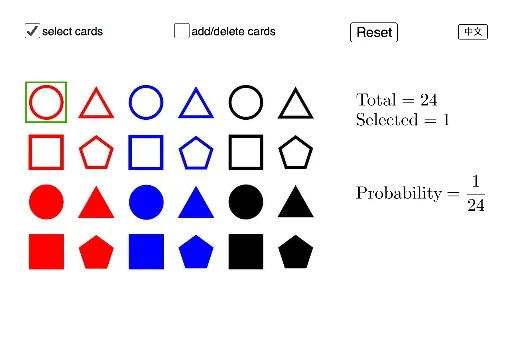
①本范例通过模拟从图案卡片中抽取卡片的实验,演示概率的基本概念和计算方法;②涉及的核心数学概念包括概率、频率、样本空间、事件、组合、比率和饼图;③作图要点——从下方『构造摘要』提炼用到了哪些 GeoGebra 命令/对象,如Polygon(多边形)、addDelete(添加删除对象)、select(选择对象)、poly1(多边形1)、s(滑块)等;④适合初中及以上学生,用于概率统计教学和实践活动。
GeoGebra 命令及参数
Polygon(P1, P1 + (0.8, 0), 4) → poly1, f, g, h, i, A, BPolygon(P4, P4 + (0.8, 0), 4) → poly4, s, t, a, b, G, HPolygon(P5, P5 + (0.8, 0), 4) → poly5, c, d, e, f_1, I, JPolygon(P6, P6 + (0.8, 0), 4) → poly6, g_1, h_1, i_1, j_1, K, LPolygon(P7, P7 + (0.8, 0), 4) → poly7, k_1, l_1, m_1, n_1, M, NPolygon(P8, P8 + (0.8, 0), 4) → poly8, p_1, q_1, r_1, s_1, O, PPolygon(P9, P9 + (0.8, 0), 4) → poly9, t_1, a_1, b_1, c_1, Q, RPolygon(P10, P10 + (0.8, 0), 4) → poly10, d_1, e_1, f_2, g_2, S, TPolygon(P11, P11 + (0.8, 0), 4) → poly11, h_2, i_2, j_2, k_2, U, VPolygon(P12, P12 + (0.8, 0), 4) → poly12, l_2, m_2, n_2, p_2, W, ZPolygon(P13, P13 + (0.8, 0), 4) → poly13, q_2, r_2, s_2, t_2, A_1, B_1Polygon(P14, P14 + (0.8, 0), 4) → poly14, a_2, b_2, c_2, d_2, C_1, D_1Polygon(P15, P15 + (0.8, 0), 4) → poly15, e_2, f_3, g_3, h_3, E_1, F_1Polygon(P16, P16 + (0.8, 0), 4) → poly16, i_3, j_3, k_3, l_3, G_1, H_1Polygon(P17, P17 + (0.8, 0), 4) → poly17, m_3, n_3, p_3, q_3, I_1, J_1Polygon(P18, P18 + (0.8, 0), 4) → poly18, r_3, s_3, t_3, a_3, K_1, L_1Polygon(P19, P19 + (0.8, 0), 4) → poly19, b_3, c_3, d_3, e_3, M_1, N_1Polygon(P20, P20 + (0.8, 0), 4) → poly20, f_4, g_4, h_4, i_4, O_1, P_1Polygon(P21, P21 + (0.8, 0), 4) → poly21, j_4, k_4, l_4, m_4, Q_1, R_1Polygon(P22, P22 + (0.8, 0), 4) → poly22, n_4, p_4, q_4, r_4, S_1, T_1Polygon(P23, P23 + (0.8, 0), 4) → poly23, s_4, t_4, a_4, b_4, U_1, V_1Polygon(P24, P24 + (0.8, 0), 4) → poly24, c_4, d_4, e_4, f_5, W_1, Z_1Polygon(P2, P2 + (0.8, 0), 4) → poly2, j, k, l, p, C, DPolygon(P3, P3 + (0.8, 0), 4) → poly3, q, r, g_5, h_5, E, F
AI 绘图提示语参考
请绘制一系列由矩形组成的图案,每个矩形宽度为0.8,高度为4。矩形之间通过连接线段相连,形成一个网格状结构。矩形的位置和连接顺序应按照给定的顺序排列,以展示概率和几何构造的概念。
以上提示语为根据原始绘图命令整理而来,仅供参考。