
风筝周长与旋转演示
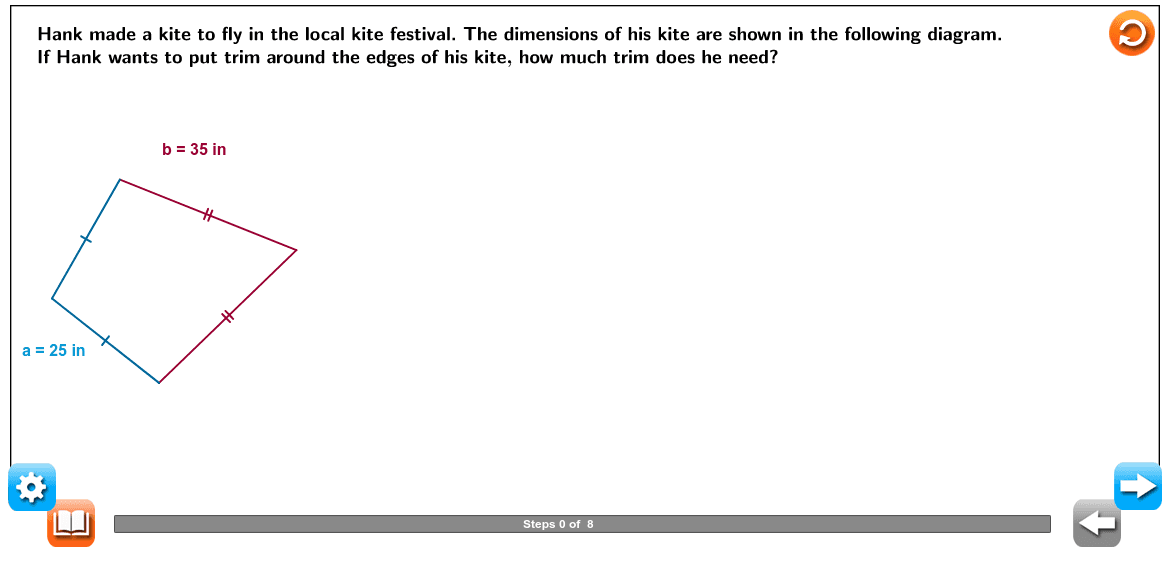
几何画板及绘图内容加载中,请稍等……
① 本范例演示一个风筝(凸四边形)的几何构造、周长计算及其绕定点旋转的动态过程。② 涉及核心数学概念:四边形/风筝的性质、周长公式、向量表示、旋转变换、数列/滑块控制动画。③ 作图要点:使用 Circle、Point、Segment、Intersect 创建顶点与边;用 Vector 表示边向量;通过 Sequence 与 Slider(Slider1、Slider2)驱动旋转角度并生成动态轨迹;LaTeX 标注尺寸与公式;Progressbar、Hint 等 UI 对象辅助教学交互。④ 适用于初中几何(四边形、周长)、高中向量与变换章节,也可作为 GeoGebra 几何作图与滑块动画教学示例。
GeoGebra 命令及参数
Circle(C, Slider1) → cPoint(c) → DSegment((0, 0), (0, 1)) → iSegment(A_0, B_0) → ScalelineSequence(Segment[A_0 + (i, 0), A_0 + (i, (-0.5))], i, 0, 10) → list1Sequence(Segment[A_0 + (i - 0.5, 0), A_0 + (i - 0.5, (-0.4))], i, 1, 10) → list2Sequence(Sequence[Segment[A_0 + ((0.5 * i) + (0.1 * j), 0), A_0 + ((0.5 * i) + (0.1 * j), (-0.3))], j, 1, 4], i, 0, 19) → list3Segment(D_0, (x(D_0), 0)) → jVector(C_0, D_0) → uLaTeX("\text{Hank made a kite to fly in the local kite festival. The dimensions of his kite are shown in the following diagram.}") → text1LaTeX("\text{If Hank wants to put trim around the edges of his kite, how much trim does he need?}") → text2LaTeX("\text{Determine the length of each side.}") → text3LaTeX("\text{Find the perimeter.}") → text6LaTeX("\text{To find the perimeter, add the lengths of all the sides.}") → text7LaTeX("\text{Write an equation.}") → text9LaTeX("\text{Simplify.}") → text11Segment(C, D) → bPoint(c) → ESegment(C, E) → dCircle(D, Slider2) → eCircle(E, Slider2) → fIntersect(e, f, 1) → FSegment(D, F) → gSegment(F, E) → lLaTeX("\text{0}") → Scalevalue0LaTeX("\text{10}") → Scalevalue1LaTeX("\text{20}") → Scalevalue2LaTeX("\text{30}") → Scalevalue3LaTeX("\text{40}") → Scalevalue4LaTeX("\text{50}") → Scalevalue5LaTeX("\text{60}") → Scalevalue6LaTeX("\text{70}") → Scalevalue7LaTeX("\text{80}") → Scalevalue8LaTeX("\text{90}") → Scalevalue9LaTeX("\text{100}") → Scalevalue10Segment(G, H) → hVector(H, P1) → vSegment(P1, (x(P1), 0)) → kLaTeX((("\text{The sides marked with one tick mark are both \textcolor{#000099}{" * v1) * "} inches long.}")) → text4LaTeX((("\text{The sides marked with two tick marks are both \textcolor{#000099}{" * v2) * "} inches long.}")) → text5LaTeX((((((((("\text{\textcolor{#000099}{P = " * v1) * "+") * v1) * "+") * v2) * "+") * v2) * "}}")) → text8LaTeX((("\text{\textcolor{#000099}{P = " * sol) * "}}")) → text10LaTeX("\text{of trim.}") → text12_1LaTeX((((("\text{The perimeter of the kite is \textcolor{#000099}{" * sol) * "} inches; therefore, Hank will need \textcolor{#000099}{") * sol) * "} inches }")) → text12LaTeX("\text{\mathbf{Perimeter} the distance around a two-dimensional figure.}") → text13LaTeX("\text{\mathbf{Line\; segment} a part of a line that is noted by two endpoints,(x ,y ) and (x ,y ). }") → text14
AI 绘图提示语参考
请绘制一个风筝图形,风筝是凸四边形,具有两条等长的对称边。图形中包含一个固定的旋转中心,风筝的一个顶点围绕该中心旋转,旋转角度由滑块控制,旋转轨迹用线段表示。风筝的四个顶点和边通过线段连接,构造顺序为:先确定风筝的初始形状和旋转中心,然后添加滑块控制旋转角度,最后绘制旋转轨迹。图形应清晰展示风筝的几何结构、旋转变换和动态动画效果。
以上提示语为根据原始绘图命令整理而来,仅供参考。