
超立方体?不
几何画板及绘图内容加载中,请稍等……
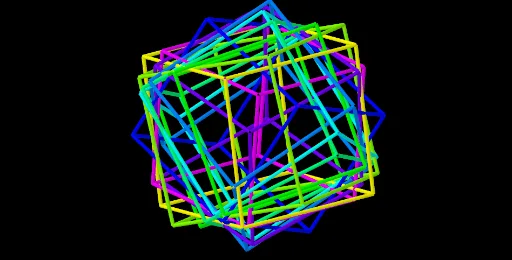
①本范例演示了超立方体的三维旋转与投影效果;②涉及的核心数学概念包括立体几何、旋转、积分、随机变量、圆柱体、自然数及统计特征;③作图要点提炼自构造摘要,使用了Point、Cube、Intersect、Sequence、Element等GeoGebra命令及对象;④适合高中及以上学生及数学爱好者用于理解高维几何与相关数学应用。
GeoGebra 命令及参数
Point(Circle[B, Distance[C, B], Segment[C, B]]) → ECube(C, B, E) → a, F, FaceEFJI, FaceGHIJ, areteCF, areteBC, areteBE, areteEF, areteCG, areteFJ, areteGJ, areteGH, G, areteBH, areteHI, areteEI, areteIJ, H, I, J, FaceBCFE, FaceCFJG, FaceBCGH, FaceBEIHIntersect(xAxis, yAxis) → KSequence(Rotate[Rotate[Dilate[Cube[C, B, E], r^(k - 1), K], (γ * (k - 1)), K], (γ * (k - 1)), xAxis], k, 1, n) → Liste1Element(Liste1, A1) → B1Element(Liste1, A2) → B2Element(Liste1, A3) → B3Element(Liste1, A4) → B4Element(Liste1, A5) → B5Element(Liste1, A6) → B6Element(Liste1, A7) → B7Element(Liste1, A8) → B8Element(Liste1, A9) → B9Element(Liste1, A10) → B10Element(Liste1, A11) → B11Element(Liste1, A12) → B12Element(Liste1, A13) → B13Element(Liste1, A14) → B14Element(Liste1, A15) → B15Element(Liste1, A16) → B16Element(Liste1, A17) → B17Element(Liste1, A18) → B18Element(Liste1, A19) → B19Element(Liste1, A20) → B20Element(Liste1, A21) → B21
AI 绘图提示语参考
绘制一个立方体,然后围绕一个轴旋转并投影,展示其三维旋转和投影效果,包含多个旋转后的立方体,体现高维几何和统计特征。
以上提示语为根据原始绘图命令整理而来,仅供参考。