
六边形镜像对称图案
几何画板及绘图内容加载中,请稍等……
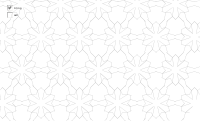
①本范例演示了六边形通过镜像和旋转生成的万花筒图案;②涉及核心数学概念包括对称性、旋转、多边形构造;③构造要点:使用Segment(线段)、Midpoint(中点)、Mirror(镜像)、Rotate(旋转)、Vector(向量)、Sequence(数列)、Line(直线)等命令创建基本图形并迭代生成复杂图案;④适合高中数学教学,用于理解变换几何和对称性原理。
GeoGebra 命令及参数
Segment(M, Q) → fSegment(M, P) → eSegment(M, N) → dSegment(L, M) → cSegment(C, B) → hMidpoint(A, B) → HSegment(E, H) → bMirror(cell1, b) → cell2Rotate(cell12, 240*°, E) → cell56Rotate(cell12, 120*°, E) → cell34Mirror(cell123456, h) → cell789012Midpoint(C, A) → GMidpoint(B, D) → IMidpoint(D, C) → JMidpoint(C, B) → KVector(A, B) → uVector(A, C) → vSegment(E, G) → aSequence(Translate[Sequence[Translate[tile, Vector[(n * u)]], n, -3, 3], Vector[(m * v)]], m, -3, 3) → tilingVector(B, D) → wVector(C, D) → gSegment(F, J) → jSegment(F, I) → kSegment(E, F) → iSegment(A, E) → pSegment(E, C) → qSegment(E, B) → rSegment(F, C) → sSegment(F, B) → tSegment(F, D) → a_1Line(A, E) → b_1Line(C, E) → c_1Line(B, E) → d_1Line(B, F) → e_1Line(C, F) → f_1Line(C, B) → g_1Line(A, B) → h_1Line(C, D) → i_1Line(B, D) → j_1Line(A, C) → k_1Line(G, q) → l_1Line(K, q) → m_1Line(I, t) → n_1Line(H, r) → p_1Line(K, r) → q_1Line(J, k) → r_1Line(H, i) → s_1Line(G, i) → t_1Line(G, H) → a_2Line(H, K) → b_2Line(K, G) → c_2Line(I, J) → d_2
AI 绘图提示语参考
画一个由六边形构成的万花筒图案,通过反射和旋转展示对称性。首先绘制一个中心点,然后从中心点向外依次绘制三条线段,形成六边形的骨架。接着,以中心点为轴心,将六边形旋转120度和240度,并分别进行镜像反射,生成对称的图案。最后,将所有基本形状组合起来,形成复杂的万花筒效果。
以上提示语为根据原始绘图命令整理而来,仅供参考。