
哥特式艺术与相切圆
几何画板及绘图内容加载中,请稍等……
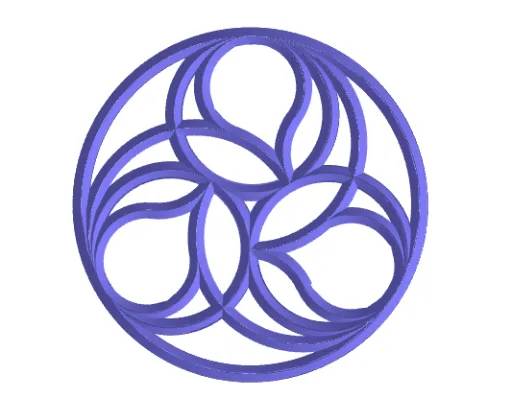
这是一个展示哥特式艺术风格的数学范例,通过相切圆的构造来实现。核心数学概念包括圆、相切、对称和几何作图。使用了序列、中点、线段、圆、旋转等 GeoGebra 命令。适合高中数学教学,特别是几何和解析几何课程。
GeoGebra 命令及参数
Sequence(Rotate[A, (ang * t), Centro], t, 0, nLados - 1) → PtosElement(Ptos, 2) → BMidpoint(B, A) → M1LineBisector(B, A) → mediatrizPoligonoUnitVector(mediatrizPoligono) → v2OrthogonalVector(v2) → v2PerpDistance(Centro, B) → rDistance(A, B) → rC1Circle(M1, grosorUsar, v2Perp) → circ2Midpoint(M1, M2) → CM1M2Line(CM1M2, CM1M2 + (0, 0, 1)) → eje3CircleArc(CM1M2, M1, M2) → t2previoCircle(B, rC1 / 2) → t1Rotate(t1, ang, Centro) → circAux2If(nLados ≤ 3, M2, Intersect[circAux2, t2previo, 1]) → PAuxLimiteCircunferenciaIf(nLados ≤ 3, 180°, Angle[M1, CM1M2, PAuxLimiteCircunferencia]) → angAuxSemicircunferenciaLine(Centro, Centro + (0, 0, 1)) → eje1Line(Centro, B) → r1_1UnitVector(r1_1) → v1OrthogonalVector(v1) → v1PerpCircle(M, grosorUsar, v1Perp) → circ1Distance(CM1M2, M1) → rc4Circle(Centro, M) → t3Segment(A, B) → lSegment(B2, CM1M2) → auxCircTangente1LineBisector(auxCircTangente1) → mediatrizTangente1Intersect(r1_1, mediatrizTangente1) → B3CircleArc(CM1M2, M1, PAuxLimiteCircunferencia) → t2Circle(B3, M) → c2Intersect(t2previo, c2, 1) → FDistance(B3, M) → rC2LineBisector(B3, M3) → mediatrizTangente2Intersect(mediatrizPoligono, mediatrizTangente2) → CCircle(C, M1) → c3Intersect(c2, c3, 1) → DCircleArc(B3, D, F) → t5CircleArc(C, D, M1) → t4Line(B, B + (0, 0, 1)) → eje2Surface(circ1, (desarrollaToro * 360°), eje2) → toro2Angle(D, B3, F) → angulo5Line(B3, B3 + (0, 0, 1)) → ejeB3OrthogonalVector(Vector[B3, D]) → v3PerpCircle(D, grosorUsar, v3Perp) → circ3Surface(circ3, (desarrollaToro * angulo5), ejeB3) → toro4Line(C, C + (0, 0, 1)) → ejeCAngle(D, C, M1) → angulo6Surface(circ2, (desarrollaToro * angAuxSemicircunferencia), eje3) → toro3Surface(circ3, (desarrollaToro * angulo6), ejeC) → toro5Surface(circ1, (desarrollaToro * 360°), eje1) → toro1Sequence(Rotate[conjuntoTorosIniciales, (ang * t), Centro], t, 0, nLados - 1) → cTorosPolygon(Ptos) → polTextfield(nLados) → CasillaDeEntrada1Segment(CM1M2, M2) → segAuxRadioASegment(M, B2) → fSegment(Centro, M) → auxCircTangente2Segment(B3, M3) → gSegment(B3, M) → segAux1Tangente2Segment(M3, M1) → segAux2Tangente2Ray(M3, M1) → hSequence(Rotate[cLineas, (ang * t), Centro], t, 0, repeticionesVistas - 1) → cLineasBPolyLine({PTrig1, Rotate[PTrig1, 120°, M, v1Perp], Rotate[PTrig1, 240°, M, v1Perp], PTrig1}) → Trig1Surface(Trig1, (desarrollaToro * 360°), eje1) → toroRecto1PolyLine({PTrig2, Rotate[PTrig2, 120°, M1, v2Perp], Rotate[PTrig2, 240°, M1, v2Perp], PTrig2}) → Trig2PolyLine({PTrig3, Rotate[PTrig3, 120°, D, v3Perp], Rotate[PTrig3, 240°, D, v3Perp], PTrig3}) → Trig3Surface(Trig1, (desarrollaToro * 360°), eje2) → toroRecto2Surface(Trig2, (desarrollaToro * angAuxSemicircunferencia), eje3) → toroRecto3Surface(Trig3, (desarrollaToro * angulo5), ejeB3) → toroRecto4Surface(Trig3, (desarrollaToro * angulo6), ejeC) → toroRecto5Sequence(Rotate[conjuntoTorosRectosIniciales, (ang * t), Centro], t, 0, nLados - 1) → cTorosRectosPolygon(E, G, 4) → polígono1, i, j, k, m, H, I