
GeoGebra礼服
几何画板及绘图内容加载中,请稍等……
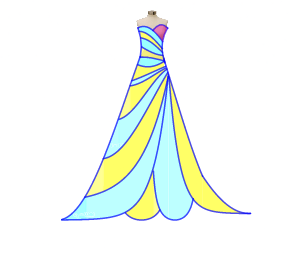
这个GeoGebra范例演示了如何使用几何作图工具绘制复杂的礼服图案。核心数学概念包括函数和三角函数。通过使用Point, CircumcircleArc, IntegralBetween等命令,可以构造出精美的几何图形。适合高中数学教学和学习。
GeoGebra 命令及参数
Point(a) → DPoint(c) → EPoint(t_1) → HPoint(a) → IPoint(b) → JPoint(d) → KPoint(q_1) → LCircumcircleArc(D, E, G) → ePoint(r_1) → MCircumcircleArc(H, J, M) → kIntegralBetween(p(x), q(x), -4.2, 0.8) → a_{1}IntegralBetween(q_1(x), q(x), -5.7, -4.2) → b_{1}IntegralBetween(q_1(x), q(x), -5.7, -4.2) → c_{1}IntegralBetween(f_1(x), h_1(x), -2.14, 0.82) → d_{1}IntegralBetween(s(x), t(x), -1.35, 0.74) → jIntegralBetween(f(x), g(x), -0.83, 0.64) → hIntegralBetween(c(x), d(x), -0.75, 0.54) → lIntegralBetween(a(x), b(x), -0.9, 0.54) → mIntegralBetween(b(x), c(x), -0.81, 0.54) → nIntegralBetween(d(x), f(x), -0.75, 0.54) → oIntegralBetween(g(x), s(x), -0.98, 0.64) → rIntegralBetween(q_1(x), s(x), -1.35, -0.98) → uIntegralBetween(q_1(x), g(x), -0.98, -0.83) → vIntegralBetween(t(x), f_1(x), -1.45, 0.74) → wIntegralBetween(q_1(x), f_1(x), -2.14, -1.45) → e_1IntegralBetween(q_1(x), h_1(x), -3.12, -2.14) → iIntegralBetween(h_1(x), p(x), -3.12, 0.87) → g_1IntegralBetween(q_1(x), p(x), -4.27, -3.12) → i_1IntegralBetween(q(x), p_1(x), -1.75, 0) → j_1IntegralBetween(g_2(x), p_1(x), 0, 0.38) → k_1IntegralBetween(q(x), g_2(x), -0.02, 0.9) → l_1IntegralBetween(r_2(x), g_2(x), 0.95, 2.45) → m_1IntegralBetween(r_1(x), r_2(x), 0.95, 3.03) → n_1IntegralBetween(s_1(x), r_2(x), 3.03, 6) → o_1IntegralBetween(t_1(x), a(x), -0.04, 0.56) → u_1IntegralBetween(t_1(x), f_2(x), 0.56, 0.87) → v_1
AI 绘图提示语参考
请绘制一个复杂的几何图形,包含多个点、圆弧和积分区域。图形由点D、E、H、I、J、K、L等构成,通过圆弧e和k连接这些点。积分区域a1、b1、c1、d1、j、h、l、m、n、o、r、u、v、w、e1、i、g1、i1、j1、k1、l1、m1、n1、o1、u1、v1形成不同的区域。这些区域之间通过函数关系相连,整体呈现一个复杂的几何图案,适合用于数学教育。
以上提示语为根据原始绘图命令整理而来,仅供参考。