
GeoGebra几何作图范例 by Tim Brzezinski (3)
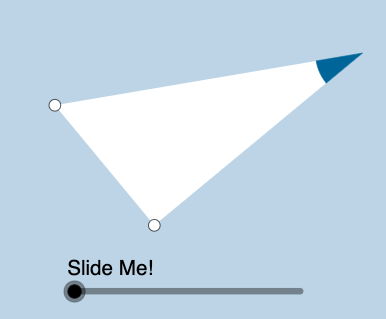
几何画板及绘图内容加载中,请稍等……
①本范例演示了利用GeoGebra进行几何图形的动态构造与变换;②涉及核心数学概念包括函数、三角函数、解析几何、几何变换等;③作图要点提炼自构造摘要,使用了Ray、OrthogonalLine、Rotate、Angle、Intersect、Segment、Polygon、Circle、CircleSector、Dilate、Vector、Translate、Midpoint等命令与对象;④适合高中及以上数学学习者和教师用于探索几何性质与函数图像的关联。
GeoGebra 命令及参数
Ray(B, C) → fOrthogonalLine(C, f) → gRotate(C, pi / 3, B) → B'Angle(C, B, B') → αRay(B, B') → hIntersect(g, h) → ASegment(B, C) → iSegment(C, A) → jSegment(B, A) → kPolygon(B, C, A) → poly1, c_1, a, bCircle(A, (0.3 * i)) → eIntersect(e, k) → D,Intersect(e, j) → E,CircleSector(A, D, E) → dDilate(A, If[0 < l ≤ 1, 1 - l, 0], B) → C'Vector(A, C') → uTranslate(d, u) → d'Rotate(d', If[1 < l ≤ 2, (((l - 1) * 2) * pi / 3), (2 * pi / 3)], B) → d''Dilate(A, If[2 < l ≤ 3, 3 - l, 0], B) → C'_1Vector(A, C'_1) → vTranslate(d, v) → d'_1Rotate(d'_1, If[3 < l ≤ 4, (((-(l - 3)) * 7) * pi / 6), (-7 * pi / 6)], B) → pDilate(A, If[4 < l ≤ 5, 5 - l, 0], C) → C'_2Vector(A, C'_2) → wTranslate(d, w) → d'_2Dilate(A, If[6 < l ≤ 7, 7 - l, 0], C) → C'_3Vector(A, C'_3) → mTranslate(d, m) → d'_3Rotate(d'_2, If[5 < l ≤ 6, ((-(l - 5)) * pi / 2), ((-pi)) / 2], C) → qRotate(d'_3, If[7 < l ≤ 8, (((l - 7) * 4) * pi / 3), (4 * pi / 3)], C) → rDilate(A, If[8 < l ≤ 9, 9 - l, 0], C) → C'_4Vector(A, C'_4) → nTranslate(d, n) → d'_4Rotate(d'_4, If[9 < l ≤ 10, (((l - 9) * 7) * pi / 6), (7 * pi / 6)], C) → sMidpoint(B, A) → FDilate(B, If[10 < l ≤ 11, 11 - l, 0], C) → A'Segment(B, A') → tRotate(B, If[11 < l ≤ 12, ((l - 11) * pi / 3), pi / 3], B) → A'_1Rotate(A', If[11 < l ≤ 12, ((l - 11) * pi / 3), pi / 3], B) → A''Segment(A'_1, A'') → t'Dilate(B, If[12 < l ≤ 13, 13 - l, 0], F) → A'_2Vector(B, A'_2) → u_1Translate(B, u_1) → A'_3Translate(A', u_1) → A''_1Segment(A'_3, A''_1) → t'_1Rotate(A'_3, If[13 < l ≤ 14, ((l - 13) * pi / 3), pi / 3], F) → GRotate(A''_1, If[13 < l ≤ 14, ((l - 13) * pi / 3), pi / 3], F) → HSegment(G, H) → f_1
AI 绘图提示语参考
该图形由若干点、射线、垂直线、旋转、角度、相交、线段、多边形、圆和圆弧构成。构造从点B和C开始,绘制射线与垂直线,旋转点B并计算角度,使射线相交得到点A。随后连接B、C、A形成多边形。以A为圆心、半径与线段BC相关绘制圆,使其与线段相交于点D和E,并画出圆弧AD和AE。进一步通过缩放、向量、平移和旋转等变换,生成多个图形变体。最后利用B与A的中点F进行缩放和旋转,构造更多图形。整体展示几何变换与函数图形的关联,适合探索几何性质与动态构造关系。
以上提示语为根据原始绘图命令整理而来,仅供参考。