
GeoGebra 函数与几何综合练习
几何画板及绘图内容加载中,请稍等……
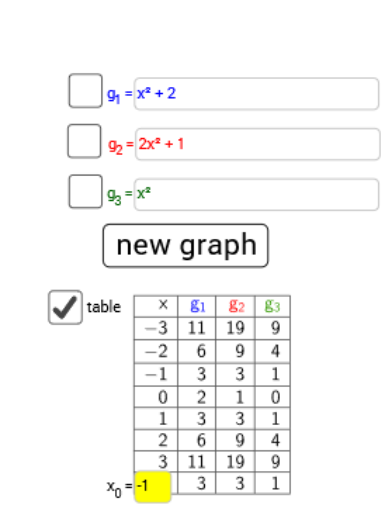
①本范例演示了函数图像、平面与条件概率的结合应用,同时涉及复数运算与线段绘制;②核心数学概念包括函数图象绘制、复数加法、条件概率计算、几何平面表示;③作图要点:使用 Random, RandomElement 生成随机数据,Textfield, TableText 显示文本,Point 绘制点,Button 触发事件,InputBox 输入参数,Locus 显示轨迹;④适合高中数学教学,用于函数、概率与复数综合应用教学。
GeoGebra 命令及参数
Random(-10, 10) → aRandom(-10, 10) → bRandomElement({-5, -4, -3, -2, -1, 1, 2, 3, 4, 5}) → cTextfield(h) → InputBox1RandomElement({-5, -4, -3, -2, -1, 1, 2, 3, 4, 5}) → a_1Random(-10, 10) → b_1RandomElement({-5, -4, -3, -2, -1, 1, 2, 3, 4, 5}) → c_1Random(-10, 10) → d_1Textfield(m) → InputBox2Textfield(g) → InputBox3Textfield(f) → InputBox4TableText({{A1_1, B_1, C_1, D_1}, {-3, g(-3), h(-3), f(-3)}, {-2, g(-2), h(-2), f(-2)}, {-1, g(-1), h(-1), f(-1)}, {0, g(0), h(0), f(0)}, {1, g(1), h(1), f(1)}, {2, g(2), h(2), f(2)}, {3, g(3), h(3), f(3)}, {1, e, l, k}}, "|_r") → text3_1Point(g_4) → A
AI 绘图提示语参考
画一个函数图像,包含随机生成的三个参数a、b、c,以及四个输入框h、m、g、f,展示函数g、h、f在不同点的值,并用表格呈现这些值。在坐标系中绘制点A,其坐标由函数g确定。
以上提示语为根据原始绘图命令整理而来,仅供参考。