
埃拉托色尼筛法的几何可视化:椭圆与数列交织筛选质数
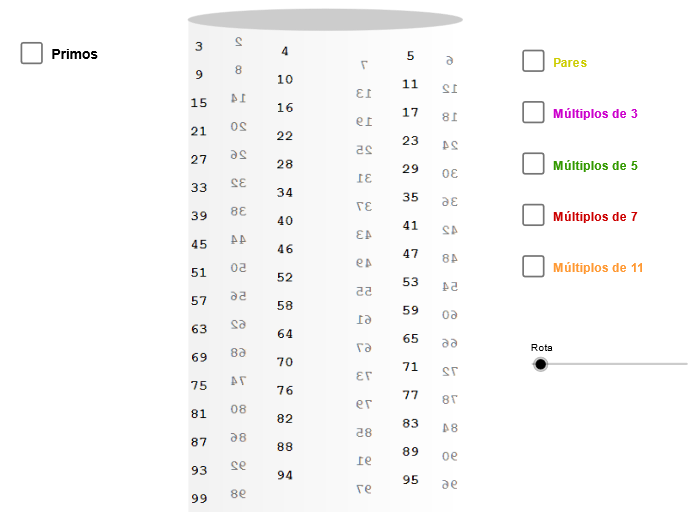
几何画板及绘图内容加载中,请稍等……
所属专题
geometriadinamica.es
本范例通过动态几何与数列构造,把“埃拉托色尼筛法”在几何/函数层面的筛选过程可视化。核心概念包括:质数筛选思想、数列(Sequence)生成、坐标几何表示点与曲线,以及用几何对象(如椭圆、旋转角与线段)关联到筛选结果。作图要点:使用 Ellipse 生成椭圆基准曲线,再用 Point 与 Element 搭建关键点集合;通过 Sequence 生成候选索引/参数序列(用于逐步标记与筛选);用 CurveCartesian 在笛卡尔坐标下绘制对应关系曲线;再用 Segment 连接与刻画相关结构;必要时引入 Angle/旋转量(如 zAngRot)与参数对象(如 p、h0、L、m2、m3、m5…)来驱动“筛”的几何位置更新,最终得到多个标记对象(如 primo 与各 picXX')来呈现被筛出的质数位置。适合中学高年级到大学通识的数学可视化、数论入门与 GeoGebra 几何建模教学,也适合作为学习“从算法到图形”的实验案例。
GeoGebra 命令及参数
Ellipse((-6.62, 5), (-5.38, 5), 0.65) → zElipse1Point(zElipse1) → XYCurveCartesian(((3 * cos(t)) * sin(zAngRot)) + ((3 * sin(t)) * cos(zAngRot)), (tan(p / 30) * t) + 5, t, (-34 * p), 0) → h0Sequence(h0(((-i) * p / 3)), i, 0, 98) → LSequence(Circle[h0(((-i) * p / 3)) + (0.19, 0.1), h0(((-i) * p / 3))], i, 0, 98) → L1Element(L1, 2) → p01Element(L1, 3) → p02Element(L1, 5) → p03Element(L1, 7) → p04Element(L1, 11) → p05Element(L1, 13) → p06Element(L1, 17) → p07Element(L1, 19) → p08Element(L1, 23) → p09Element(L1, 29) → p10Element(L1, 31) → p11Element(L1, 37) → p12Element(L1, 41) → p13Element(L1, 43) → p14Element(L1, 47) → p15Element(L1, 53) → p16Element(L1, 59) → p17Element(L1, 61) → p18Element(L1, 67) → p19Element(L1, 71) → p20Element(L1, 73) → p21Element(L1, 79) → p22Element(L1, 83) → p23Element(L1, 89) → p24Element(L1, 97) → p25Element(L1, 10) → m502Element(L1, 15) → m503Element(L1, 20) → m504Element(L1, 25) → m505Element(L1, 30) → m506Element(L1, 35) → m507Element(L1, 40) → m508Element(L1, 45) → m509Element(L1, 50) → m510Element(L1, 55) → m511Element(L1, 60) → m512Element(L1, 65) → m513Element(L1, 70) → m514Element(L1, 75) → m515Element(L1, 80) → m516Element(L1, 85) → m517Element(L1, 90) → m518Element(L1, 95) → m519Element(L1, 14) → m702Element(L1, 21) → m703Element(L1, 28) → m704Element(L1, 35) → m705Element(L1, 42) → m706Element(L1, 49) → m707Element(L1, 56) → m708Element(L1, 63) → m709Element(L1, 70) → m710Element(L1, 77) → m711Element(L1, 84) → m712Element(L1, 91) → m713Element(L1, 98) → m714Element(L1, 22) → m112Element(L1, 33) → m113Element(L1, 44) → m114Element(L1, 55) → m115Element(L1, 66) → m116Element(L1, 77) → m117Element(L1, 88) → m118Element(L1, 99) → m119Segment(h0(((-p)) / 3) + (0.2, -0.12), h0((-97 * p / 3)) + (0.2, -1)) → s2aSegment(h0((-p)) + (0.2, 0.1), h0((-93 * p / 3)) + (0.2, -1)) → s2bSegment(h0((-5 * p / 3)) + (0.15, 0.1), h0((-95 * p / 3)) + (0.15, -1)) → s2cSegment(h0((-2 * p / 3)) + (0.2, -0.12), h0((-98 * p / 3)) + (0.2, -1)) → s3aSegment(h0((-5 * p / 3)) + (0.2, 0.1), h0((-95 * p / 3)) + (0.2, -1)) → s3bCurveCartesian(0.2 + ((3 * cos(t + p)) * sin(zAngRot)) + ((3 * sin(t)) * cos(zAngRot)), (tan(27.7°) * t) + 10.7, t, (-11 * p), (-11 * p / 3) - 0.1) → h5CurveCartesian(0.2 + ((3 * cos(t)) * sin(zAngRot)) + ((3 * sin(t)) * cos(zAngRot)), (tan(36.4°) * t) + 13.7, t, (-17 * p / 2), (-4 * p) - 0.1) → h7CurveCartesian(0.2 + ((3 * cos(t + p)) * sin(zAngRot)) + ((3 * sin(t)) * cos(zAngRot)), (tan(49°) * t) + 17.2, t, (-33 * p / 5), (-11 * p / 3) - 0.1) → h11Ellipse((-3, 5.5), (3.4, 5.5), 3.21) → base
AI 绘图提示语参考
在笛卡尔坐标系中绘制一个椭圆作为基准,然后基于一个旋转角度参数和多个序列参数,生成一系列圆,这些圆的中心位于椭圆上,并随着序列索引变化位置。用不同颜色或样式标记出序列中特定索引的圆(如第2、3、5、7、11、13、17、19、23、29、31、37、41、43、47、53、59、61、67、71、73、79、83、89、97索引的圆),并用线段连接这些特殊圆,展示质数筛选的过程,其中质数对应的圆用一种颜色或样式突出显示。
以上提示语为根据原始绘图命令整理而来,仅供参考。