
分数比较 by suresan c
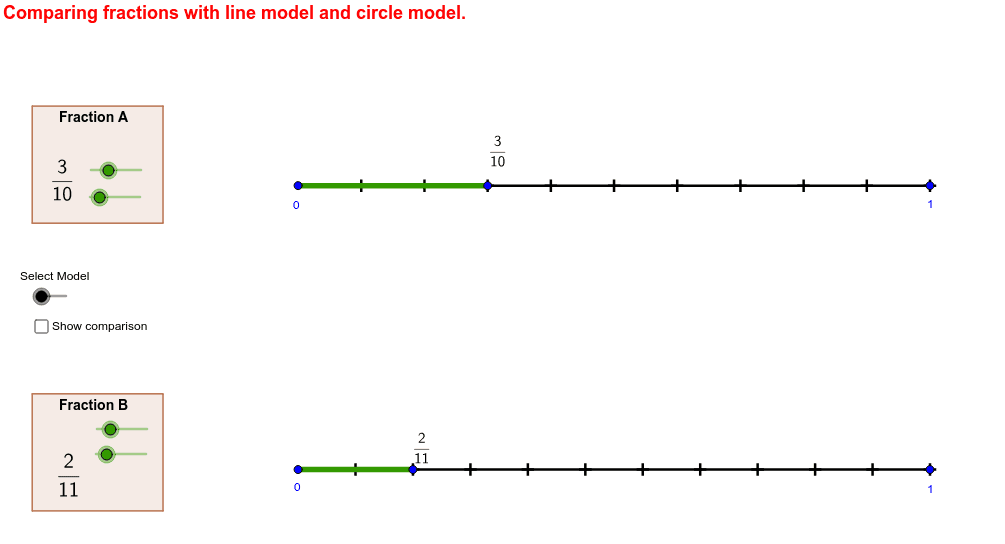
几何画板及绘图内容加载中,请稍等……
①本范例演示如何通过可视化方法比较两个分数的大小;②涉及的核心数学概念包括分数、分母、分子、几何表示、三角函数等;③作图要点——从下方『构造摘要』提炼用到了Segment(线段)、Sequence(序列)、Circle(圆)、Point(点)、Rotate(旋转)、CircleSector(扇形)、Polygon(多边形)等GeoGebra命令/对象;④适合初中及以上学生学习和理解分数比较的几何意义,也可用于数学教学演示。
GeoGebra 命令及参数
Segment(A, A + (unitsize1, 0)) → line1Segment(B, B + (unitsize2, 0)) → line2Sequence((x(A) + i * unitsize1 / denominator1, y(A)), i, 1, denominator1) → numdots1Sequence((x(B) + i * unitsize2 / denominator2, y(B)), i, 1, denominator2) → numdots2Segment(E, (x(E), y(E) - (y(A) - y(B)))) → showcomparison_1Segment(A, E) → showfrac1_1Segment(B, F) → showfrac2_1Circle(G, unitradius) → cPoint(c) → HSegment(G, H) → aRotate(G, 360 * ° / denominator1, G) → G'Sequence(Segment[Rotate[G, i * 360 * ° / denominator1, G], Rotate[H, i * 360 * ° / denominator1, G]], i, 1, denominator1) → denominatorwedges1Circle(I, unitradius) → dPoint(d) → JSegment(I, J) → bSequence(Segment[Rotate[I, i * 360 * ° / denominator2, I], Rotate[J, i * 360 * ° / denominator2, I]], i, 1, denominator2) → denominatorwedges2Rotate(H, numerator1 * 360 * ° / denominator1, G) → H'Rotate(J, numerator2 * 360 * ° / denominator2, I) → J'CircleSector(G, H, H') → numeratorwedge1CircleSector(I, J, J') → numeratorwedge2Polygon(K, (x(K), y(K) - boxheight), (x(K) + boxwidth, y(K) - boxheight), (x(K) + boxwidth, y(K))) → poly1, e, f, g, hPolygon(L, (x(L), y(L) - boxheight), (x(L) + boxwidth, y(L) - boxheight), (x(L) + boxwidth, y(L))) → poly2, l, i, j, k