
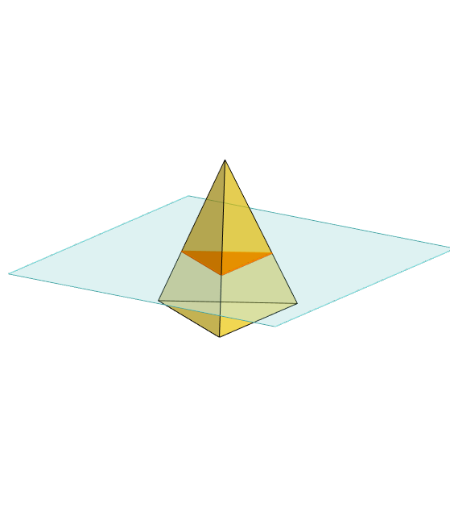
三角錐體的截面探究
几何画板及绘图内容加载中,请稍等……
所属专题
Area, Surface Area, Volume, Cross Section, 3D
3D Geometry & Cross Sections
Geometry - Areas and Volumes
Sections of 3D Shapes
Cross Sections
Cross sections
①本范例演示三角錐体在不同平面下的截面形状与性质;②涉及的核心数学概念包括立体几何、截面分析、多边形性质;③作图要点运用了Polygon(多边形)、PointIn(点在对象内判断)、Translate(平移)、Rotate(旋转)、Pyramid(锥体)、Plane(平面)、IntersectPath(路径相交)、OrthogonalLine(垂线);④适合高中立体几何教学与探究,帮助学生理解三维图形的截面关系。
GeoGebra 命令及参数
Polygon(B + (-2, -2), B + (2, -2), B + (2, 2), B + (-2, 2)) → poly3, e, f, g, iPointIn(poly3) → CTranslate((0, 0, 0), Vector[B, C]) → APolygon(A + (-4, -4), A + (4, -4), A + (4, 4), A + (-4, 4)) → poly1, a, b, c, dRotate(Rotate[Translate[poly1, Vector[A, A + (0, 0, h)]], (90° * s), A + (0, 0, h), yAxis], (90° * t), A, zAxis) → poly2Pyramid(Polygon[(-2, 0, 0), Rotate[(-2, 0, 0), 120°, zAxis], Rotate[(-2, 0, 0), (-(120°)), zAxis]], (0, 0, 4)) → m, face1, face2, face3, edge1, edge2, edge3Rotate(D, 120°, (0, 0, 0)) → EPolygon(D, E, 3, xOyPlane) → poly4, j, k, l, FPointIn(poly2) → GPointIn(poly2) → HPointIn(poly2) → IPlane(G, I, H) → nIntersectPath(n, m) → poly6, poly5, r, a_1, b_1, c_1, K, L_1, O, P, J, L, p, qRotate(m, 0, zAxis) → m'Rotate(m, 0, zAxis) → m'_1OrthogonalLine(A, n) → d_1
AI 绘图提示语参考
画一个三角锥,展示其不同平面截面的形状和性质。首先绘制一个底面为三角形的平面图形,然后在图形上随机选择一点,以此点为顶点构造一个三角锥。接着,在锥体下方绘制一个矩形,并将其旋转形成另一个锥体。最后,选择锥体上的三个点,通过这三个点确定一个平面,并展示该平面与三角锥的交线,同时绘制一条与交线平行的直线。
以上提示语为根据原始绘图命令整理而来,仅供参考。