
双反射平移镶嵌
几何画板及绘图内容加载中,请稍等……
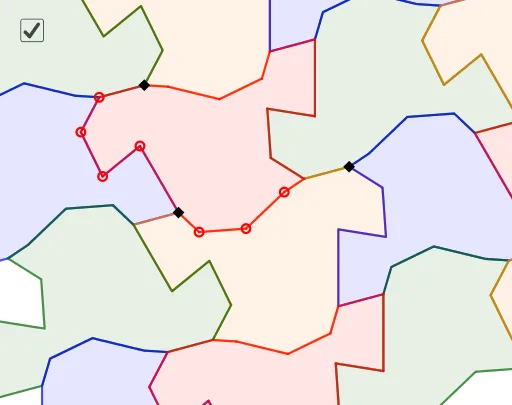
这是一个展示双反射平移镶嵌的范例。它涉及反射变换和平移变换的概念。通过使用GeoGebra中的Vector, Point, LineBisector, Line, Translate, Polygon等命令,可以构造出具有特定对称性的镶嵌图案。适合初中及以上学生学习几何变换和镶嵌图案。
GeoGebra 命令及参数
Vector(A, B) → uPoint(Ray[A, A - OrthogonalVector[u]]) → CVector(A, C) → vLineBisector(A, B) → fLineBisector(A, C) → gLine(B, f) → hPoint(h) → JTranslate(Mirror[J, f], v) → KTranslate(Mirror[D, f], v) → LTranslate(Mirror[E, f], v) → MTranslate(Mirror[F, f], v) → NTranslate(Mirror[A, f], v) → OVector(A, J) → wTranslate(Mirror[G, g], w) → PTranslate(Mirror[A, g], w) → QTranslate(Mirror[H, g], w) → RTranslate(Mirror[I, g], w) → SPolygon(B, J, L, M, N, O, Q, P, R, S, D, E, F, A, G, H, I, K) → poly1, i, s, t, a, b, c, d, e, f_1, g_1, j, k, l, m, n, p, q, rTranslate(Polygon[Mirror[B, g], Mirror[J, g], Mirror[D, g], Mirror[E, g], Mirror[F, g], Mirror[A, g], Mirror[G, g], Mirror[H, g], Mirror[I, g], Mirror[K, g], Mirror[L, g], Mirror[M, g], Mirror[N, g], Mirror[O, g], Mirror[Q, g], Mirror[P, g], Mirror[R, g], Mirror[S, g]], w) → poly2Translate(Polygon[Mirror[B, f], Mirror[J, f], Mirror[D, f], Mirror[E, f], Mirror[F, f], Mirror[A, f], Mirror[G, f], Mirror[H, f], Mirror[I, f], Mirror[K, f], Mirror[L, f], Mirror[M, f], Mirror[N, f], Mirror[O, f], Mirror[Q, f], Mirror[P, f], Mirror[R, f], Mirror[S, f]], v) → poly3Translate(Mirror[poly3, g], w) → poly4Translate(poly4, Vector[(2 * v)]) → poly4'Translate(poly3, Vector[(-2 * v)]) → poly3'Translate(poly2, Vector[(-2 * u)]) → poly2'Translate(poly4', Vector[(-2 * u)]) → poly4''Translate(poly4, Vector[(-2 * u)]) → poly4'_1Translate(poly3', Vector[(-2 * u)]) → poly3''Polygon(Translate[B, Vector[(-2 * u)]], Translate[J, Vector[(-2 * u)]], Translate[L, Vector[(-2 * u)]], Translate[M, Vector[(-2 * u)]], Translate[N, Vector[(-2 * u)]], Translate[O, Vector[(-2 * u)]], Translate[Q, Vector[(-2 * u)]], Translate[P, Vector[(-2 * u)]], Translate[R, Vector[(-2 * u)]], Translate[S, Vector[(-2 * u)]], Translate[D, Vector[(-2 * u)]], Translate[E, Vector[(-2 * u)]], Translate[F, Vector[(-2 * u)]], Translate[A, Vector[(-2 * u)]], Translate[G, Vector[(-2 * u)]], Translate[H, Vector[(-2 * u)]], Translate[I, Vector[(-2 * u)]], Translate[K, Vector[(-2 * u)]]) → poly5, h_1, r_1, s_1, t_1, a_1, b_1, c_1, d_1, e_1, f_2, i_1, j_1, k_1, l_1, m_1, n_1, p_1, q_1Translate(poly3'', Vector[(2 * v)]) → poly3'''Translate(poly5, Vector[(2 * v)]) → poly5'Translate(poly2', Vector[(2 * v)]) → poly2''Translate(poly2, Vector[(2 * v)]) → poly2'_1Translate(poly5', Vector[(2 * u)]) → poly5''
AI 绘图提示语参考
绘制一个由双重滑移反射生成的对称镶嵌图案。先确定两个不平行的向量,以它们为基准构造两个方向的平移。取一个基础多边形,将其关于一条中垂线镜像,再沿另一向量平移,形成第一组复制;再关于另一条中垂线镜像并沿第一向量平移,形成第二组复制。随后将这两组复制分别沿两个向量的正负方向多次平移,铺满平面,得到交错排列的规则多边形镶嵌,整体呈现周期性对称图案。
以上提示语为根据原始绘图命令整理而来,仅供参考。