
描述图形旋转
几何画板及绘图内容加载中,请稍等……
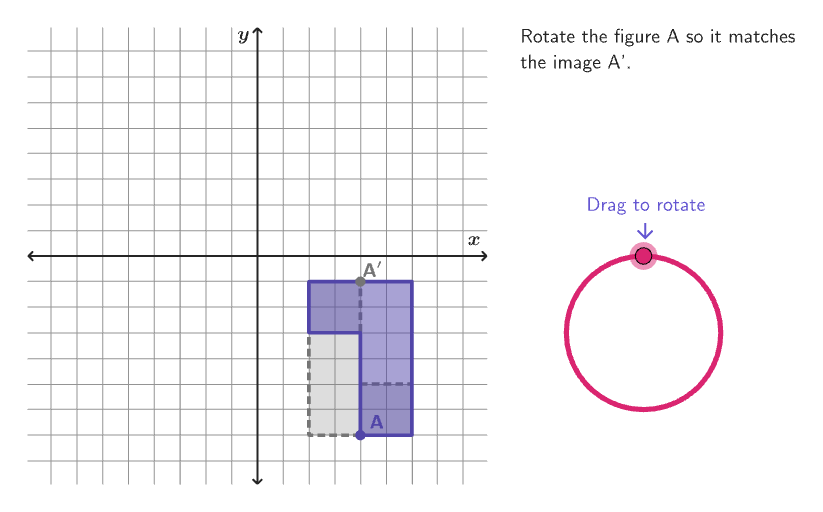
本范例通过旋转图形,学习如何描述变换。涉及的核心数学概念是刚性变换中的旋转。作图要点包括使用Sequence、Circle、Point、Angle、If、Shuffle、Element、Mod、Vector、Translate、KeepIf、Join、Rotate、Textfield、Polygon、Corner、Segment等GeoGebra命令。适合6-8年级学生学习解析几何中的图形变换。
GeoGebra 命令及参数
Sequence(Rotate[D, n°, B], n, 1, 360) → dialPointsCircle(B, 3) → dialPoint(dialPoints) → CAngle(D, B, C) → alphaIf(clockwise, 1, 2) → senseCaseShuffle(Sequence[100]) → randomList8, {72, 50, 38, 13, 2, 44, 99, 100, 75, 98, 71, 89, 87, 25, 37, 84, 58, 29, 11, 51, 7, 47, 8, 81, 65, 28, 54, 16, 26, 19, 90, 49, 68, 20, 76, 55, 27, 9, 61, 33, 91, 34, 53, 59, 17, 41, 62, 64, 57, 82, 86, 78, 32, 24, 1, 15, 3, 4, 79, 67, 22, 31, 93, 6, 83, 48, 56, 95, 60, 52, 14, 66, 10, 23, 63, 5, 21, 70, 12, 80, 74, 94, 42, 88, 36, 96, 73, 45, 69, 35, 85, 30, 39, 43, 40, 18, 92, 97, 77, 46}Shuffle(Sequence[15]) → randomList2, {2, 8, 11, 3, 6, 12, 10, 15, 1, 7, 4, 5, 9, 14, 13}Shuffle(Sequence[15]) → randomList6, {15, 12, 10, 7, 6, 14, 11, 9, 4, 8, 2, 3, 5, 1, 13}Element(randomList2, Mod[countQuestion, 15] + 1) → randomNum2Mod(Element[randomList6, Mod[countQuestion, 15] + 1], 4) → randomNum6Shuffle(Sequence[20]) → randomList1, {14, 3, 1, 9, 7, 4, 11, 12, 2, 6, 18, 8, 16, 10, 19, 5, 13, 20, 15, 17}Element(listCoordInitCenter, Mod[randomNum2, Length[listCoordInitCenter]] + 1) → xInitCenterShuffle(Sequence[15]) → randomList3, {5, 1, 10, 14, 6, 7, 15, 4, 8, 12, 3, 13, 11, 2, 9}Element(randomList3, Mod[countQuestion, 15] + 1) → randomNum3Element({pi / 2, pi, ((-pi)) / 2}, Mod[randomNum3, 3] + 1) → angleImgElement(listCoordInitCenter, Mod[randomNum3, Length[listCoordInitCenter]] + 1) → yInitCenterVector(CenterPoint, (xInitCenter, yInitCenter)) → vectorInitialTranslate(CenterPoint, vectorInitial) → CenterPointPreKeepIf(CenterOKNew[PP, angleImg, CenterPointPre, radiusFig], PP, Flatten[Zip[Zip[(j, k), j, listCoordInitCenter], k, listCoordInitCenter] \ {CenterPointPre}]) → listCentersImgCandidatesElement(listCentersImgCandidates, Mod[randomList8(1), Length[listCentersImgCandidates]] + 1) → RandomCenterJoin({{CenterPointPre, (0, 0)}, {RandomCenter}}) → listCentersImgRotate(Translate[listBasicVertices(randomNum1), vectorInitial], (90° * randomNum6), CenterPointPre) → verticesPreShuffle(Sequence[15]) → randomList5, {12, 6, 3, 13, 8, 9, 2, 1, 11, 14, 5, 10, 15, 7, 4}Element(randomList5, Mod[countQuestion, 15] + 1) → randomNum5Element(listCentersImg, Mod[randomNum5, 3] + 1) → CenterRotShuffle(Sequence[15]) → randomList4, {14, 9, 1, 10, 2, 5, 15, 11, 13, 3, 4, 6, 7, 12, 8}Element(randomList4, Mod[countQuestion, 15] + 1) → randomNum4Element(listCoordInitCenter \ Sequence[xInitCenter - 2, xInitCenter + 2], Mod[randomNum4, Length[listCoordInitCenter \ Sequence[xInitCenter - 2, xInitCenter + 2]]] + 1) → xInitCenterImgElement(listCoordInitCenter \ Sequence[yInitCenter - 2, yInitCenter + 2], Mod[randomNum5, Length[listCoordInitCenter \ Sequence[yInitCenter - 2, yInitCenter + 2]]] + 1) → yInitCenterImgShuffle(Sequence[15]) → randomList7, {14, 4, 7, 6, 13, 3, 2, 8, 12, 10, 15, 5, 11, 1, 9}Textfield(input1) → InputBox1Polygon(Zip[PixelsToPoint[Corner[1], Corner[3], Corner[5], A], A, {(pixelsLeft, pixelsTop), (pixelsLeft, y(Corner[5]) - pixelsBottom), Corner[5] - (pixelsRight, pixelsBottom), (x(Corner[5]) - pixelsRight, pixelsTop)}]) → borderBoxCorner(5) → layoutAppSizePolygon({(9, 9), (-9, 9), (-9, -9), (9, -9)}) → viewBoxSegment((-8.9, 0), (8.9, 0)) → axisXSegment((0, -8.9), (0, 8.9)) → axisYPolygon(verticesPre) → FigurePreRotate(verticesPre, angleImg, CenterRot) → verticesImgPolygon(verticesImg) → FigureImgRotate(verticesPre, (-input1), CenterRot) → verticesStPolygon(verticesSt) → FigureStElement({(("\color{" * colorPink) * "}clockwise"), (("\color{" * colorPurpleDark) * "}counterclockwise")}, senseCase) → senseonboardingTextOffset(Corner[onboardingText, 1], Corner[onboardingText, 3], onboardingCase, Corner[1], Corner[3], Corner[5]) → OnboardingTextOffsetcirclePixels(D, 10 + (7 * pulsing), Corner[1], Corner[3], Corner[5]) → pulsingObject
AI 绘图提示语参考
在坐标平面上画出一个以圆心为中心的旋转情境图:先给定一个旋转中心点,并画一条经过原点的水平与竖直坐标轴。以该旋转中心为基准构造一个半径为3的圆,用于标识与旋转角相关的圆形参考。再生成一组多边形顶点形成初始图形(多边形保持刚体),随后围绕旋转中心按随机选择的角度(从90°、180°、-90°中取值)旋转得到旋转后的图形。用角度弧与角度标记表示以两条射线(来自同一圆心方向)构成的旋转角,并用文字指示顺时针或逆时针的旋转方向。
以上提示语为根据原始绘图命令整理而来,仅供参考。