
十二面体展开图 by Anthony OR 柯志明
几何画板及绘图内容加载中,请稍等……
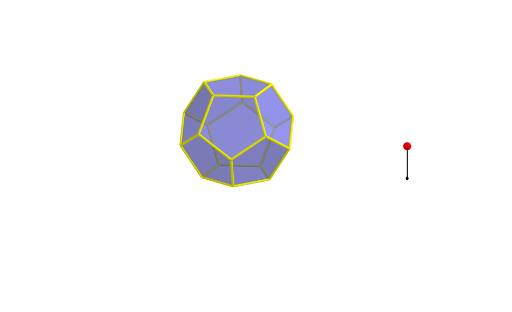
①本范例演示十二面体的展开图及其构造过程;②涉及的核心数学概念包括多边形、立体几何、向量与变换;③作图要点:使用Point、Dodecahedron、Segment、Rotate、Circle、Center、OrthogonalLine、Polygon、TableText等GeoGebra命令绘制点、线、面,并通过旋转、正交线等操作构建展开图;④适合高中及以上学生及数学爱好者学习立体几何与几何作图。
GeoGebra 命令及参数
Point(Circle[(((1 - sqrt(5)) * A) + ((3 + sqrt(5)) * B)) / 4, (Distance[A, B] * sqrt(10 + (2 * sqrt(5))) / 4), Segment[A, B]]) → CDodecahedron(A, B, C) → a, D, M, N, O, P, Q, R, S, T, faceABCDE, faceAEIOJ, E, faceABFKJ, faceBCGLF, faceCDHMG, faceDEINH, faceINSTO, faceJKPTO, faceFKPQL, faceGLQRM, faceHMRSN, facePQRST, F, edgeAE, edgeAB, edgeBC, edgeCD, edgeDE, edgeAJ, edgeEI, edgeIO, edgeJO, edgeJK, G, edgeFK, edgeBF, edgeFL, edgeGL, edgeCG, edgeGM, edgeHM, edgeDH, edgeHN, edgeIN, H, edgeNS, edgeST, edgeOT, edgePT, edgeKP, edgePQ, edgeLQ, edgeQR, edgeMR, edgeRS, I, J, K, LSegment(U, U + (0, 0, 2)) → bPoint(b) → VRotate(Polygon[A, B, F, K, J], (α * t), Segment[A, B]) → poly1Rotate(Polygon[F, K, P, Q, L], (α * t), Segment[K, F]) → poly2Rotate(Polygon[P, Q, R, S, T], (α * t), Segment[P, Q]) → poly3Rotate(poly2, (α * t), Segment[A, B]) → poly2'Rotate(poly3, (α * t), Segment[K, F]) → poly3'Rotate(poly3', (α * t), Segment[A, B]) → poly3''Circle(A, B, D) → cCenter(c) → WOrthogonalLine(W, Plane[A, B, D]) → dRotate(poly1, 72°, d) → poly1'Rotate(poly1', 72°, d) → poly1''Rotate(poly1'', 72°, d) → poly1'''Rotate(poly1''', 72°, d) → poly4Rotate(poly2', 72°, d) → poly2''Rotate(poly2'', 72°, d) → poly2'''Rotate(poly2''', 72°, d) → poly5Rotate(poly5, 72°, d) → poly5'Polygon(A, B, C, D, E) → poly6, a_1, b_1, c_1, d_1, eTableText({{LaTeX[A, true, true]}, {LaTeX[B, true, true]}, {LaTeX[C, true, true]}, {LaTeX[D, true, true]}, {LaTeX[E, true, true]}, {LaTeX[F, true, true]}, {LaTeX[G, true, true]}, {LaTeX[H, true, true]}, {LaTeX[I, true, true]}, {LaTeX[J, true, true]}, {LaTeX[K, true, true]}, {LaTeX[L, true, true]}, {LaTeX[M, true, true]}, {LaTeX[N, true, true]}, {LaTeX[O, true, true]}, {LaTeX[P, true, true]}, {LaTeX[Q, true, true]}, {LaTeX[R, true, true]}, {LaTeX[S, true, true]}, {LaTeX[T, true, true]}, {LaTeX[U, true, true]}, {LaTeX[V, true, true]}, {LaTeX[W, true, true]}}) → text1Rotate(poly2''', 72°, d) → poly7Rotate(poly1'', 72°, d) → poly1'''_1Polygon(A, B, C, D, E) → poly8, a_2, b_2, c_2, d_2, e_1Rotate(poly1''', 72°, d) → poly9Rotate(poly5, 72°, d) → poly5'_1Rotate(Polygon[A, B, F, K, J], (α * t), Segment[A, B]) → poly10Rotate(poly2, (α * t), Segment[A, B]) → poly2'_1Rotate(poly3', (α * t), Segment[A, B]) → poly3''_1Rotate(poly1, 72°, d) → poly1'_1Rotate(poly2', 72°, d) → poly2''_1Rotate(poly1', 72°, d) → poly1''_1Rotate(poly2'', 72°, d) → poly2'''_1
AI 绘图提示语参考
绘制一个十二面体的展开图,展示其构造过程。首先画出十二个正五边形,然后通过旋转和连接这些五边形,形成一个立体的十二面体。在绘制过程中,注意使用旋转和正交线来确保形状的准确性,并标注关键点和边,最终呈现出一个清晰、可理解的十二面体展开图。
以上提示语为根据原始绘图命令整理而来,仅供参考。