
自制圣诞树
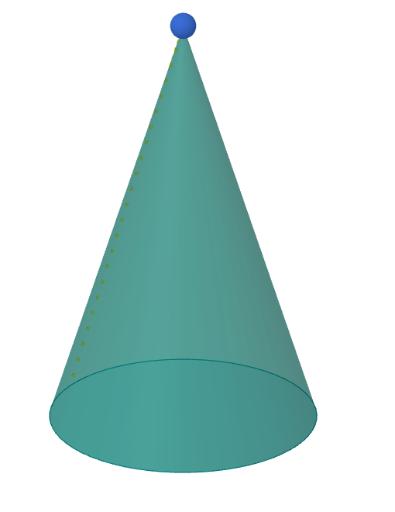
几何画板及绘图内容加载中,请稍等……
①本范例演示如何利用参数方程和三维图形构造一个圣诞树形状;②涉及的核心数学概念包括参数曲线、立体几何、平移变换、三角形和向量运算;③作图要点——从下方『构造摘要』提炼用到了Point(点)、Circle(圆)、Vector(向量)、Cone(圆锥)、CurveCartesian(笛卡尔曲线)、Sequence(数列)、Sphere(球体)等GeoGebra命令/对象;④适合高中及以上学生学习和探索空间几何与参数方程的应用。
GeoGebra 命令及参数
Point(zAxis) → VPoint(Circle[O, r, Line[V, O]]) → CCircle(O, r, Line[V, O]) → dVector(O, C) → wCone(O, V, r) → tree, c, eCurveCartesian(x(V + (h * (O - V + (cos((30 * h)) * v) + (sin((30 * h)) * w)))), y(V + (h * (O - V + (cos((30 * h)) * v) + (sin((30 * h)) * w)))), z(V + (h * (O - V + (cos((30 * h)) * v) + (sin((30 * h)) * w)))), h, 0, draw) → aSequence(Circle[V + (h * Vector[V, O]), (r * h), Line[V, O]], h, 0, orCin, 0.1) → cinOrSequence(Segment[V, O + (cos(k) * v) + (sin(k) * w)], k, 0, verCin, pi / 12) → cinVertPoint(cinOr) → P1Point(cinOr) → P2Point(cinOr) → P3Point(cinOr) → P4Point(cinOr) → P5Point(cinOr) → P6Point(cinOr) → P7Point(cinOr) → P8Point(cinOr) → P9Point(cinVert) → P10Point(cinVert) → P11Point(cinVert) → P12Point(cinVert) → P13Point(cinVert) → P14Point(cinVert) → P15Point(cinVert) → P16Point(cinVert) → P17Sphere(P8, light) → bSphere(P1, light) → fSphere(P2, light) → gSphere(P3, light) → hSphere(P4, light) → iSphere(P5, light) → jSphere(P6, light) → kSphere(P7, light) → lSphere(P8, light) → mSphere(P9, light) → nSphere(P10, light) → oSphere(P11, light) → pSphere(P12, light) → qSphere(P13, light) → sSphere(P14, light) → tSphere(P15, light) → a_1Sphere(P16, light) → b_1Sphere(P17, light) → c_1
AI 绘图提示语参考
请绘制一个3D圣诞树形状:在三维空间建立一根竖直轴方向,并从该轴上选取基准圆与半径,形成以圆心为起点的向量与方向。用一个圆锥体叠加生成树干/树体,再沿高度参数画出具有周期侧向摆动的空间曲线(呈螺旋样式),曲线围绕轴线变化并连接到圆锥形轮廓。最后在曲线所对应的离散高度位置上放置多组小球作为“彩球/灯饰”,每个球相对固定在螺旋与竖直框架的交会点处,整体呈现从下到上逐渐延展的树形装饰。
以上提示语为根据原始绘图命令整理而来,仅供参考。