
骰子投掷模拟
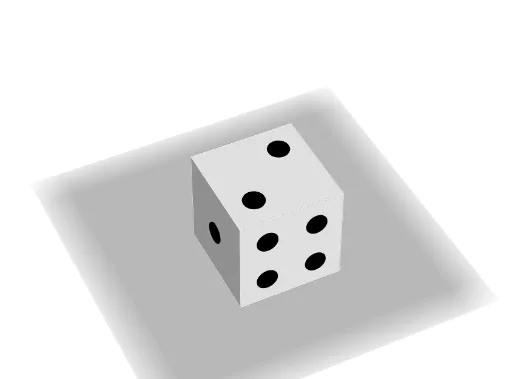
几何画板及绘图内容加载中,请稍等……
①本范例演示了六面骰子的投掷过程及其概率分布;②涉及的核心数学概念包括概率统计、几何变换和立体几何;③作图要点——从下方『构造摘要』提炼用到了Point(点)、Cube(立方体)、Circle(圆)、Line(直线)、Rotate(旋转)等GeoGebra命令和对象;④适合高中阶段学生学习概率统计与立体几何知识,也可用于数学建模教学。
GeoGebra 命令及参数
Point(Circle[(0, 0, 1), Distance[(0, 0, 0), (0, 0, 1)], Segment[(0, 0, 0), (0, 0, 1)]]) → ACube((0, 0, 0), (0, 0, 1), A) → a, B, faceABFE, faceCDEF, edge2, edge1, edge4, edgeAB, edge3, edgeBF, edgeCF, edgeCD, C, edge5, edgeDE, edgeAE, edgeEF, D, E, F, face1, face3, face2, face4Circle((0.5, -0.01, 0.5), p, yAxis) → cCircle((1.01, 0.5 + s, 0.5 - s), p, xAxis) → c_1Circle((1.01, 0.5 - s, 0.5 - s), p, xAxis) → d_1Circle((d, 1.01, 3 / 6), p, yAxis) → eCircle((1.01, 0.5 - s, 0.5 + s), p, xAxis) → e_1Circle((d, 1.01, 0.5 - s), p, yAxis) → fCircle((-0.01, 0.5 - s, 0.5 + s), p, xAxis) → f_1Circle((d, 1.01, 0.5 + s), p, yAxis) → gCircle((-0.01, 0.5 + s, 0.5 - s), p, xAxis) → g_1Circle((1 - d, 1.01, 0.5), p, yAxis) → hCircle((1 - d, 1.01, 0.5 + s), p, yAxis) → kCircle((0.5 + s, 0.5 + s, -0.01), p, zAxis) → k_1Circle((0.5 - s, 0.5 - s, -0.01), p, zAxis) → p_1Circle((1 - d, 1.01, 0.5 - s), p, yAxis) → qCircle((0.5 - s, 0.5 - s, 1.01), p, zAxis) → q_1Circle((1.01, 0.5, 0.5), p, xAxis) → rCircle((0.5 - s, 0.5 + s, 1.01), p, zAxis) → r_1Circle((0.5 + s, 0.5 + s, 1.01), p, zAxis) → s_1Circle((1.01, 0.5 + s, 0.5 + s), p, xAxis) → tCircle((0.5 + s, 0.5 - s, 1.01), p, zAxis) → t_1Circle((0.5, 0.5, -0.01), p, zAxis) → h_1Line(M, yAxis) → iLine(M, xAxis) → jLine(M, zAxis) → lRotate(Rotate[Rotate[a, α, i], β, j], γ, l) → bRotate(Rotate[Rotate[c, α, i], β, j], γ, l) → c_2Rotate(Rotate[Rotate[c_1, α, i], β, j], γ, l) → d_2Rotate(Rotate[Rotate[d_1, α, i], β, j], γ, l) → e_2Rotate(Rotate[Rotate[e, α, i], β, j], γ, l) → f_2Rotate(Rotate[Rotate[e_1, α, i], β, j], γ, l) → g_2Rotate(Rotate[Rotate[f, α, i], β, j], γ, l) → h_2Rotate(Rotate[Rotate[f_1, α, i], β, j], γ, l) → k_2Rotate(Rotate[Rotate[g, α, i], β, j], γ, l) → p_2Rotate(Rotate[Rotate[g_1, α, i], β, j], γ, l) → q_2Rotate(Rotate[Rotate[h, α, i], β, j], γ, l) → r_2Rotate(Rotate[Rotate[h_1, α, i], β, j], γ, l) → s_2Rotate(Rotate[Rotate[k, α, i], β, j], γ, l) → t_2Rotate(Rotate[Rotate[k_1, α, i], β, j], γ, l) → c_3Rotate(Rotate[Rotate[p_1, α, i], β, j], γ, l) → d_3Rotate(Rotate[Rotate[q, α, i], β, j], γ, l) → e_3Rotate(Rotate[Rotate[q_1, α, i], β, j], γ, l) → f_3Rotate(Rotate[Rotate[r, α, i], β, j], γ, l) → g_3Rotate(Rotate[Rotate[r_1, α, i], β, j], γ, l) → h_3Rotate(Rotate[Rotate[s_1, α, i], β, j], γ, l) → k_3Rotate(Rotate[Rotate[t, α, i], β, j], γ, l) → p_3Rotate(Rotate[Rotate[t_1, α, i], β, j], γ, l) → q_3