
COSMOS谜题 - 四方块
几何画板及绘图内容加载中,请稍等……
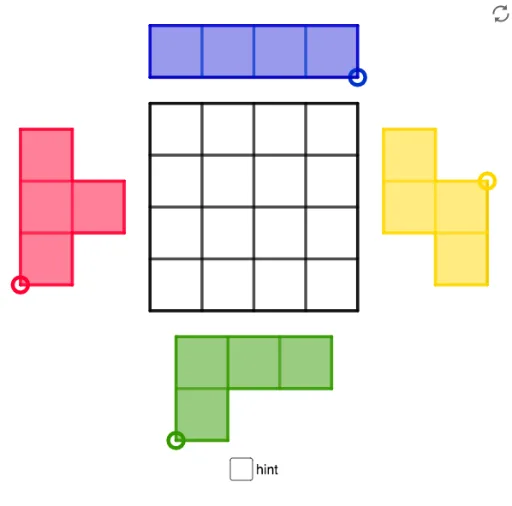
该范例演示了COSMOS谜题中的四方块拼图。涉及的核心数学概念包括几何构造和图形变换。通过使用GeoGebra命令如Intersect、Polygon、Midpoint等,可以构建四方块并进行拼接。适合初中及以上学生或教师用于几何教学和学习。
GeoGebra 命令及参数
Intersect(xAxis, yAxis) → APolygon(A, B, 4) → poly1, f, g, h, i, C, DMidpoint(D, A) → EMidpoint(A, B) → FMidpoint(B, C) → GMidpoint(C, D) → HMidpoint(H, D) → IMidpoint(D, E) → JMidpoint(E, A) → KMidpoint(A, F) → LMidpoint(F, B) → MMidpoint(B, G) → NMidpoint(G, C) → OMidpoint(C, H) → PSegment(I, L) → jSegment(H, F) → kSegment(P, M) → lSegment(J, O) → mSegment(E, G) → nSegment(K, N) → pPolygon(A, L, 4) → poly2, q, r, s, t, Q, RPolygon(F, M, 4) → poly3, a, b, c, d, S, TPolygon(Q, T, 4) → poly4, e, f_1, g_1, h_1, U, VPolygon(E, V, 4) → poly5, i_1, j_1, k_1, l_1, W, ZPolygon(I, W, 4) → poly6, m_1, n_1, p_1, q_1, A_1, B_1Polygon(A_1, U, 4) → poly7, r_1, s_1, t_1, a_1, C_1, D_1Polygon(C_1, S, 4) → poly8, b_1, c_1, d_1, e_1, E_1, F_1Polygon(P, D_1, 4) → poly9, f_2, g_2, h_2, i_2, G_1, H_1Point(Circle[I_1, 2]) → J_1Segment(I_1, J_1) → j_2Midpoint(j_2) → K_1Polygon(I_1, K_1, 4) → whiteS2, k_2, l_2, m_2, n_2, L_1, M_1Polygon(K_1, J_1, 4) → poly11, p_2, q_2, r_2, s_2, N_1, O_1Polygon(L_1, N_1, 4) → whiteS1, t_2, a_2, b_2, c_2, P_1, Q_1Polygon(P_1, N_1, 4) → poly13, d_2, e_2, f_3, g_3, R_1, S_1Polygon(I_1, J_1, N_1, R_1, S_1, Q_1, L_1, M_1) → Sborder_0, i_3, j_3, n_3, r_3, s_3, q_3, l_3, m_3Polygon(M_1, I_1, J_1, N_1, R_1, S_1, Q_1, L_1) → Sborder_2, m_4, i_4, j_4, n_4, r_4, s_4, q_4, l_4Segment(L_1, K_1) → h_3Segment(P_1, N_1) → k_3Segment(L_1, N_1) → p_3Point(Circle[T_1, 2]) → U_1Segment(T_1, U_1) → t_3Midpoint(t_3) → V_1Polygon(T_1, V_1, 4) → poly10, a_3, b_3, c_3, d_3, W_1, Z_1Polygon(V_1, U_1, 4) → whiteL1, e_3, f_4, g_4, h_4, A_2, B_2Polygon(Z_1, W_1, 4) → whiteL2, k_4, p_4, t_4, a_4, C_2, D_2Polygon(D_2, C_2, 4) → poly15, b_4, c_4, d_4, e_4, E_2, F_2Polygon(F_2, T_1, U_1, A_2, W_1, E_2) → Lborder_0, f_5, t_5, u_1, a_5, w_1, e_5Segment(D_2, C_2) → g_5Segment(Z_1, W_1) → h_5Segment(W_1, V_1) → i_5Polygon(F_2, T_1, U_1, A_2, W_1, E_2) → Lborder_2, f_6, t_6, u_2, a_6, w_2, e_6Point(Circle[G_2, 3]) → H_2Segment(G_2, H_2) → j_5Circle(G_2, 1) → c_5Circle(H_2, 1) → d_5Intersect(c_5, j_5, 1) → I_2Intersect(d_5, j_5, 1) → J_2Polygon(G_2, I_2, 4) → poly14, k_5, l_5, m_5, n_5, K_2, L_2Polygon(I_2, J_2, 4) → whiteT1, p_5, q_5, r_5, s_5, M_2, N_2Polygon(J_2, H_2, 4) → poly17, b_5, g_6, h_6, i_6, O_2, P_2Polygon(K_2, M_2, 4) → poly18, j_6, k_6, l_6, m_6, Q_2, R_2Polygon(G_2, H_2, O_2, M_2, Q_2, R_2, K_2, L_2) → Tborder_0, g_7, h_7, o_2, m_7, q_6, r_6, k_7, l_7Segment(K_2, I_2) → n_6Segment(K_2, M_2) → p_6Segment(M_2, J_2) → s_6Polygon(G_2, H_2, O_2, M_2, Q_2, R_2, K_2, L_2) → Tborder_2, g_8, h_8, o_1, m_8, q_7, r_7, k_8, l_8Point(Circle[S_2, 4]) → T_2Segment(S_2, T_2) → b_6Midpoint(b_6) → U_2Midpoint(S_2, U_2) → V_2Midpoint(U_2, T_2) → W_2Polygon(S_2, V_2, 4) → whiteI1, c_6, d_6, f_7, i_7, Z_2, A_3Polygon(V_2, U_2, 4) → poly19, j_7, n_7, p_7, s_7, B_3, C_3Polygon(U_2, W_2, 4) → whiteI2, t_7, a_7, b_7, c_7, D_3, E_3Polygon(W_2, T_2, 4) → Iborder_1, d_7, e_7, f_8, i_8, F_3, G_3Polygon(A_3, S_2, T_2, F_3) → Iborder_0, a_8, s_8, t_8, f_9Segment(Z_2, V_2) → j_8Segment(B_3, U_2) → n_8Segment(D_3, W_2) → p_8Polygon(A_3, S_2, T_2, F_3) → Iborder_2, a_9, s_9, t_9, f_{10}