
圆锥截面与圆锥曲线元素
几何画板及绘图内容加载中,请稍等……
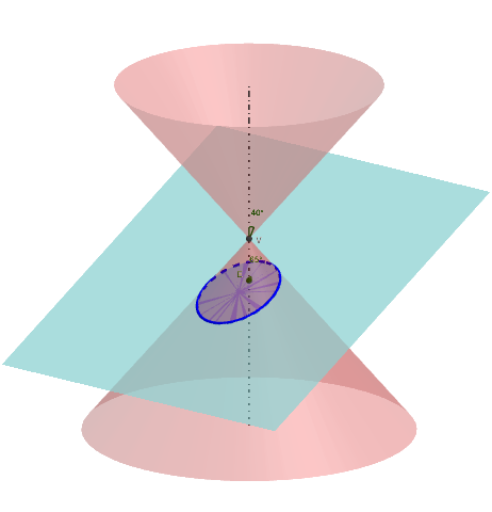
①本范例演示圆锥截面与圆锥曲线(椭圆、双曲线、抛物线)的形成及其元素;②涉及核心数学概念包括圆锥截面、椭圆、双曲线、抛物线、几何作图、解析几何;③构造要点:使用Intersect(相交)、Point(点)、Line(直线)、InfiniteCone(圆锥)、Plane(平面)、Rotate(旋转)、Angle(角度)、IntersectPath(路径相交)、Midpoint(中点)、OrthogonalLine(垂线)、AngularBisector(角平分线)、Circle(圆)、Sphere(球)、Mirror(镜像)、Segment(线段)、Ray(射线)、Tangent(切线)、CircumcircleArc(外接圆弧)、LineBisector(线段平分线)、Locus(轨迹)、Textfield(文本框)、PointIn(点在对象内)等命令和对象;④适合高中数学教学与学习圆锥曲线性质与作图方法。
GeoGebra 命令及参数
Intersect(yAxis, xAxis) → VPoint(zAxis) → BLine(V, B) → aInfiniteCone(V, B, g) → conePoint(a) → HPlane(Q_1, a) → bRotate(B, p, V, b) → B'Angle(B, V, B', b) → αLine(V, B') → cLine(Q_1, c) → dIntersectPath(b, cone) → eIntersect(a, d) → ARotate(Q_1, (-p), A, b) → P'Angle(P', A, Q_1, b) → βRotate(B, g, V, b) → B'_1Angle(B, V, B'_1, b) → γIntersect(d, e) → V_1, V_2Midpoint(V_2, V_1) → COrthogonalLine(C, b) → fAngularBisector(V, V_1, A) → iOrthogonalLine(Q_1, e) → hPlane(d, h) → jIntersectPath(j, cone) → kOrthogonalLine(V_1, i, b) → lIntersect(a, i) → E2Intersect(l, a) → E1Line(V, V_1) → mIntersect(f, k) → V_3, V_4Intersect(d, a) → ELine(V, V_1) → b_1AngularBisector(d, m) → n, qIntersect(a, n) → E_1Intersect(a, q) → E_2OrthogonalLine(E_1, m, b) → rOrthogonalLine(E_2, m, b) → sIntersect(m, r) → DIntersect(m, s) → FCircle(a, D) → e_1Circle(a, F) → e_2Sphere(E_1, D) → oSphere(E_2, F) → uMirror(D, a) → D'Mirror(F, a) → F'Plane(e_1) → vPlane(e_2) → wIntersectPath(j, v) → d_1IntersectPath(j, w) → d_2OrthogonalLine(E_1, d, b) → k_1OrthogonalLine(E_2, d, b) → l_1Intersect(d, k_1) → F_1Intersect(d, l_1) → F_2Segment(V_3, V_4) → n_1Ray(V_1, F_1) → p_1Ray(V_2, F_2) → q_1Intersect(d, d_1) → GSegment(V_2, V_1) → m_1Tangent(V_1, k) → t_1, i_2Tangent(V_2, k) → j_2, t_7Tangent(V_3, k) → k_2, t_8Tangent(V_4, k) → l_2, t_9Circle(C, F_1, j) → p_2Circle(C, F_2, j) → c_3Intersect(t_7, c_3, 2) → ILine(C, I) → i_1Intersect(t_1, c_3, 1) → JLine(C, J) → t_{10}Point(t_{10}) → KPoint(i_1) → LCircle(F_2, Segment[V_1, V_2], j) → c_2Intersect(c_2, k) → O, Z, G_1, J_1Intersect(d, c_2, 1) → TIntersect(d, c_2, 2) → UOrthogonalLine(F_1, d, j) → t_6Intersect(t_6, c_2, 2) → MIntersect(t_6, c_2, 1) → NCircumcircleArc(M, T, N) → e_4CircumcircleArc(M, U, N) → f_2CircumcircleArc(M, T, N) → g_2Point(f_2) → P_1Point(g_2) → RLine(P_1, F_2) → b_2LineBisector(P_1, F_1, j) → h_2Intersect(b_2, h_2) → SLocus(S, P_1) → loc1Line(F_2, R) → m_2LineBisector(F_1, R, j) → n_2Intersect(m_2, n_2) → WLocus(W, R) → loc2Circle(F_1, Radius[c_2], j) → c_1Point(k) → PSegment(P, F_1) → r1OrthogonalLine(P, d_1, j) → s_2Intersect(d_1, s_2) → A_1Segment(P, A_1) → Pd_1Textfield(Q_1) → ct1Line(V, P) → b_3Circle(E, Q_1, b) → g_3Point(g_3) → B_1Rotate(Q_1, (-p), E, b) → Q'Angle(Q', E, Q_1, b) → δPoint(a) → C_1Circle(V, C_1, b) → h_3Rotate(C_1, g, V, b) → D_1Angle(C_1, V, D_1, b) → εPlane(V, j) → j_3IntersectPath(j_3, cone) → k_3Intersect(d, f) → C_ePointIn(j) → QLine(Q, f) → a_1Line(Q, d) → f_1Segment(F_1, P) → r_1Segment(P, F_2) → r_2Line(F_2, P) → d_3Point(d_3) → H_1Point(d_3) → I_1Ray(F_2, H_1) → n_3Ray(P, I_1) → m_3Tangent(P, k) → p_3, tPlane(V, E, V_1) → w_3IntersectPath(w_3, j) → f_4OrthogonalLine(P, w_3) → g_4Intersect(f_4, g_4) → K_1Line(V, K_1) → h_4IntersectPath(w_3, j_3) → i_4IntersectPath(w_3, v) → j_4IntersectPath(w_3, w) → k_4Circle(E1, F, w_3) → c_4Circle(E2, D, w_3) → d_4Line(V_2, t_1) → t_2Tangent(P, k) → l_4,Midpoint(F_1, F_2) → C_2Mirror(C_e, t_{10}) → L_1Mirror(t_{10}, d) → t_{11}OrthogonalLine(V_3, t_1, j) → t_3OrthogonalLine(V_4, t_1, j) → t_4Line(V, V_4) → j_1Line(V, V_3) → m_4Line(V, V_2) → n_4Line(V, V_1) → p_4Line(V, d) → q_4Line(V, t_{11}) → a_4Line(V, t_{10}) → b_4
AI 绘图提示语参考
画一个展示圆锥截面形成的图形,包含椭圆、双曲线和抛物线。首先画出坐标轴的交点和一条直线,以此为基础构造一个无限圆锥。然后通过旋转和相交操作,得到圆锥与平面的交线,并标记关键点。接着,利用中点、垂线、角平分线等几何工具,绘制截面上的焦点、顶点、切线等元素,并画出辅助圆和球体。最后,通过镜像操作得到对称图形,完成整个圆锥截面元素的展示。
以上提示语为根据原始绘图命令整理而来,仅供参考。