
刚体变换下的图形全等 by Hannah
几何画板及绘图内容加载中,请稍等……
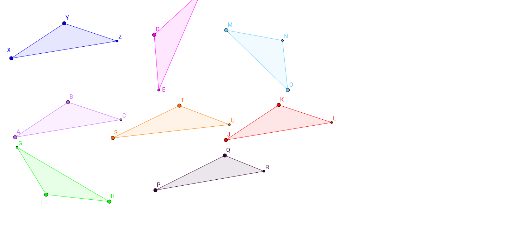
本范例演示了通过刚体变换(平移、旋转、镜像)实现图形全等的过程。核心数学概念包括全等性、几何变换、向量、线段和复杂数。作图要点运用了Point、Polygon、Intersect、Line、Mirror、Rotate、Vector、Translate等GeoGebra命令与对象。适合高中阶段学习几何变换与全等性的学生使用。
GeoGebra 命令及参数
Point(Circle[A, 3.605551275463989]) → BPolygon(A, B, C_1) → poly1, c, a, bPoint(Circle[X, 3.605551275463989]) → YPolygon(X, Y, F_1) → poly2, f, d, eIntersect(a, b) → CIntersect(d, e) → ZLine(G_1, I_1) → gMirror(A, g) → FMirror(B, g) → DMirror(C_1, g) → J_1Polygon(F, D, J_1) → poly1', j, a', b'Intersect(a', b') → ERotate(A, 140°, K_1) → HRotate(B, 140°, K_1) → IRotate(C_1, 140°, K_1) → L_1Polygon(H, I, L_1) → poly1'_1, l, a'_1, b'_1Intersect(a'_1, b'_1) → GVector(J_2, M_1) → uTranslate(A, u) → JTranslate(B, u) → KTranslate(C_1, u) → N_1Polygon(J, K, N_1) → poly1'_2, n, a'_2, b'_2Intersect(a'_2, b'_2) → LPoint(Circle[P, 4.40953512288994]) → QPolygon(P, Q, Q_1) → poly3, q, o, pPoint(Circle[M, 4.88069667158286]) → OPolygon(M, O, T_1) → poly4, t, r, sPoint(Circle[S, 4.204045670541651]) → TPolygon(S, T, W) → poly5, w, u_1, vIntersect(u_1, v) → UIntersect(o, p) → RIntersect(r, s) → N