
Zindler Curve
Loading the math board and drawing, please wait…
In collections
geometriadinamica.es
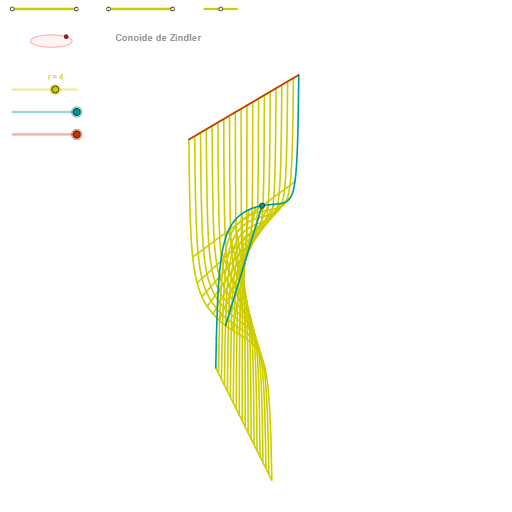
This example demonstrates the construction of Zindler curves, a special type of ellipse. It involves key concepts in coordinate geometry and geometric construction. Using GeoGebra commands such as Segment, Point, Circle, Intersect, and Ellipse, the Zindler curve can be constructed. This example is suitable for high school mathematics education, particularly in coordinate geometry and geometric construction.
GeoGebra Commands & Parameters
Segment(Q3, Q4) → p2Point(p2) → P3Segment(P3, Q4) → p4Point(p4) → P4Segment(Q1, Q2) → p1Point(p1) → P1Segment(P1, Q2) → p3Point(p3) → P2OrthogonalLine(C, xAxis) → zz2Circle(C, 0.62) → zz0Intersect(zz0, zz2, 1) → ZZ4Intersect(zz0, zz2, 2) → ZZ3Ellipse(ZZ3, ZZ4, 0.65) → zElipse2Point(zElipse2) → ZIntersect(zElipse2, zz2) → ZZ7, ZZ8Angle(ZZ8, C, Z) → zAngIncOrthogonalLine(C, yAxis) → zz1Intersect(zz0, zz1, 2) → ZZ2Intersect(zz0, zz1, 1) → ZZ1Ellipse(ZZ1, ZZ2, 0.65) → zElipse1Point(zElipse1) → XYIntersect(zElipse1, zz1) → ZZ5, ZZ6Angle(ZZ6, C, XY) → zAngRotSegment(Q5, Q6) → p5Point(p5) → P5CurveCartesian(((r / 2 * u) * sin(zAngRot)), (r / 2 * (((-u) * cos(zAngRot)) * sin(zAngInc))), u, u1, u2) → curva1Segment(ZZ5, ZZ6) → zz4Segment(ZZ7, ZZ8) → zz3Intersect(zElipse2, zElipse1, 1) → zPunto1Intersect(zElipse2, zElipse1, 4) → zPunto2Segment(zPunto1, zPunto2) → zSeg2CurveCartesian((r / 2 * (((α * cos(v)) * sin(zAngRot)) + ((α * sin(v)) * cos(zAngRot)))), (r / 2 * (((((-α) * cos(v)) * cos(zAngRot)) * sin(zAngInc)) + (((α * sin(v)) * sin(zAngRot)) * sin(zAngInc)) + ((a * tan((2 * v))) * cos(zAngInc)))), v, v1, v2) → curva2CurveCartesian((r / 2 * (((u * cos(β)) * sin(zAngRot)) + ((u * sin(β)) * cos(zAngRot)))), (r / 2 * (((((-u) * cos(β)) * cos(zAngRot)) * sin(zAngInc)) + (((u * sin(β)) * sin(zAngRot)) * sin(zAngInc)) + ((a * tan((2 * β))) * cos(zAngInc)))), u, u1, u2) → a1Sequence(CurveCartesian[(r / 2 * (((u * cos(v)) * sin(zAngRot)) + ((u * sin(v)) * cos(zAngRot)))), (r / 2 * (((((-u) * cos(v)) * cos(zAngRot)) * sin(zAngInc)) + (((u * sin(v)) * sin(zAngRot)) * sin(zAngInc)) + ((a * tan((2 * v))) * cos(zAngInc)))), v, v1, v2], u, u1, u2, paso) → list3Sequence(CurveCartesian[(r / 2 * (((u * cos(v)) * sin(zAngRot)) + ((u * sin(v)) * cos(zAngRot)))), (r / 2 * (((((-u) * cos(v)) * cos(zAngRot)) * sin(zAngInc)) + (((u * sin(v)) * sin(zAngRot)) * sin(zAngInc)) + ((a * tan((2 * v))) * cos(zAngInc)))), u, u1, u2], v, v1, v2, paso) → list1
AI Drawing Prompt Reference
Draw a Zindler curve, which is a special type of ellipse curve. First, on the coordinate plane, draw a circle with center C and radius 0.62, then draw two lines perpendicular to the x-axis and y-axis passing through the circle center. Using the intersection points of these lines with the circle as foci, with a distance of 0.65 as the semi-major axis, construct two ellipses. Take points Z and XY on these two ellipses respectively, and measure the angles zAngInc and zAngRot formed by these points with the circle center. Then, using these angle parameters, draw curves through parametric equations to create curves such as curva1 and curva2, which intertwine to form the unique spiral shape of the Zindler curve. Finally, connect the intersection points of the ellipses with the lines: ZZ5 to ZZ6, ZZ7 to ZZ8, and the intersection points zPunto1 to zPunto2 between the two ellipses, forming the internal grid structure of the curve.
The prompt above was compiled from the original drawing commands and is for reference only.