
Writing Coordinates of Random Points
Loading the math board and drawing, please wait…
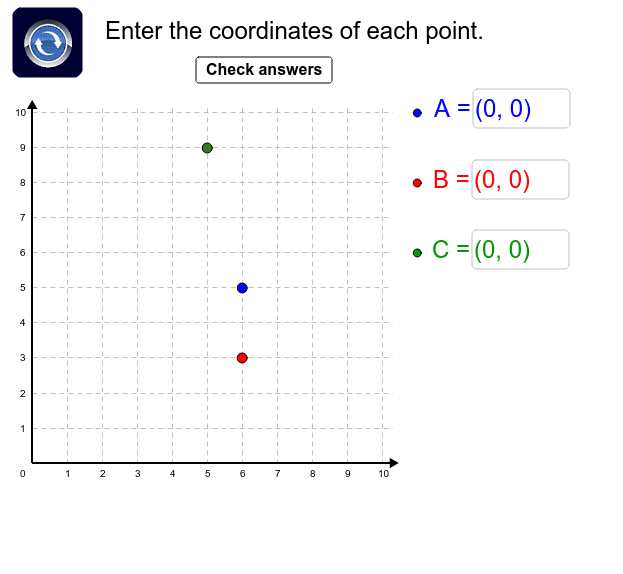
① This interactive example provides practice in writing the coordinates of randomly generated points on a coordinate plane. ② The core mathematical concept is the Cartesian coordinate system, focusing on reading and writing ordered pairs (x, y) and understanding the one-to-one correspondence between a point and its coordinates. ③ Construction highlights: The GeoGebra commands Random, Point, Textfield, Shuffle, and Element are used to generate random coordinates (e.g., ax, ay, bx, by), create point objects, build a dynamic question interface with text fields, and implement answer checking with color-coded feedback (Blu, Red, Gren) via a check button. ④ This resource is suitable for middle school students learning coordinate geometry, as well as for elementary students beginning to explore coordinates, offering immediate feedback to reinforce accuracy.
GeoGebra Commands & Parameters
Random(1, 10) → ayRandom(1, 10) → cyRandom(1, 10) → cxRandom(1, 10) → axPoint(a) → GPoint(b) → HRandom(1, 10) → bxRandom(1, 10) → byTextfield(PA) → kgætATextfield(PB) → kgætBTextfield(PC) → kgætCShuffle(A1:K11) → list1Element(list1, 1) → AElement(list1, 2) → BElement(list1, 3) → C
AI Drawing Prompt Reference
A Cartesian coordinate plane is shown with three random points plotted in the first quadrant. Each point has integer coordinates ranging from 1 to 10, represented by small markers. The points are labeled for reference, and the axes are clearly marked. The drawing provides a visual exercise where the user must write down the coordinates of each point on the plane.
The prompt above was compiled from the original drawing commands and is for reference only.