
Wrapping a Chocolate Bar
Loading the math board and drawing, please wait…
In collections
Surface and Volume Applets
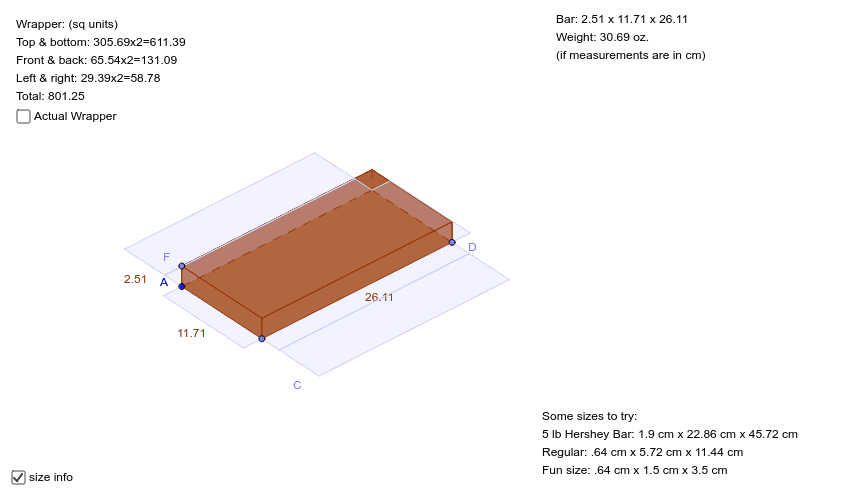
This example demonstrates how to use GeoGebra to draw the wrapping of a chocolate bar. Key mathematical concepts include line segments, polynomial functions, linear regression, intersections, and definite integrals. Using commands such as Line, Point, Rotate, Intersect, Polygon, Circle, and Distance, the construction of the chocolate bar wrapping is achieved. Suitable for high school mathematics education and learning.
GeoGebra Commands & Parameters
Line(A, B) → aPoint(c) → FRotate(B, 300*°, A) → B'Line(A, B') → bPoint(b) → CLine(C, a) → dLine(F, b) → eLine(C, c) → fIntersect(e, f) → ELine(F, a) → hLine(E, a) → iPolygon(C, E, F, A) → poly3, c_2, e_3, f_2, a_1Point(d) → DLine(D, b) → gLine(D, c) → jIntersect(i, j) → GLine(G, b) → kIntersect(a, g) → HIntersect(h, k) → IPolygon(C, E, G, D) → poly1, c_1, e_1, g_1, d_1Polygon(G, I, H, D) → poly2, g_2, i_1, h_1, d_2Polygon(I, F, A, H) → poly4, i_2, f_1, a_2, h_2Polygon(F, E, G, I) → poly5, f_3, e_2, g_3, i_3Circle(A, F) → pIntersect(p, b, 1) → JCircle(C, f_1) → qIntersect(q, b, 2) → KLine(K, d) → lLine(J, a) → mIntersect(p, a, 1) → LLine(L, b) → nCircle(D, f_1) → rIntersect(r, d, 2) → MLine(M, g) → sIntersect(m, g) → NIntersect(s, a) → OIntersect(g, l) → PIntersect(d, n) → QCircle(K, a_1 / 2) → tIntersect(t, b, 2) → RCircle(J, a_1 / 2) → k_1Intersect(k_1, b, 1) → SLine(S, a) → b_1Line(R, d) → j_1Intersect(b_1, g) → TIntersect(j_1, g) → UPolygon(A, H, N, J) → poly6, a_3, h_3, n_1, j_2Polygon(J, S, T, N) → poly7, j_3, s_1, t_1, n_2Polygon(C, K, P, D) → poly8, c_3, k_2, p_1, d_3Polygon(K, R, U, P) → poly9, k_3, r_1, u, p_2Polygon(C, Q, L, A) → poly10, c_4, q_1, l_1, a_4Polygon(D, M, O, H) → poly11, d_4, m_1, o, h_4Distance(f_2, a_1) → vIntersect(b, a_1) → VIntersect(b, a_1) → WIntersect(j_1, n) → ZCircle(Z, 0.5) → q_2Intersect(q_2, j_1, 1) → B_1Intersect(q_2, n, 2) → C_1Line(B_1, n) → b_2Line(C_1, j_1) → l_2Intersect(l_2, b_2) → D_1Intersect(s, b_1) → A_1Circle(A_1, 0.5) → r_2Intersect(r_2, s, 1) → E_1Intersect(r_2, b_1, 2) → F_1Line(E_1, b_1) → m_2Line(F_1, s) → s_2Intersect(m_2, s_2) → G_1Intersect(b_2, m_2) → H_1Intersect(l_2, s_2) → I_1Polygon(D_1, I_1, G_1, H_1) → poly12, d_5, i_4, g_4, h_5
AI Drawing Prompt Reference
Draw a chocolate bar wrapper with four rectangles and a circle. Start by drawing two parallel line segments a and b, then take points A and F on a, and points B and B' on b. Rotate B' around point A to create line segment d and e, and points C and E. Draw line segment f using point C and line a, and line segment h using point F and line b. Then, create polygon C-E-F-A, followed by polygons C-E-G-D, G-I-H-D, I-F-A-H, and F-E-G-I. Finally, draw circles A-F, C-f1, D-f1, K-a1/2, J-a1/2, S-a1/2, R-d, M-g, L-a, N-g, Q-g, T-a, and U-g, as well as polygons A-H-N-J and J-S-T-N.
The prompt above was compiled from the original drawing commands and is for reference only.