
Wave Pulse Reflection on a String: Free vs Fixed Ends
Loading the math board and drawing, please wait…
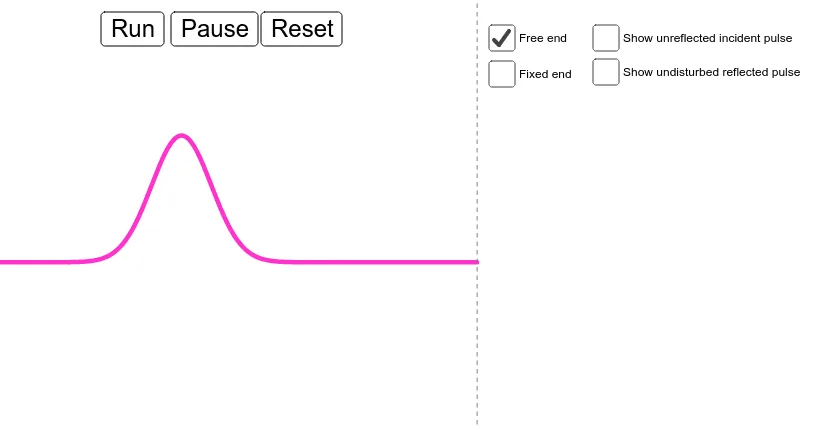
This GeoGebra example simulates how a wave pulse bounces off the end of a string, with the boundary end toggled between free and fixed conditions. It visually contrasts the reflection behavior by showing how the pulse shape evolves after reaching the endpoint, making the role of boundary conditions immediately clear. Key mathematical ideas include one-dimensional wave propagation with reflection rules under different ends (free/fixed boundary conditions), parameterized time evolution of a pulse profile, and dynamic construction driven by a time parameter. Construction-wise, the model uses multiple geometric/parameter objects (a, t, g, f, h, p, q, b, c, d, e) and interactive controls (button1, button2, button3) to switch between modes and display options, with auxiliary objects (i, j) supporting the positioning and depiction of the incident and reflected components. Suitable for upper secondary and introductory undergraduate teaching, especially for physics-math units on waves, simulation-based learning, and boundary-condition reasoning.
GeoGebra Commands & Parameters
Numeric a(-3.0)Numeric t(-7.0)g(x) = If[x ≤ 0,(a * ℯ^((-(x + t)^(2))))]f(x) = If[x ≤ 15,((-a) * ℯ^((-(x - t)^(2))))]h(x) = If[x < 0,f(x) + g(x)]p(x) = If[x ≤ 0,((-a) * ℯ^((-(x + t)^(2))))]q(x) = If[x < 0,f(x) + p(x)]Boolean b(true)Boolean c(false)Boolean d(false)Boolean e(false)Line i(1.0, 0.0, 0.0)Line j(1.0, 0.0, 0.0)
AI Drawing Prompt Reference
Draw a wave pulse reflection on a string. Start by drawing a wave pulse g(x) moving from left to right, then draw another wave pulse f(x) moving from right to left. Depending on the boundary condition, draw the reflected waveforms for both free and fixed ends. Use two buttons to switch between display modes: one showing the sum of g(x) and f(x), and the other showing the sum of p(x) and q(x).
The prompt above was compiled from the original drawing commands and is for reference only.