
Volumes and Surface Areas of Similar 3D Figures by powere
Loading the math board and drawing, please wait…
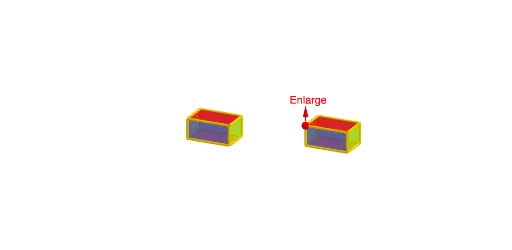
This example demonstrates the relationships between side lengths, surface areas, and volumes of similar 3D figures, such as prisms. Key math concepts include similarity ratios, proportional relationships, and volume/surface area formulas. GeoGebra commands and objects used in construction are Polygon, Prism, Point, Segment, Rotate, Intersect, and Vector. Suitable for high school students learning solid geometry to visually understand the quantitative relationships in similar shapes.
GeoGebra Commands & Parameters
Polygon(A, B, C, D) → poly1, a, b, c, dPrism(poly1, E) → e, F, edgeBF, edgeCG, edgeDH, edgeEF, edgeFG, edgeGH, edgeEH, G, H, faceABFE, faceBCGF, faceCDHG, faceADHE, faceEFGH, edgeAEPoint(Segment[A' + (0, 0, h), A' + (0, 0, (2 * h))]) → E'Polygon(A', B', C', D') → poly2, a', b', c', d'Prism(poly2, E') → f, F', edgeB'I, edgeC'J, edgeD'K, edgeE'I, edgeIJ, edgeJK, edgeE'K, G', H', faceA'B'IE', faceB'C'JI, faceC'D'KJ, faceA'D'KE', faceE'IJK, edgeA'E'Segment(I, J) → gPoint(g) → KRotate(faceABFE, ((t * 90))°, a) → faceABFE'Rotate(faceBCGF, ((t * 90))°, b) → faceBCGF'Rotate(faceCDHG, ((t * 90))°, c) → faceCDHG'Rotate(faceADHE, ((t * 90))°, d) → faceADHE'Rotate(E, ((t * 90))°, a) → E'_1Rotate(F, ((t * 90))°, a) → F'_1Rotate(Rotate[faceEFGH, ((t * 90))°, a], ((t * 90))°, Segment[E'_1, F'_1]) → poly3Rotate(faceA'B'IE', ((t * 90))°, a') → faceA'B'IE''Rotate(faceB'C'JI, ((t * 90))°, b') → faceB'C'JI'Rotate(faceC'D'KJ, ((t * 90))°, c') → faceC'D'KJ'Rotate(faceA'D'KE', ((t * 90))°, d') → faceA'D'KE''Rotate(E', ((t * 90))°, a') → E''Rotate(F', ((t * 90))°, a') → F''Rotate(Rotate[faceE'IJK, ((t * 90))°, a'], ((t * 90))°, Segment[E'', F'']) → poly4Rotate(Segment[Midpoint[B', C'], Midpoint[F', G']], ((t * 90))°, b') → jRotate(Segment[Midpoint[B', F'], Midpoint[C', G']], ((t * 90))°, b') → iRotate(Segment[Midpoint[A', B'], Midpoint[E', F']], ((t * 90))°, a') → mRotate(Segment[Midpoint[A', E'], Midpoint[B', F']], ((t * 90))°, a') → nRotate(Segment[Midpoint[C', D'], Midpoint[G', H']], ((t * 90))°, c') → pRotate(Segment[Midpoint[C', G'], Midpoint[D', H']], ((t * 90))°, c') → qRotate(Segment[Midpoint[A', E'], Midpoint[D', H']], ((t * 90))°, d') → rRotate(Segment[Midpoint[A', D'], Midpoint[E', H']], ((t * 90))°, d') → sRotate(Rotate[Segment[Midpoint[E', F'], Midpoint[G', H']], ((t * 90))°, a'], ((t * 90))°, Segment[E'', F'']) → a_1Rotate(Rotate[Segment[Midpoint[E', H'], Midpoint[G', F']], ((t * 90))°, a'], ((t * 90))°, Segment[E'', F'']) → b_1Segment(Midpoint[A', B'], Midpoint[C', D']) → c_1Segment(Midpoint[A', D'], Midpoint[C', B']) → d_1Segment(Midpoint[F', C'], Midpoint[E', D']) → e_1Segment(Midpoint[F', A'], Midpoint[C', H']) → f_1Intersect(Line[E, E'], z = 0) → LSegment(L, E) → g_1Segment(L, H) → i_1Segment(L, F) → k_1Segment(L, G) → m_1Segment(H, H') → j_1Segment(G, G') → n_1Segment(E, E') → h_1Segment(F, F') → l_1Segment(L, A) → p_1Segment(A, A') → q_1Segment(L, B) → r_1Segment(B, B') → s_1Segment(L, C) → t_1Segment(C, C') → a_2Segment(L, D) → b_2Segment(D, D') → c_2Vector(E' + (0, 0, 0.3), E' + (0, 0, 1.3)) → uSegment(Midpoint[A', C'], Midpoint[E', G']) → d_2
AI Drawing Prompt Reference
Draw two similar 3D prisms, one smaller and one larger, to illustrate the relationships between side lengths, surface areas, and volumes. Start with a quadrilateral-based prism, then construct a larger similar prism above it, sharing the same central axis. Use semi-transparent faces to show the internal structure. Add a rotation animation around the base edges to view from different angles. Draw segments connecting corresponding vertices of the two prisms, and auxiliary lines from the base center to the top vertices to highlight the similarity ratio. Label key dimensions and ratios, such as side length ratio, surface area ratio, and volume ratio, using different colors for clarity.
The prompt above was compiled from the original drawing commands and is for reference only.