
Volume of Rectangular Prism
Loading the math board and drawing, please wait…
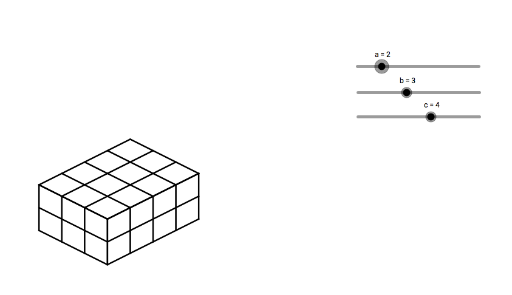
This example demonstrates the calculation of the volume of a rectangular prism. Key mathematical concepts include the methods for calculating the volume of geometric bodies. Using the GeoGebra command Sequence, the dimensions of the rectangular prism can be dynamically adjusted to observe changes in volume. Suitable for students at the middle school level and above for learning volume calculations of geometric bodies.
GeoGebra Commands & Parameters
Sequence(Segment[(n, a - n / 2), (n, ((-n)) / 2)], n, 0, b) → list1Sequence(Segment[(n + b, ((-b)) / 2 + n / 2), (n + b, ((-b)) / 2 + n / 2 + a)], n, 0, c) → list2Sequence(Segment[(0, a - n), (b, ((-b)) / 2 - n + a)], n, 0, a) → list3Sequence(Segment[(b, ((-b)) / 2 + n), (b + c, ((-b)) / 2 + n + c / 2)], n, 0, a) → list4Sequence(Segment[(n, ((-n)) / 2 + a), (n + c, c / 2 - n / 2 + a)], n, 0, b) → list5Sequence(Segment[(n, a + n / 2), (n + b, a + n / 2 - b / 2)], n, 0, c) → list6
AI Drawing Prompt Reference
Draw a rectangular prism with adjustable length, width, and height to demonstrate volume changes. Start by sketching the base as a polygon composed of several line segments, then create the top face parallel to the base by connecting corresponding vertices. Next, draw the four vertical edges connecting the base and top to form the complete prism. The image should clearly display the 3D shape of the prism and how changes in dimensions affect its volume.
The prompt above was compiled from the original drawing commands and is for reference only.