
Volume of Prisms Exploration
Loading the math board and drawing, please wait…
In collections
Area and Volume
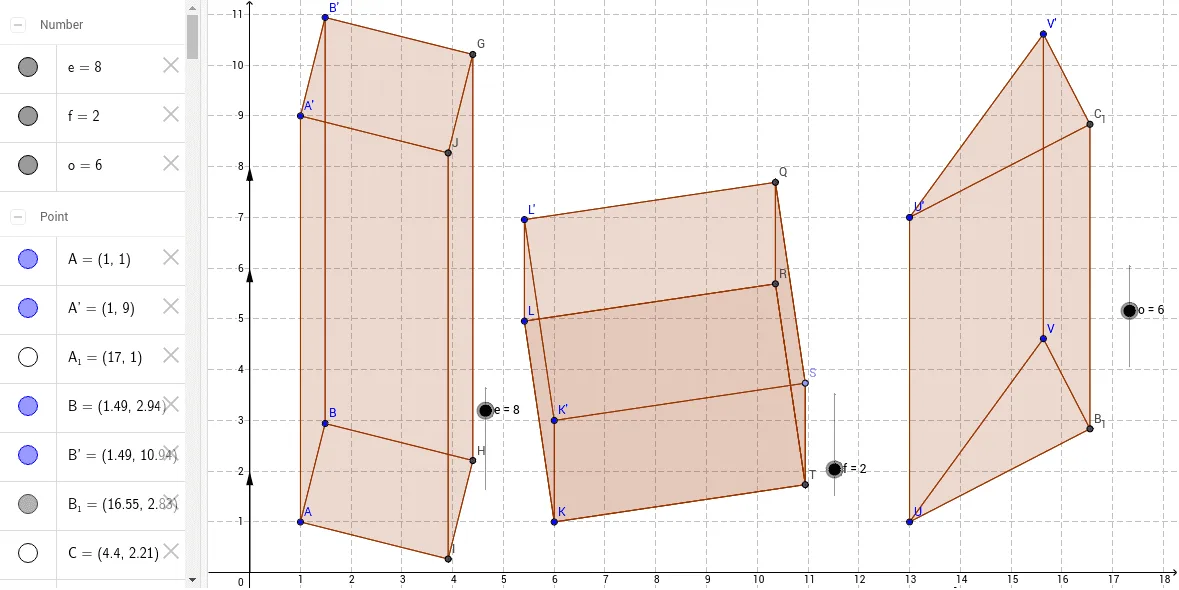
This example demonstrates the exploration of the volume of prisms. Key mathematical concepts include the calculation of the volume of prisms. Using GeoGebra commands such as Point, Polygon, Vector, Translate, etc., the shape and size of the prism can be dynamically changed to observe the changes in volume. Suitable for middle school and above students or teachers.
GeoGebra Commands & Parameters
Point(Circle[A, 2]) → BPolygon(A, B, C, D) → poly1, a, b, c, dVector(E, F) → uTranslate(A, v) → A'Translate(B, v) → B'Translate(C, v) → C'Translate(D, v) → D'Polygon(A', B', C', D') → poly1', a', b', c', d'Polygon(B', B, A, A') → poly2, b'_1, b_1, a_1, a'_1Intersect(c', b') → GIntersect(c, b) → HPolygon(B', G, H, B) → poly3, b'_2, g, h, b_2Intersect(d, c) → IIntersect(d', c') → JPolygon(G, H, I, J) → poly4, g_1, h_1, i, jPolygon(J, I, A, A') → poly5, j_1, i_1, a_2, a'_2Point(Circle[K, 4]) → LPolygon(K, L, M, N) → poly6, k, l, m, nPoint(xAxis) → OVector(O, P) → wTranslate(K, z) → K'Translate(L, z) → L'Translate(M, z) → M'Translate(N, z) → N'Polygon(K', L', M', N') → poly6', k', l', m', n'Polygon(L', L, K, K') → poly7, l'_1, l_1, k_1, k'_1Intersect(m', l') → QIntersect(m, l) → RPolygon(L', Q, R, L) → poly8, l'_2, q, r, l_2Point(m') → SIntersect(n, m) → TPolygon(R, Q, S, T) → poly9, r_1, q_1, s, tPolygon(T, R, L, K) → poly10, t_1, r_2, l_3, k_2Polygon(K', S, T, K) → poly11, k'_2, s_1, t_2, k_3Point(Circle[U, 4.47213595499958]) → VPolygon(U, V, W) → poly12, w_1, u_1, v_1Point(xAxis) → ZVector(Z, A_1) → pTranslate(U, z_1) → U'Translate(V, z_1) → V'Translate(W, z_1) → W'Polygon(U', V', W') → poly12', w', u', v'Intersect(v_1, u_1) → B_1Intersect(v', u') → C_1Polygon(U', U, B_1, C_1) → poly13, u'_1, u_2, b_3, c_1Polygon(U', U, V, V') → poly14, u'_2, u_3, v_2, v'_1Polygon(V', V, B_1, C_1) → poly15, v'_2, v_3, b_4, c_2Polygon(R, Q, S, T) → poly16, r_3, q_2, s_2, t_3
AI Drawing Prompt Reference
Draw a prism and explore how its volume changes as its shape and size are dynamically altered. Start by creating a circle and then form a quadrilateral on the circle to serve as the base. Use a vector to translate the base vertically, creating a parallel quadrilateral for the top face. Connect the base and top face to form the prism. Add some auxiliary lines and heights to clearly illustrate the volume, and label the positions of key points.
The prompt above was compiled from the original drawing commands and is for reference only.