
Volume of Intersection of Two Cylinders
Loading the math board and drawing, please wait…
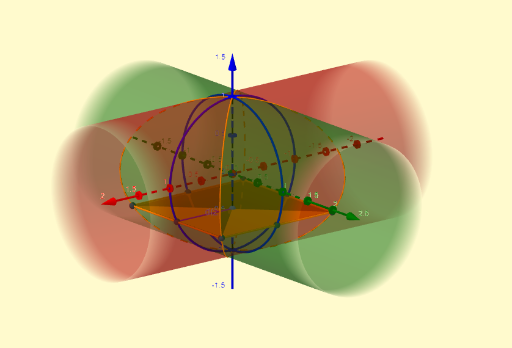
This example demonstrates the calculation of the volume of the intersection of two cylinders, involving core mathematical concepts such as solid geometry and integral calculus. The construction uses GeoGebra commands like Segment, Polygon, Circle, Intersect, Textfield, and IntersectPath. Suitable for high school students and math enthusiasts learning spatial geometry and integral applications.
GeoGebra Commands & Parameters
Segment((0, 0, (-r)), (0, 0, r)) → fPolygon(B, C, D, E) → polígono1, i, j, k, lCircle((0, 0, 0), r, xAxis) → gCircle((0, 0, 0), r, yAxis) → hIntersect(l, h, 1) → FIntersect(i, g, 1) → GIntersect(j, h, 1) → HIntersect(k, g, 1) → ISegment(F, A) → dTextfield(r) → CasillaDeEntrada1IntersectPath(e, b) → pIntersectPath(m, a) → q
AI Drawing Prompt Reference
Draw two perpendicular cylinders intersecting, showing the volume of their intersection. Start by drawing two cylinders with circular bases, one vertical and the other horizontal. Highlight the lines of intersection between the cylinders and calculate the volume of the intersecting region. Use geometric shapes and integral formulas to represent the volume calculation process, suitable for students learning spatial geometry and integral applications.
The prompt above was compiled from the original drawing commands and is for reference only.