
Volume of Cone and Cylinder
Loading the math board and drawing, please wait…
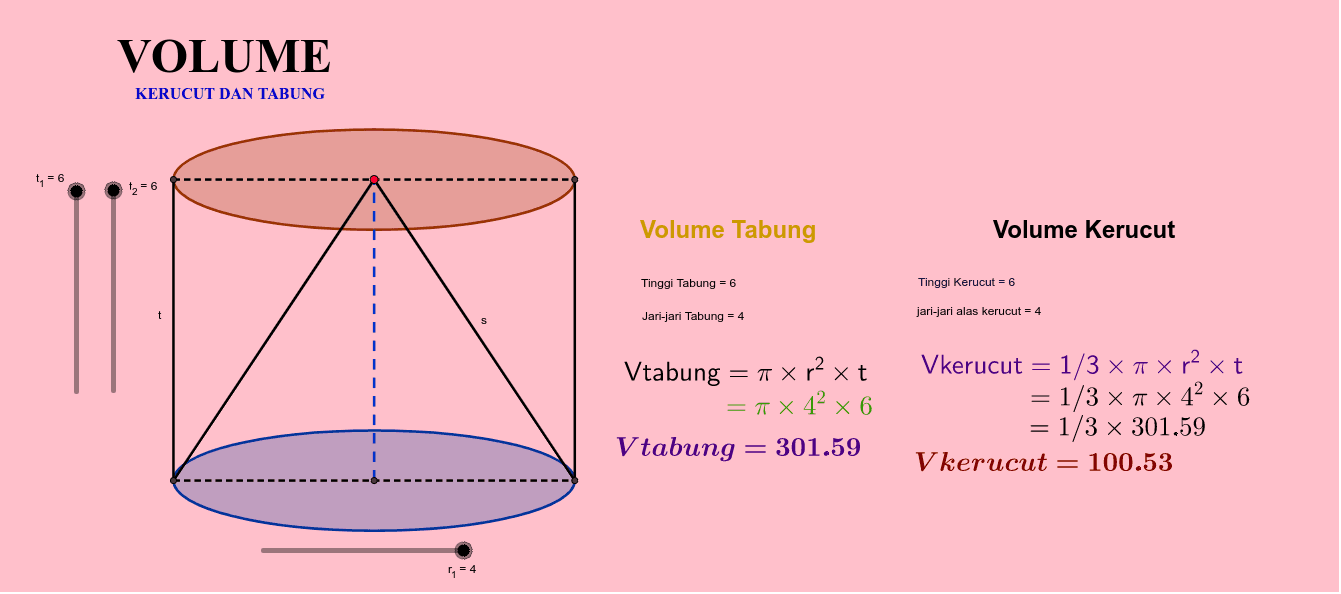
This example demonstrates the volume calculation of a cone and a cylinder. Key mathematical concepts include the volume formulas of geometric solids. Using GeoGebra commands such as Intersect and Segment, it constructs circles, line segments, cones, and cylinders. Suitable for middle and high school students learning solid geometry.
GeoGebra Commands & Parameters
Intersect(d, g, 1) → AIntersect(c, g, 1) → BSegment(A, B) → tIntersect(d, f, 1) → CIntersect(c, f, 1) → DSegment(C, D) → iIntersect(xAxis, yAxis) → FSegment(G, B) → lSegment(G, D) → sSegment(F, G) → jSegment(A, C) → hSegment(B, D) → m
AI Drawing Prompt Reference
Draw a cone and a cylinder to demonstrate volume calculations. Start by creating two circles with the same base. Draw a vertical line segment from the center of each circle upwards, using the segments as heights to construct the cone and cylinder. Connect the intersection points of the circles with the apexes of the cone and cylinder to form the outlines. Add coordinate axes and mark the origin, then connect the origin to the centers of the base circles and the apexes of the cone and cylinder to complete the auxiliary lines.
The prompt above was compiled from the original drawing commands and is for reference only.