
Volume of a Cylinder Inscribed in a Cone: Optimization Exploration
Loading the math board and drawing, please wait…
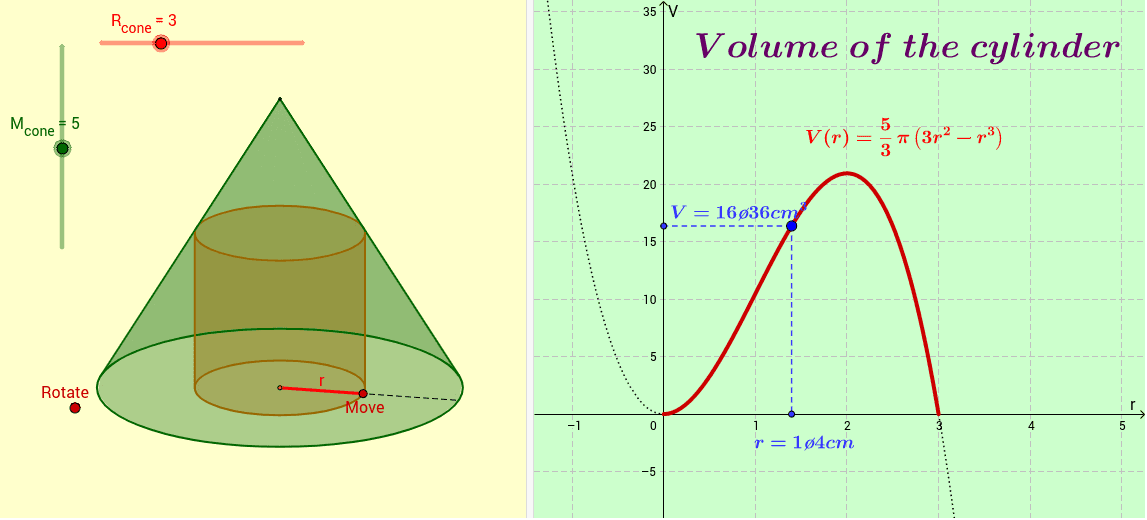
This GeoGebra example demonstrates how to inscribe a cylinder within a given cone and investigate the maximum possible volume of the cylinder as its dimensions vary. It covers core mathematical concepts including solid geometry volume formulas, function modeling, and derivative-based optimization. The construction uses GeoGebra commands such as Vector, Kúp (cone), Segment, Point, Distance, Henger (cylinder), and Function, together with objects like O, M_{cone}, R_{cone}, K, A, and volume functions a1, a2, a, culminating in a Max operation to locate the optimal volume. Suitable for high school and introductory calculus courses, this interactive resource supports classroom teaching and independent inquiry into applied optimization problems in three-dimensional geometry.
GeoGebra Commands & Parameters
Vector((cos(x(O)), -1 * sin(x(O)) * sin(y(O)))) → iVector((-1 * sin(x(O)), -1 * cos(x(O)) * sin(y(O)))) → jVector((0, cos(y(O)))) → kKúp(O, K, R_{cone}, M_{cone}) → A, lista1, c, a1, a2Segment(K, B) → bPoint(b) → CDistance(K, B) → dDistance(K, C) → eSegment(K, C) → fHenger(O, K, r, m) → D, lista2, g, h, l, nFunction(V, 0, R_{cone}) → V1Segment(P, P1) → pSegment(P, P2) → q
AI Drawing Prompt Reference
Draw a cylinder inscribed within a cone to explore the maximum volume of the cylinder as its dimensions vary. Construct the cone first, then determine the position and size of the cylinder. Calculate the volumes of the cylinder and cone, and use functions and derivatives to find the maximum volume of the cylinder. The process demonstrates geometric construction, volume calculation, and optimization techniques.
The prompt above was compiled from the original drawing commands and is for reference only.