
Volume of a Cone with Steps
Loading the math board and drawing, please wait…
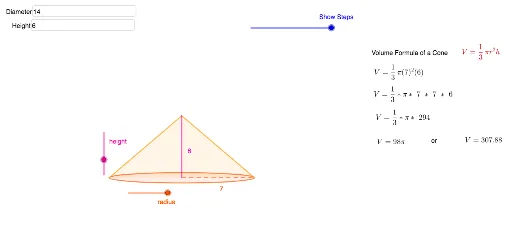
This example demonstrates how to construct a cone and calculate its volume using GeoGebra. Key math concepts include the formula for the volume of a cone, properties of circles, and analytical geometry. Construction highlights involve using commands like Intersect for finding intersections, Ellipse for drawing ellipses, Polygon for creating polygons, Midpoint for locating midpoints, Segment for drawing line segments, and Textfield for adding text annotations. Suitable for high school mathematics education, helping students visually understand the calculation process and geometric properties of cones.
GeoGebra Commands & Parameters
Intersect(xAxis, yAxis) → AEllipse(A, B, C) → cPolygon(A, D, B) → t1, b, a, dMidpoint(A, B) → ESegment(E, B) → fSegment(E, D) → gTextfield(radius) → InputBox1Textfield(height) → InputBox2
AI Drawing Prompt Reference
Draw a cone by first finding the intersection point A on the coordinate axes, then drawing an ellipse c with A as one of the foci. Use points A, D, and B to draw a quadrilateral t1, b, a, d. Find the midpoint E of A and B, and draw line segments f and g connecting E to B and E to D. Input the radius and height of the cone and add corresponding text annotations.
The prompt above was compiled from the original drawing commands and is for reference only.