
Volume Calculation & Geometric Demonstration
Loading the math board and drawing, please wait…
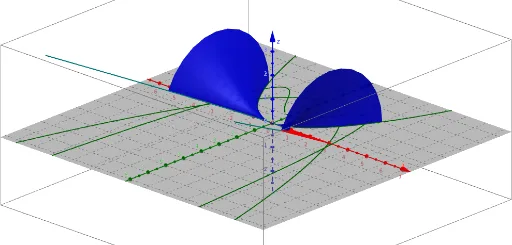
This example demonstrates the dynamic calculation of volume through interactive elements, integrating similar triangles and function graphs. Core mathematical concepts include volume formulas, properties of similar triangles, function modeling, conditional probability, and tangent line equations. Construction highlights from GeoGebra commands involve SelectedElement, CurveCartesian, Surface, Sequence, with objects like α, d, min, max, list2, f, aa, b, list1, button1, button2. Suitable for high school students and math enthusiasts exploring solid geometry, calculus, and probability & statistics.
GeoGebra Commands & Parameters
SelectedElement(list2) → fCurveCartesian(a, (f(a) * cos(α)), (f(a) * sin(α)), a, -5, 5) → aaSurface(a, (f(a) * cos(β)), (f(a) * sin(β)), a, min, max, β, 0, α) → bSequence(Segment[(a, 0, 0), (a, (f(a) * cos(α)), (f(a) * sin(α)))], a, min, max, d) → list1