
Visualizing Triangles
Loading the math board and drawing, please wait…
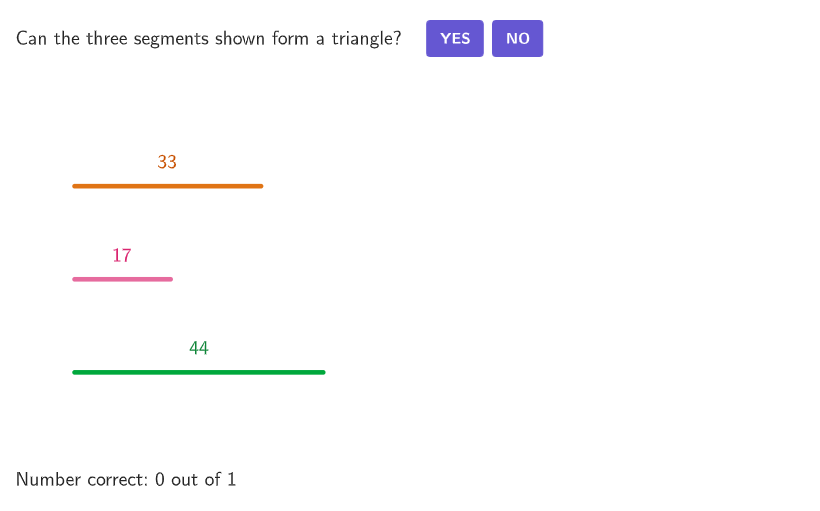
This example demonstrates how three line segments can form a triangle using dynamic geometry. The key mathematical concept is the triangle inequality theorem, which states that the sum of any two sides must be greater than the third side. Construction involves GeoGebra commands like Shuffle, Element, Sort, and Circle to create the triangle. Suitable for students in grades 6-8 for geometry learning.
GeoGebra Commands & Parameters
Shuffle(Sequence[Random[1, 3], i, 1, 100]) → randomOrderList, {3, 3, 1, 1, 3, 1, 1, 3, 3, 2, 2, 3, 3, 3, 3, 3, 3, 1, 2, 3, 2, 1, 1, 1, 2, 3, 3, 3, 3, 3, 2, 3, 1, 1, 1, 3, 1, 3, 3, 1, 1, 1, 3, 1, 3, 2, 3, 1, 2, 3, 2, 3, 2, 3, 1, 3, 2, 3, 3, 2, 3, 3, 1, 2, 3, 3, 2, 1, 1, 3, 2, 3, 3, 3, 1, 3, 1, 2, 3, 1, 1, 1, 3, 1, 1, 1, 1, 1, 1, 2, 1, 1, 1, 1, 3, 1, 2, 1, 3, 3}Element(randomOrderList, Mod[countQuestion, 100] + 1) → randomOrderShuffle(Sequence[Random[10, 30], i, 1, 100]) → randomSideList2, {17, 15, 30, 20, 12, 20, 24, 16, 23, 29, 25, 23, 12, 23, 19, 14, 11, 30, 25, 15, 13, 27, 22, 20, 28, 17, 11, 20, 17, 30, 20, 30, 23, 28, 23, 14, 20, 21, 24, 16, 16, 20, 25, 12, 16, 10, 30, 26, 18, 14, 25, 10, 17, 18, 22, 24, 27, 19, 13, 27, 19, 10, 25, 20, 22, 19, 11, 21, 15, 12, 28, 30, 21, 17, 17, 19, 20, 25, 17, 21, 13, 10, 22, 30, 28, 22, 14, 30, 28, 19, 24, 16, 26, 27, 20, 13, 22, 12, 26, 26}Element(randomSideList2, Mod[countQuestion, 100] + 1) → randomSide2Shuffle(Sequence[Random[20, 50], i, 1, 100]) → randomSideList1, {33, 45, 28, 50, 29, 47, 35, 35, 37, 42, 36, 42, 43, 21, 37, 40, 26, 22, 30, 50, 40, 49, 31, 29, 32, 29, 50, 43, 23, 32, 21, 42, 26, 40, 40, 23, 24, 26, 31, 35, 43, 27, 45, 24, 37, 29, 46, 25, 37, 39, 46, 29, 23, 42, 50, 33, 21, 21, 35, 30, 49, 22, 50, 35, 35, 27, 25, 29, 45, 41, 26, 26, 35, 40, 42, 25, 44, 24, 29, 45, 31, 27, 47, 43, 30, 38, 23, 27, 26, 47, 42, 21, 26, 49, 26, 49, 47, 32, 23, 44}Element(randomSideList1, Mod[countQuestion, 100] + 1) → randomSide1Shuffle(Sequence[Random[-10, 5], i, 1, 100]) → randomSideAddendList, {-6, 5, -3, -10, -9, -4, 1, 1, -3, 2, -7, -8, -8, -2, 4, -9, -10, -5, 4, 4, -9, -5, 1, -8, -4, -4, 3, 4, -7, -7, -5, 1, 0, -3, 2, 3, -4, -7, -7, 5, 5, -1, -2, -7, -1, 4, -6, -2, -4, -3, -2, 5, 0, 3, -5, -6, -5, -6, -4, 3, 2, -6, 1, 4, -2, -10, 0, -3, -10, 1, -2, -7, -7, -3, -9, -3, -1, -3, 4, -7, 4, 3, 0, 1, -4, -1, -10, -4, 1, 0, 4, 0, -1, -10, -4, -7, 5, -9, -9, -3}Sort({randomSide1, randomSide2, randomSide3}) → sideOrderElement(sideStartPoints, Mod[randomOrder + 1, 3] + 1) → PointSideStart2Element(sideStartPoints, Mod[randomOrder + 2, 3] + 1) → PointSideStart3Element(sideStartPoints, Mod[randomOrder, 3] + 1) → PointSideStart1Circle(PointSideStart1, randomSide1) → sideCircle1Ray(PointSideStart1, Vector[(1, 0)]) → sideRay1Segment(PointSideStart1, Intersect[sideCircle1, sideRay1]) → side1Min({1, ratioHeight, ratioWidth}) → ratioChoiceDistance(PointSideStart2, PointStartAnimationS1_a) → animationRange3Distance(PointSideStart3, PointStartAnimationS1_a) → animationRange1Distance(PointSideEnd1, (xAnimationEnd, y(PointStartAnimationS1_a))) → animationRange5If(animationSlider < animationStart5, 0, animationSlider < animationRange, animationSlider - (animationStart5 + 1), animationRange5) → animationSlider5PartitionPoint(PointSideStart1 + (sideOrder(2), 0), PointStartAnimationS2_a, animationSlider5, animationRange5) → PointMoveAnimation5Circle(PointMoveAnimation5, solutionLengths(1)) → circleSolution2If(animationSlider < animationStart3, 0, animationSlider < animationStart5, animationSlider - (animationStart3 + 1), animationRange3) → animationSlider3PartitionPoint(PointSideStart2, PointStartAnimationS1_a, animationSlider3, animationRange3) → PointMoveAnimation3Circle(PointMoveAnimation3, solutionLengths(2)) → circleSolution1Ray(PointSideStart2, Vector[(1, 0)]) → sideRay2Circle(PointSideStart2, randomSide2) → sideCircle2Segment(PointSideStart2, Intersect[sideCircle2, sideRay2]) → side2PartitionPoint(PointSideStart2 + (sideOrder(1), 0), PointStartAnimationS1_b, animationSlider3, animationRange3) → PointMoveAnimation3bRay(PointSideStart3, Vector[(1, 0)]) → sideRay3Circle(PointSideStart3, randomSide3) → sideCircle3Segment(PointSideStart3, Intersect[sideCircle3, sideRay3]) → side3If(sideOrder(1) + sideOrder(2) > sideOrder(3), 1, 2) → correctIndexPolygon(Zip[PixelsToPoint[Corner[1], Corner[3], Corner[5], A], A, {(pixelsLeft, pixelsTop), (pixelsLeft, y(Corner[5]) - pixelsBottom), Corner[5] - (pixelsRight, pixelsBottom), (x(Corner[5]) - pixelsRight, pixelsTop)}]) → borderBoxCorner(5) → DimsIf(animationSlider < animationRange1, animationSlider, animationRange1) → animationSlider1PartitionPoint(PointSideStart3, PointStartAnimationS1_a, animationSlider1, animationRange1) → PointMoveAnimation1If(sideOrder(1) + sideOrder(2) < sideOrder(3), "<", sideOrder(1) + sideOrder(2) > sideOrder(3), ">", "=") → textInequalityIf(sideOrder(1) + sideOrder(2) < sideOrder(3), "less than", sideOrder(1) + sideOrder(2) > sideOrder(3), "greater than", "equal to") → textInequalityWordIf(correctIndex ≟ 1, "can", "cannot") → textCanCannotPoint(circleSolution1) → PointMoveAnimation3c_{1}Polygon({(minXGrid, minYGrid), (minXGrid, maxYGrid), (maxXGrid, maxYGrid), (maxXGrid, minYGrid)}) → solutionGridAreaPartitionPoint(PointSideStart3 + (sideOrder(3), 0), PointStartAnimationS2_a, animationSlider1, animationRange1) → PointMoveAnimation1bSegment(PointMoveAnimation1, PointMoveAnimation1b) → segmentAnimation1Segment(PointMoveAnimation3, PointMoveAnimation3b) → segmentAnimation3PartitionPoint(PointSideStart1, PointStartAnimationS2_b, animationSlider5, animationRange5) → PointMoveAnimation5bSegment(PointMoveAnimation5, PointMoveAnimation5b) → segmentAnimation5Point(circleSolution2) → PointMoveAnimation7Point(circleSolution1) → PointMoveAnimation3cSegment(PointStartAnimationS1_a, PointMoveAnimation3c) → segmentAnimation6Point(circleSolution2) → PointMoveAnimation5cSegment(PointStartAnimationS2_a, PointMoveAnimation5c) → segmentAnimation7Sequence(PointStarts(n) + (((-Element[textDims2, n, 1])) / 2, (5 * Element[textDims2, n, 2] / 4)) - (Element[textDims2, n, 3], Element[textDims2, n, 4]), n, 1, 3) → PointTextStartsPointToPixels(Corner[1], Corner[3], Corner[5], PointMoveAnimation5c) → OnboardingPointonboardingTextOffset(Corner[onboardingText, 1], Corner[onboardingText, 3], onboardingCase, Corner[1], Corner[3], Corner[5]) → OnboardingTextOffsetcirclePixels(PointMoveAnimation5c, 7 + (7 * pulsing), Corner[1], Corner[3], Corner[5]) → pulsingObject
AI Drawing Prompt Reference
On a coordinate plane, construct a triangle from three given side-lengths by building three consecutive line segments that meet to form a closed polygon. Determine the endpoints stepwise using circles and horizontal rays: start from the first segment’s start point, draw a circle with the first length as radius, intersect it with the horizontal ray to get the first segment; then from the second start point draw a circle with the second length, intersect with a horizontal ray to obtain the second segment; finally use the third start point with a circle of the third length intersected with a horizontal ray to set the third segment endpoint. Connect the three segments end-to-end to show the triangle outline, and include a small text statement comparing the sum of two sides with the third using symbols (<, >, =) together with “can/cannot” wording.
The prompt above was compiled from the original drawing commands and is for reference only.