
Visualizing the Correlation Coefficient: IM Algebra 1 Lesson 3.7
Loading the math board and drawing, please wait…
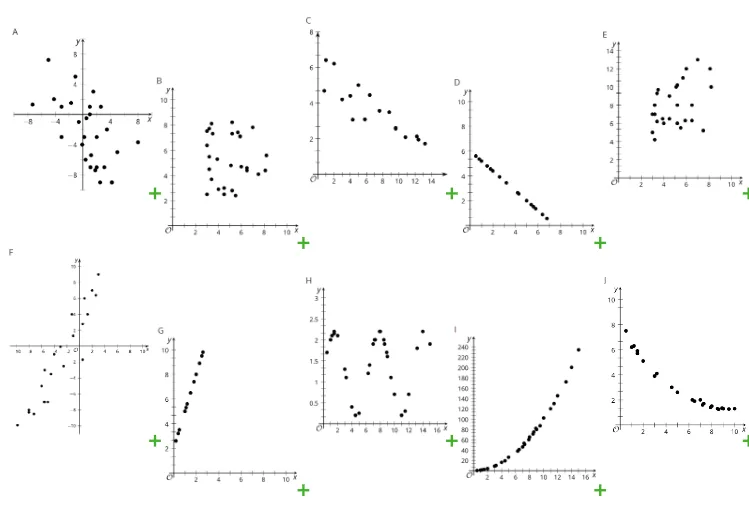
This GeoGebra example is a teaching resource for Lesson 3.7 of Illustrative Mathematics Algebra 1, designed to visually demonstrate the concept of the correlation coefficient in statistics. It presents multiple scatter plots (pic1 through pic10) showing data distributions with varying strengths and directions of linear association, helping students understand how the r-value from -1 to 1 reflects the tightness and direction of a linear relationship between two variables. Core mathematical concepts include linear correlation, positive and negative correlation, no correlation, and the interpretation of the correlation coefficient. The construction uses GeoGebra to insert multiple images (pic1 to pic10) and defines paired point objects (e.g., A, B; C, D; etc.) for labeling or interaction, possibly with sliders for dynamic exploration. It is suitable for upper middle school or high school students learning statistics and data analysis, and serves as an effective classroom demonstration tool for teachers.
GeoGebra Commands & Parameters
Point A(-10, 4)Point B(-4, 4)Point C(-4, 2)Point D(2, 2)Point E(2, 4)Point F(8, 4)Point G(8, 2)Point H(14, 2)Point I(14, 4)Point J(20, 4)Point K(-10, -6)Point L(-4, -6)Point M(-4, -8)Point N(2, -8)Point O(2, -6)Point P(8, -6)Point Q(8, -8)Point R(14, -8)Point S(14, -6)Point T(20.002198253997786, -6)
AI Drawing Prompt Reference
Plot multiple scatter-plot point groups on a coordinate plane to visualize correlation strength and direction. First place points on the y=4 line at x values about −10, −4, 2, 8, 14, and about 20. Then add points on the y=2 line at x values about −4, 2, 8, and 14, producing a clear upper distribution with two levels. Next, place matching groups on the lower part: add points at y=−6 at x about −10, −4, 2, 8, 14, and about 20, and include points at y=−8 at x about −4, 2, 8, 14. Keep the rightmost x around 20 (close to 20). The resulting clusters should make the linear association patterns visually distinguishable.
The prompt above was compiled from the original drawing commands and is for reference only.