
Visualizing Squares and Square Roots with Functions and Geometry
Loading the math board and drawing, please wait…
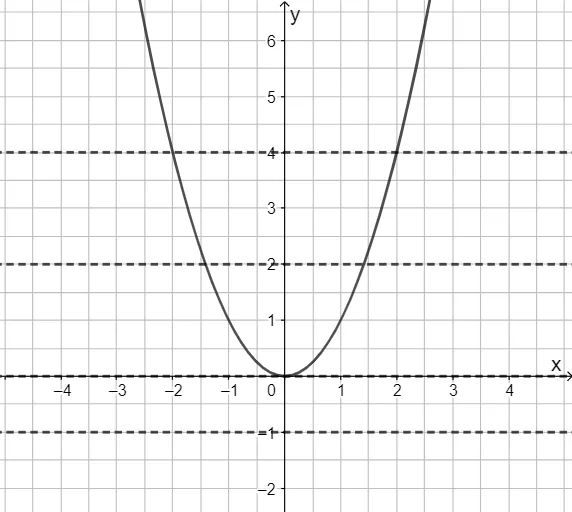
This example demonstrates how to use geometry to represent the relationship between squaring a number and taking its square root, linking these ideas to function behavior and graphical interpretation. The key math concepts include squares of integers/real numbers, the definition and properties of square roots, and the visual structure of quadratic expressions/functions on a coordinate system. Construction-wise, the figure is built around the GeoGebra objects f, g, h, p, and q, using them to coordinate the mapping from an input value to a squared output (and the corresponding inverse relationship related to square roots). The interactive/linked objects help students observe how changing inputs moves the geometric elements and how the resulting shapes reflect function properties such as symmetry and graph placement. Suitable for middle and high school learners, especially for introducing quadratic functions and making square/root concepts concrete through graphing and geometric construction.
GeoGebra Commands & Parameters
y = x^(2)y = -1y = 0y = 2y = 4
AI Drawing Prompt Reference
Draw a coordinate system with x and y axes ranging from -5 to 5. First, plot the parabola y=x^2, then draw four horizontal lines at y=-1, y=0, y=2, and y=4. Observe where these lines intersect the parabola to understand the relationship between squaring and square roots.
The prompt above was compiled from the original drawing commands and is for reference only.