
Visualizing Linear Combinations of Two Vectors
Loading the math board and drawing, please wait…
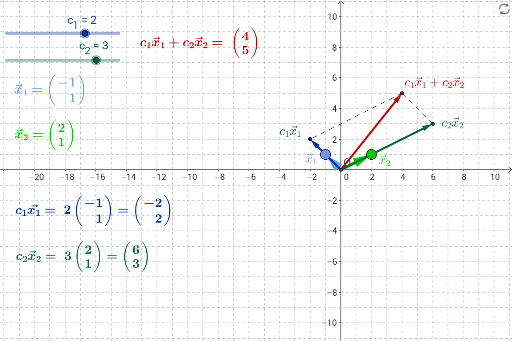
This GeoGebra example dynamically demonstrates the linear combination of two vectors in the plane, showing how the resulting vector sweeps across the entire plane as the coefficients change. The core mathematical concepts include linear combination, basis and span, as well as the geometric meaning of vector addition and scalar multiplication. The construction uses the Vector command to create two base vectors a and b, sliders or input boxes to control coefficients c1 and c2, Segment and Line commands to construct the geometric representation of the combination vector LinComb, and the Intersect command to find intersection points for observation. It is suitable for high school or introductory college linear algebra, helping students grasp the geometric intuition of linear combinations and explore linear dependence and independence.
GeoGebra Commands & Parameters
Intersect(xAxis, yAxis) → OLine(O, x_1) → aLine(O, x_2) → bVector(O, x_1) → x1Vector(O, x_2) → x2Segment(c2x_2, LinComb) → cSegment(LinComb, c1x_1) → dVector(O, LinComb) → LinComboVector(O, c1x_1) → c1x1Vector(O, c2x_2) → c2x2
AI Drawing Prompt Reference
In a coordinate plane, draw two non-collinear base vectors starting from the origin, each extending in a distinct direction. Use two sliders to control the scaling factors of these vectors, and display the scaled versions of each. From the origin, construct a resultant vector that is the sum of the two scaled vectors, with its endpoint determined by the parallelogram rule. Connect the endpoint of the resultant vector to the endpoints of the two scaled vectors with line segments to show the geometric addition. Keep the original base vectors as extended lines to visualize how linear combinations span the plane.
The prompt above was compiled from the original drawing commands and is for reference only.