
Visualizing Inequalities on the Real Line
Loading the math board and drawing, please wait…
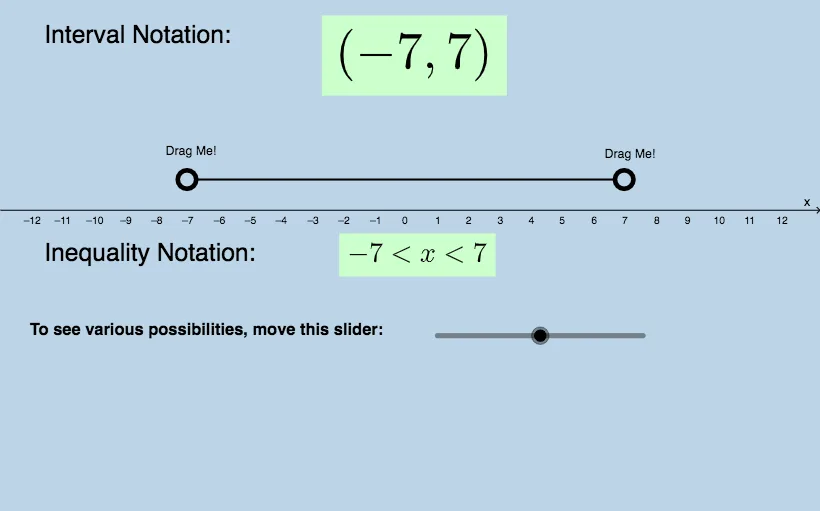
This example demonstrates how to graph inequalities on the real number line to represent solution sets intuitively, highlighting the difference between strict and non-strict inequalities via endpoints and open/closed intervals. It centers on key ideas such as solving one-variable inequalities, expressing solutions as intervals on the real line, and using function-related geometric features (including quadratic-function context elements) to support interpretation. Construction is built in GeoGebra using segment and ray primitives (“Segment, Ray”) to create boundary and extent on the number line, with many point/segment objects (e.g., f, a, b, A, B, g, C, D, j, i, h, k, c, d) forming the critical markers that correspond to inequality thresholds. Text objects (text1–text21) label the inequality symbols, special points, and interval descriptions, while button1 enables interactive demonstration or stepping through configurations. Suitable for high school and early college students learning inequality solving and graph-based reasoning.
GeoGebra Commands & Parameters
Segment(A, B) → gSegment((x(A) + 0.3, 1), (x(B) - 0.3, 1)) → jRay((x(A) - 0.3, 1), (x(D), y(D))) → iRay((x(B) + 0.3, 1), (x(C), y(C))) → hRay((x(A) + 0.3, 1), (x(C), y(C))) → k
AI Drawing Prompt Reference
Draw a number line representing the solution set of an inequality. Mark two key endpoints on the line, using filled or open circles to indicate inclusive or exclusive bounds. Above the line, draw a thick segment connecting the endpoints for a closed interval, and add rays extending outward from the endpoints for open or infinite intervals. Place text labels near the endpoints to show inequality symbols and interval descriptions, such as 'less than or equal' or 'greater than'. Keep the layout clear to emphasize the range and boundary nature of the solution set.
The prompt above was compiled from the original drawing commands and is for reference only.